 Translate
AI-Powered
-20%
4.01.88
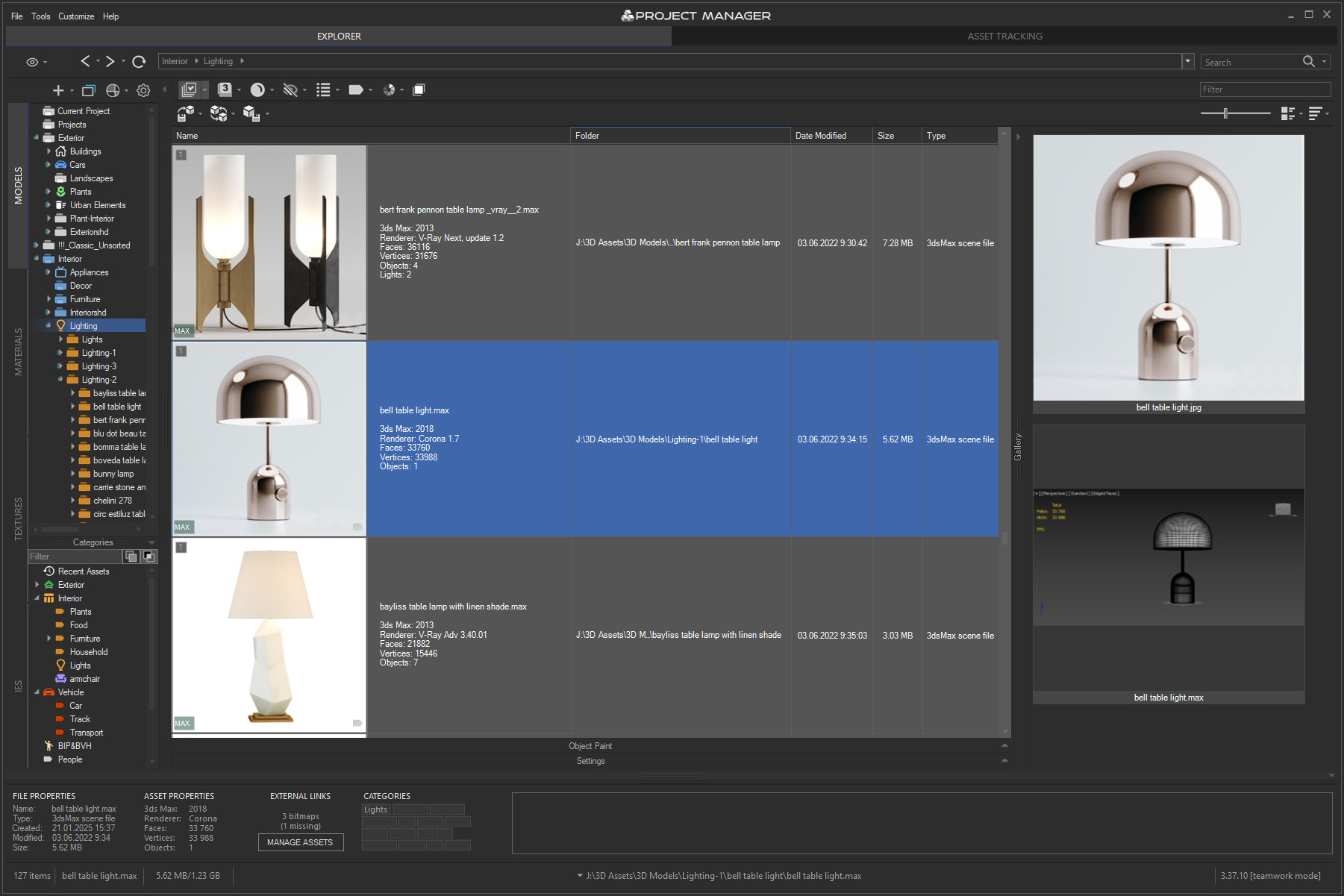

Project Manager
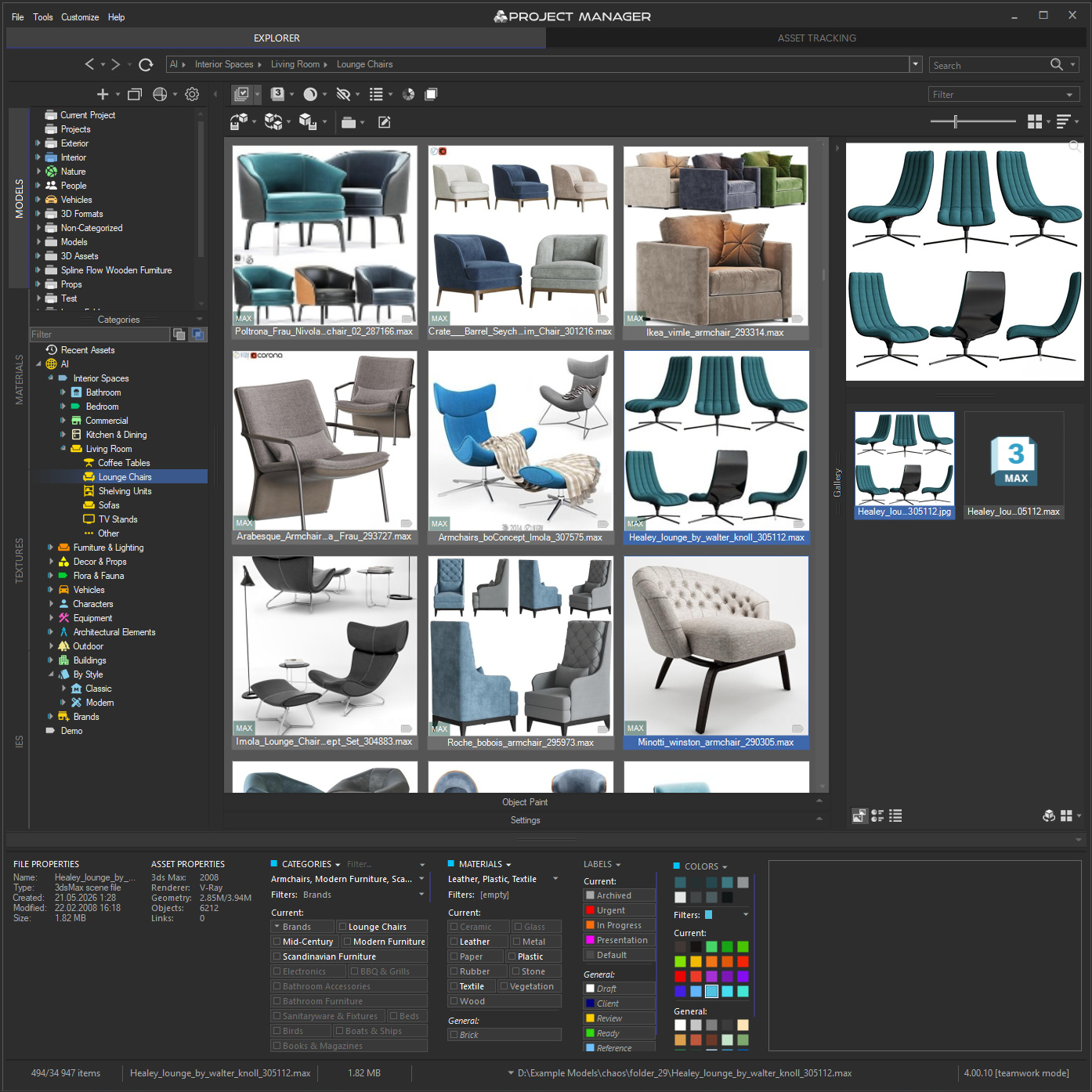
✦ AI-Powered Asset Browser and 3D Digital Asset Management for 3ds Max
Project Manager for 3ds Max puts a local AI engine at the heart of your asset library.
It classifies 3D models automatically by type, style, material and brand, so your library organises itself with no manual tagging.
AI Text Search lets you describe what you need in plain words, in your own language, and returns matching models straight away.
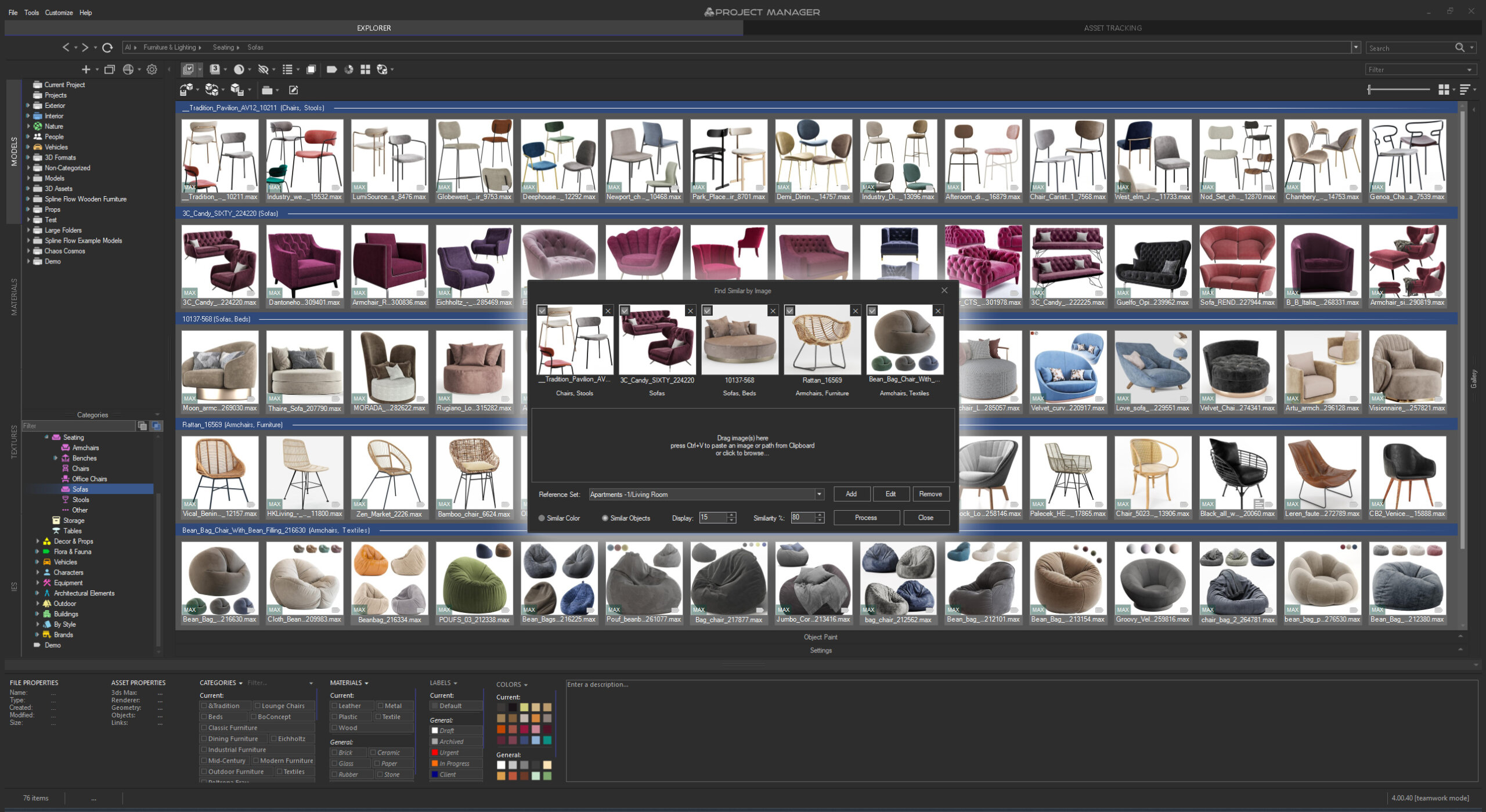
Find Similar matches assets by how they look, from any model or reference image, while Colour Search finds models and textures by colour.
Everything runs locally — no cloud, no subscription.
Managing a large library of 3D Models, Materials, Textures, IES Lights and Proxies can quickly eat up hours, and Project Manager streamlines the whole asset management workflow:
browse folders and open ZIP/RAR/7Z archives like folders, filter by name, description, category, material or colour,
then drag & drop assets straight into your scene or paint objects directly onto surfaces.
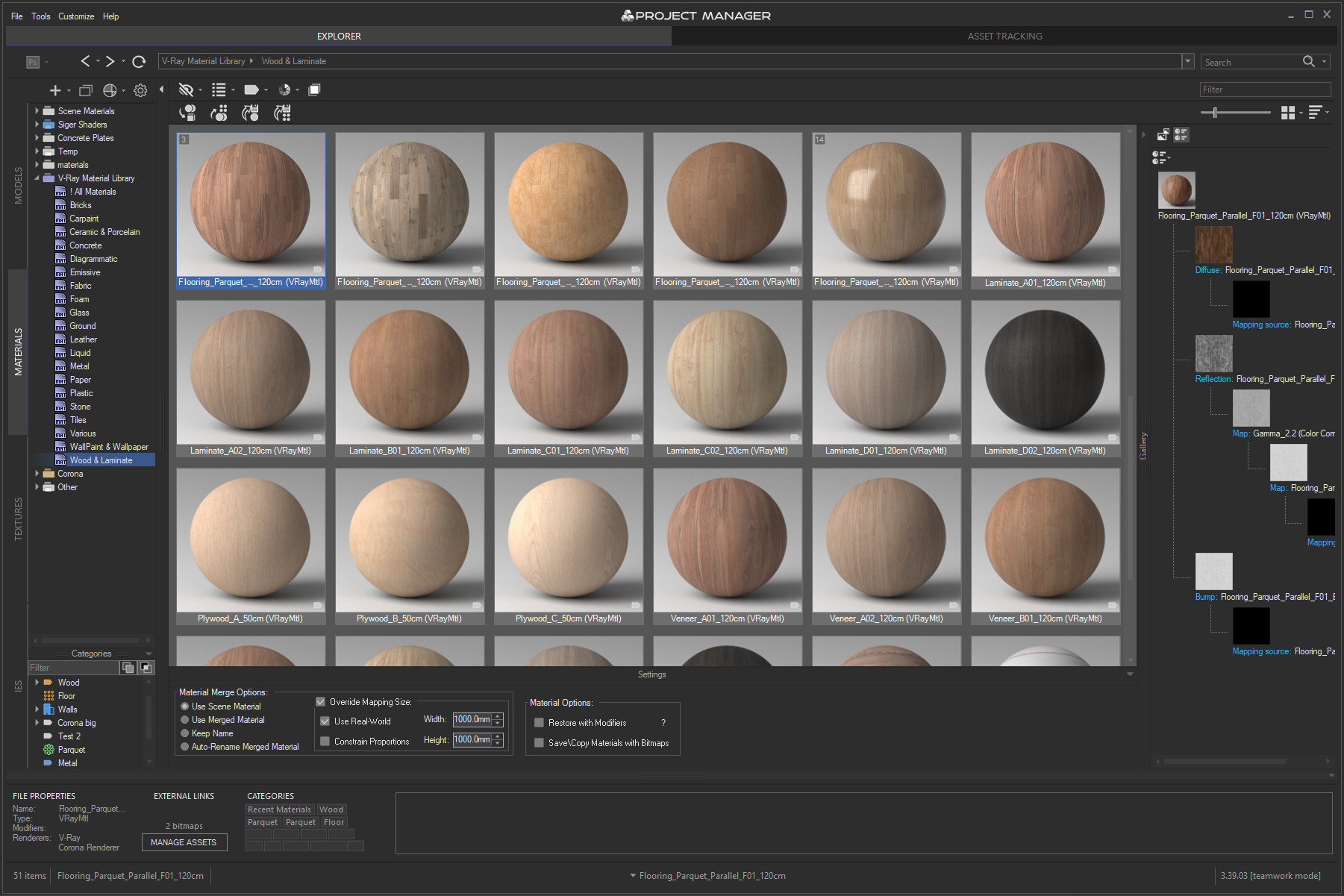
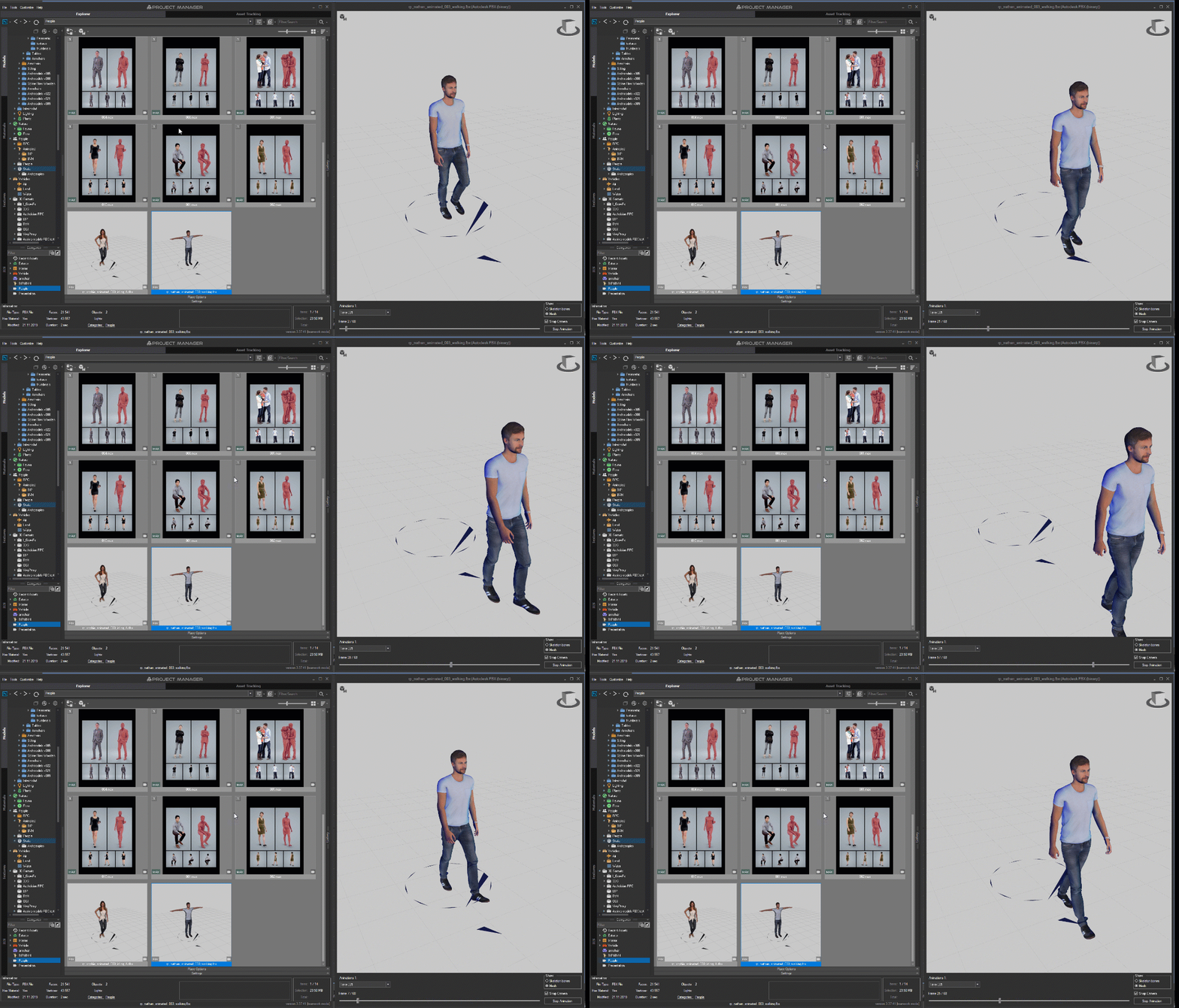
Preview materials, IES lights and BVH animations in real time, and use batch tools for image conversion, advanced renaming, rendering and relinking.
Project Manager is built for both individual artists and studios.
Its interface is localised into 12 languages, right down to the category names generated by the AI.
Network Database Sync keeps catalogue structure and metadata synchronised across users and workstations, while silent installation makes studio-wide deployment scriptable.
You can customise the interface and define your own keyboard shortcuts, and extend Project Manager further through its MAXScript API.
Original price was: $60.00.$48.00Current price is: $48.00.
Available in Bundle(s)
Original price was: $584.50.$257.18Current price is: $257.18.
AI-Powered Asset Management for 3ds Max


Merging Assets

Asset Tracking

Customisation

Batch Processing
Project Manager turns a sprawling 3ds Max library into something you can actually navigate.
At its core, a local AI engine organises your assets for you — classifying models, and letting you find them by plain description, visual similarity or colour, all on your own machine, with no subscription.
Around it sit the tools you reach for every day: merging, asset tracking, batch processing and deep customisation — built to keep even large teams and complex projects in order.
AI Asset Organisation & Search
At the core of version 4 is a local AI engine that classifies your 3D models automatically — by type, style, material and brand. Your library effectively organises itself, with no manual tagging, and everything runs on your own machine: no cloud, no subscription, your assets never leaving your computer.
The AI proposes, you decide — review, reassign or remove any suggestion at any time.
AI Text Search lets you describe what you need the way you’d say it out loud — “cube glass coffee table” — and see matching models straight away.
No exact file names, no categories to remember, nothing to tag first.
Type in your own language: over 30 languages are supported, so you search the way you think rather than the way your library was named.
Find Similar matches assets by how they look, not by their tags — filter a folder down to everything resembling a model you pick, search your whole library from one or several reference objects, or drag in a photo, render or even a rough pencil sketch and let Project Manager find the models that match.
Save references as reusable Reference Sets and switch between them in a click.
Colour Search finds both models and textures by colour — pick shades straight from the palette and watch the library narrow down in real time, with perceptual matching that understands how colours actually look.
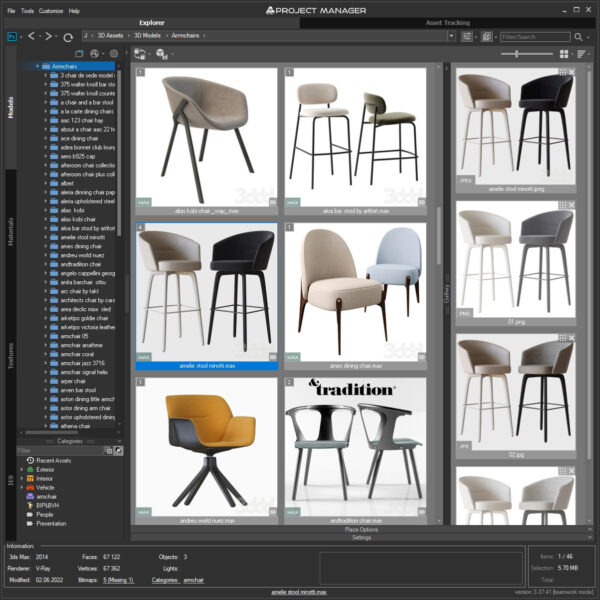
Around this, Project Manager keeps your whole library in order. It has two main tabs: Explorer, for managing models, materials and other assets, and Asset Files, for the links used in your current scene.
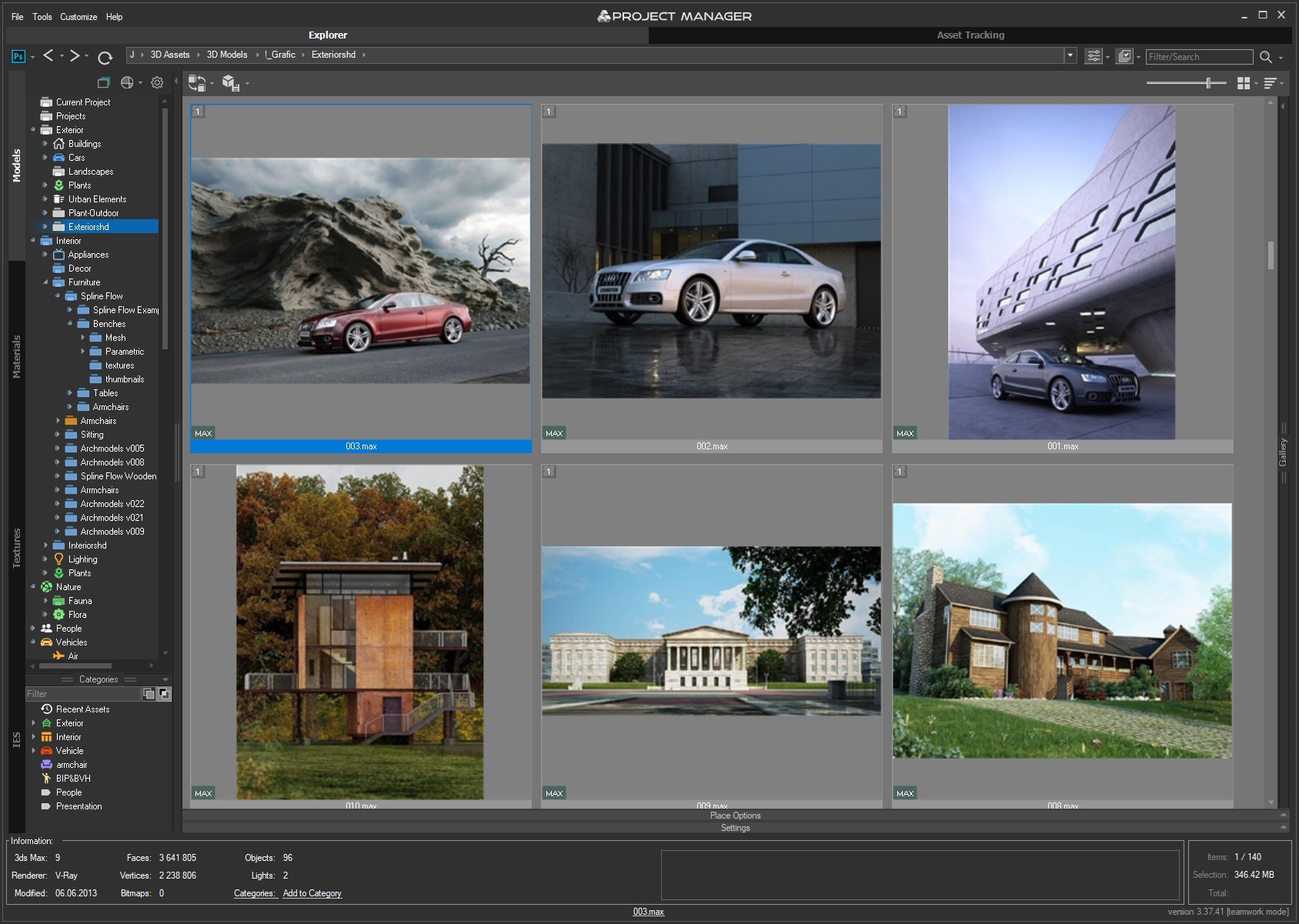
The Explorer tab is split into four — 3D Models, Materials, Textures and IES Photometric files — giving instant access to external files straight from 3ds Max. Gather scattered folders into virtual Catalogs, which structure long lists of external folders without moving or duplicating the originals on your drive.
Each tab also carries a Categories section — a quick way to reach frequently used files and filter or search by name, description or category. Descriptions can be added to 3ds Max files, IES lights, materials and images, so even large, heavy scenes stay easy to navigate.
With the optional shared database mode, the folder tree stays synchronised across the whole team.
Adding assets to a scene
3D Models
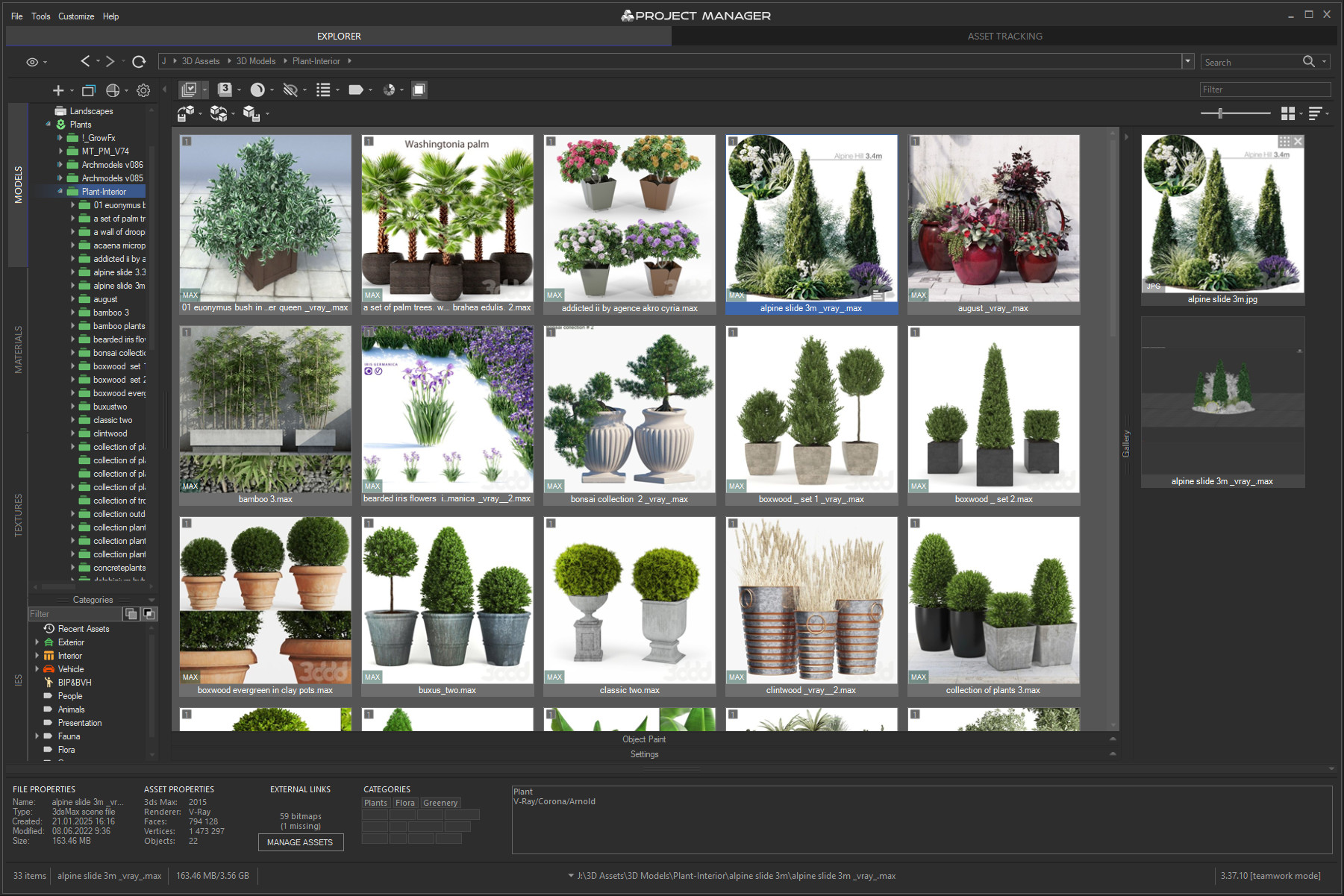
Project Manager lets you merge 3D models directly into the viewport — as standard geometry, proxies, xRef scenes and objects, or Sini proxies. Most proxy types are supported: V-Ray, Corona, FStorm, Octane, Maxwell, Arnold, Redshift, Final Render, Sini and others.
Objects can be placed in the usual way, snapped to the grid, or painted directly onto the surfaces of existing scene geometry.
A wide range of formats is covered, including 3ds Max files, GrowFX, BIP motion, Archvision RPC, DWG, SketchUp and Revit. Select the asset you want and add it to your scene.
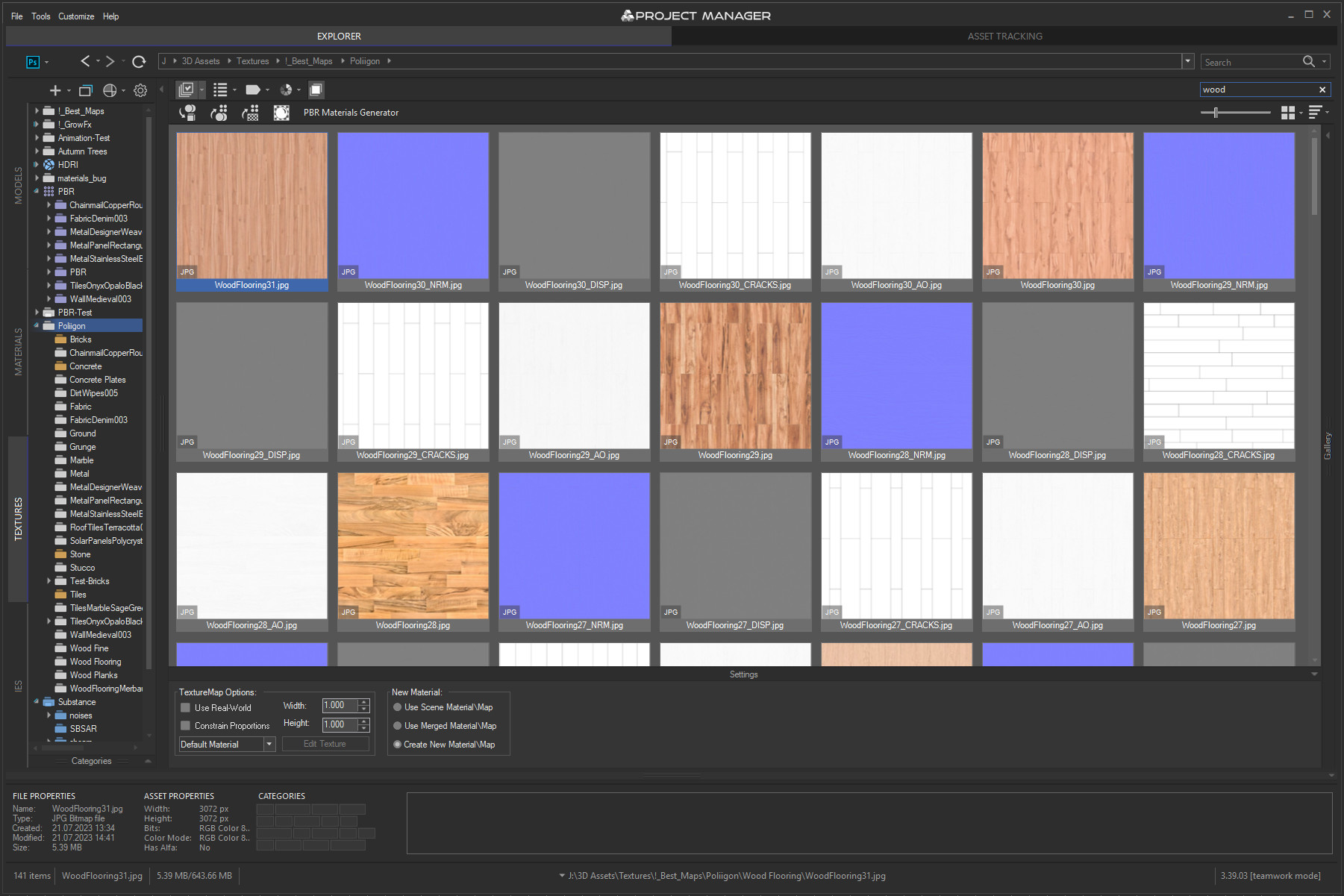
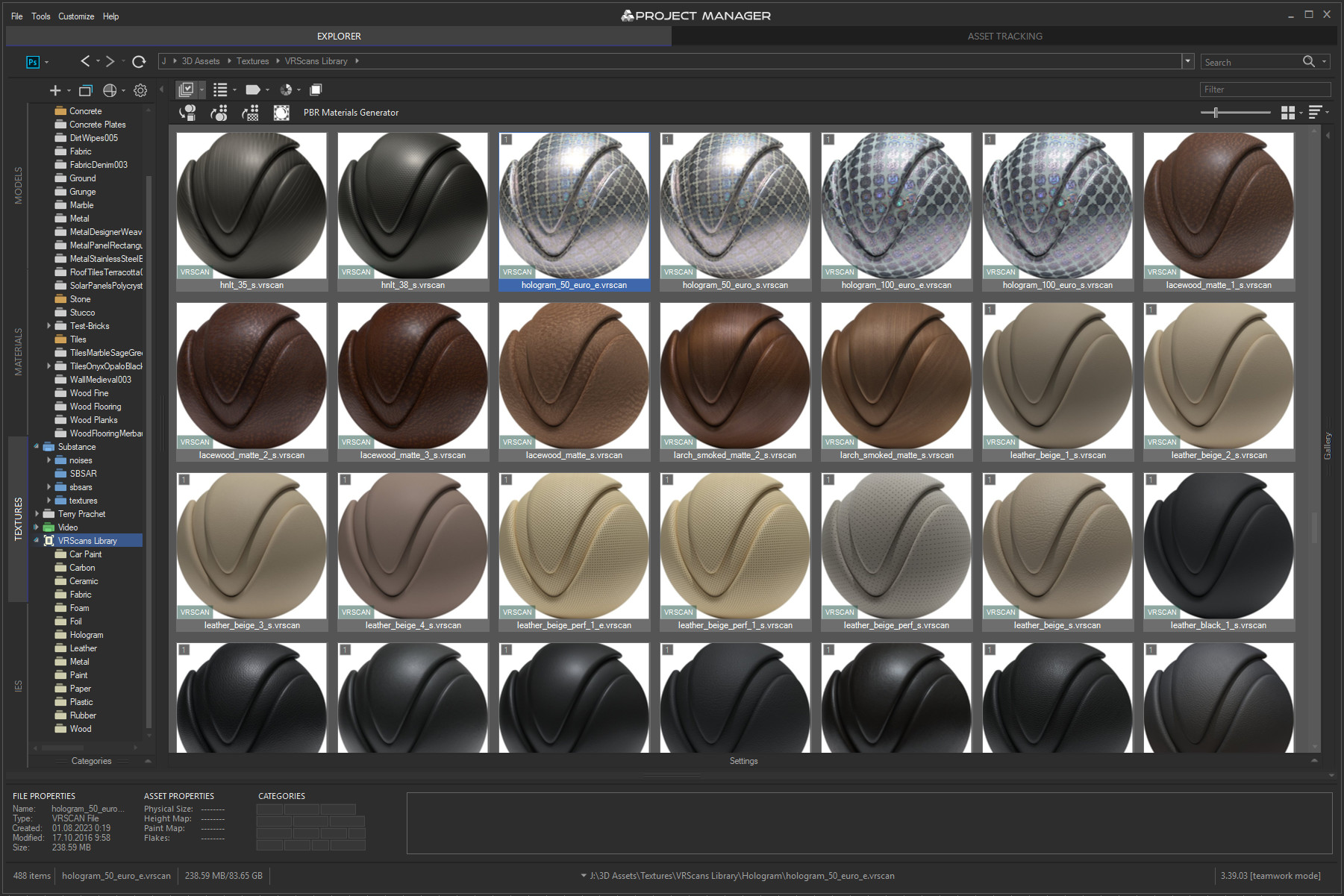
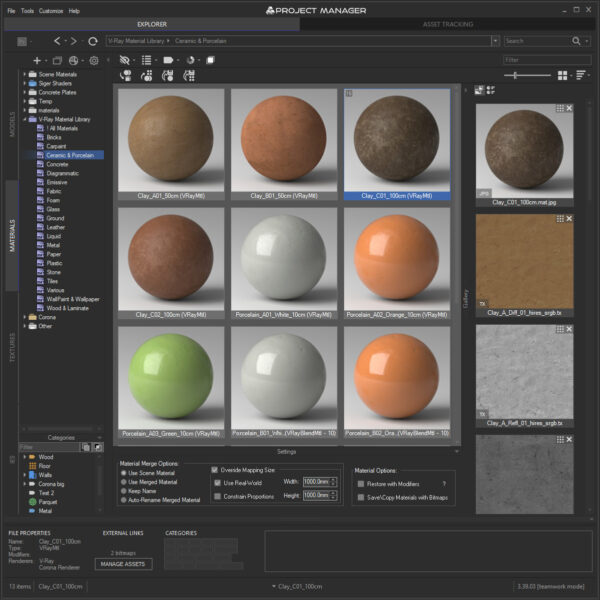
Materials, Textures and IES photometric lights work the same way — drag and drop them onto an object, into the Material Editor, or straight into the viewport.
Materials & Textures
Use Project Manager to organise your existing material libraries or build new ones from scratch.
You can also create materials on the fly: drag one or several bitmaps onto a model in the viewport, or into the Standard or Slate Material Editor.
PBR materials are generated in a single step, and more complex setups can be built by dragging bitmaps or Substance textures from Project Manager into your scene. VRscan materials are supported as well.
IES Photometric
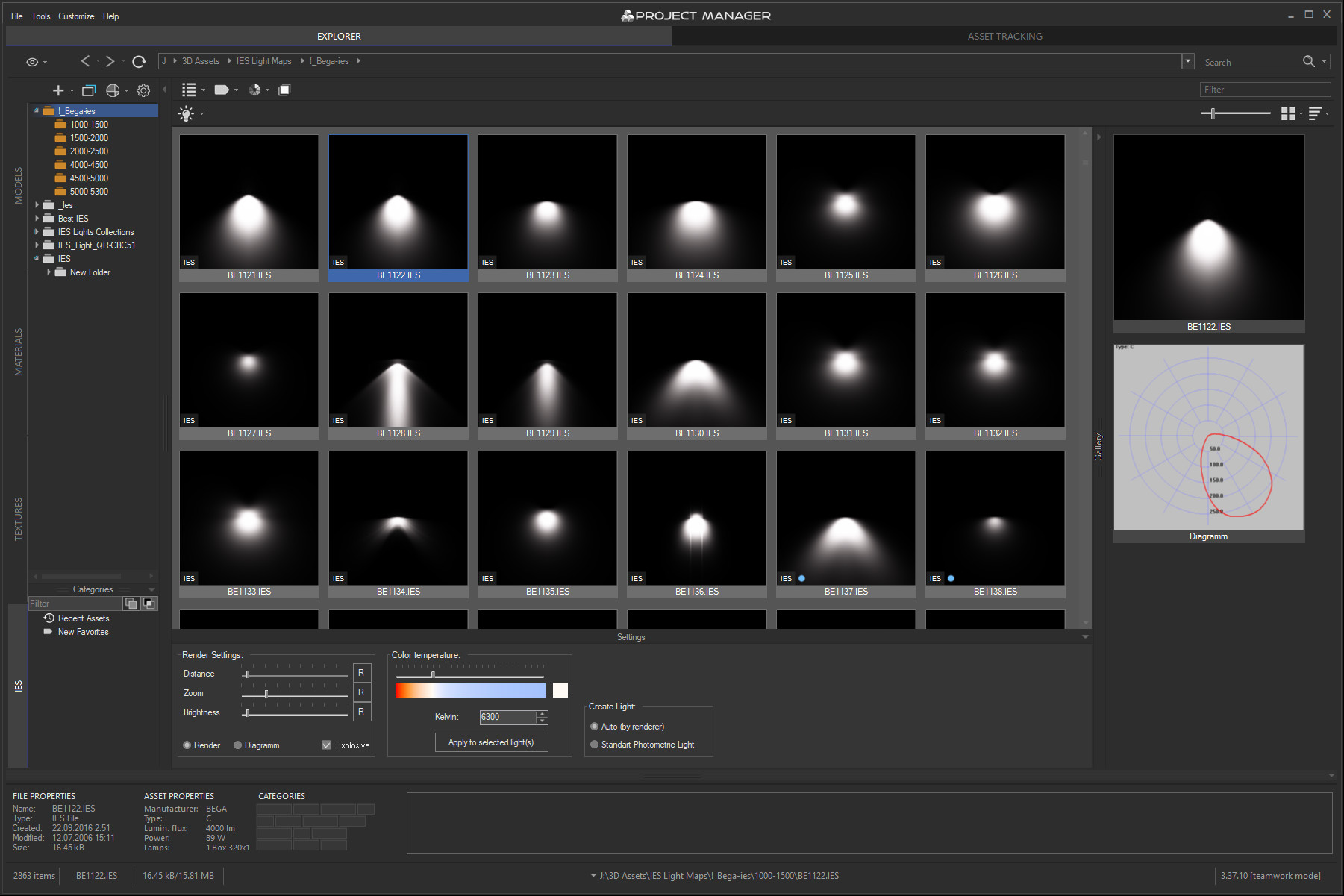
Project Manager also creates IES photometric lights for realistic lighting, matched to your active render engine.
Each new light takes its parameters from the source IES file: light multiplier (in lumens), the shape of the light and its size.
IES files are rendered interactively, which makes picking the right one considerably faster.
Drag the IES file you want straight into the viewport — or use the replace function to create a photometric light exactly where your lamp geometry already sits.
Beyond that, Project Manager can replace, export and render previews for 3D models and materials.
Embedded previews are supported for 3ds Max files, GrowFX, BIP motion, Archvision RPC, DWG, SketchUp, Revit and many more.
Interactive rendering of previews works for Materials, IES files, BVH Motion, FBX, USD, OBJ, 3DS and a wide range of other formats.
Preview animated Archvision RPC
Interactive rendering 3D files
Create PBR materials
Asset Tracking System
Project Manager puts you fully in control of the external links in your scenes.
Asset tracking covers xRef files and makes working with external references straightforward.
From the Asset Files tab — and from Batch Render & Relink — you can find missing assets and relink external files across whole projects.
Editing and managing scene assets becomes far quicker: filter by name, asset type, file status or by the objects you have selected to locate exactly what you need.
The tool can also display, interactively, every asset linked to the objects currently selected in your scene.
Editing scene bitmaps is simpler too — any texture can be located and placed into the Material Editor in a single click.
Asset renaming and image resizing are supported as well.
Finally, entire scenes can be archived for backup or sent on to render farm services such as RebusFarm.
Batch Processing 3D Files
Project Manager also includes a set of tools for batch processing your assets.
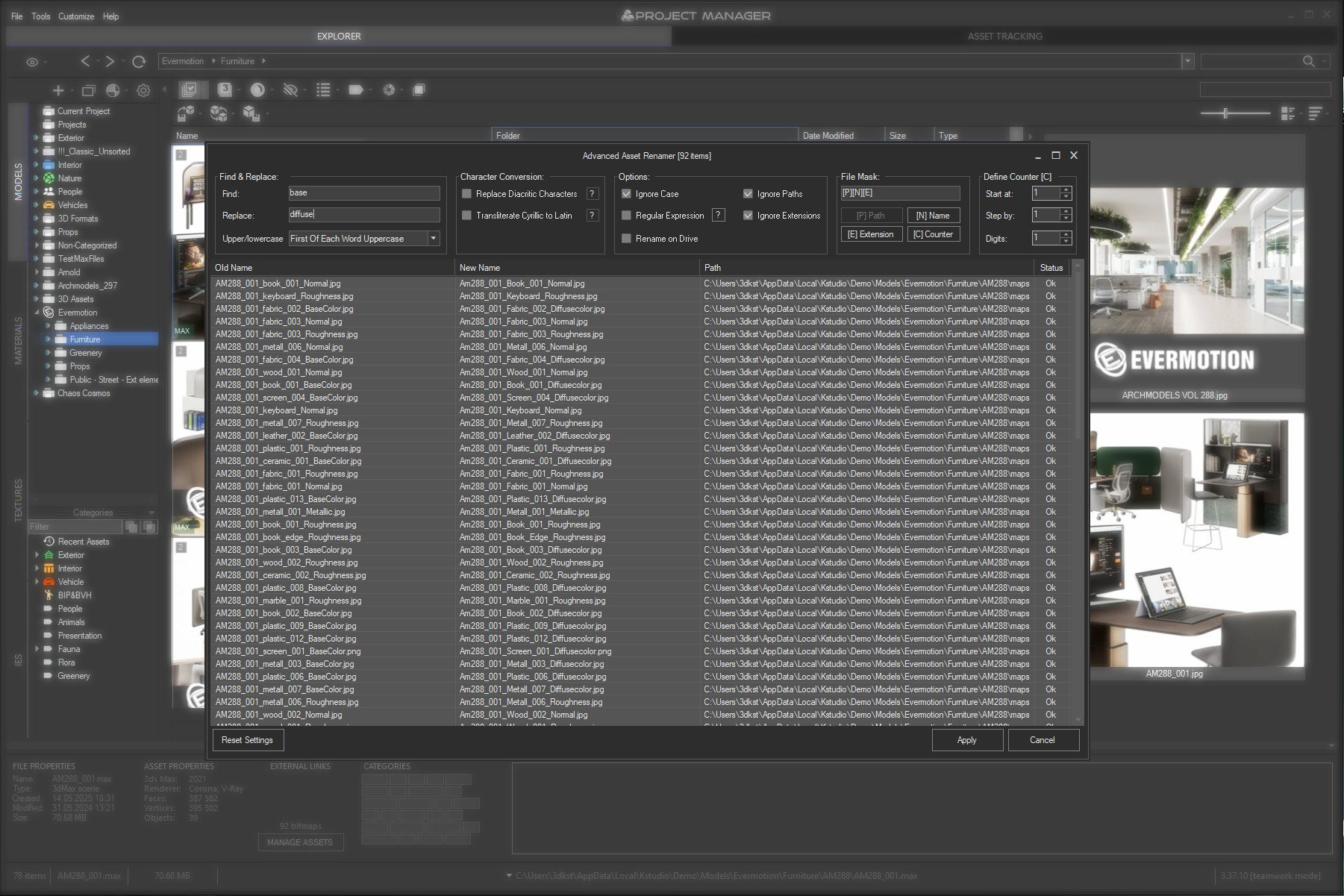
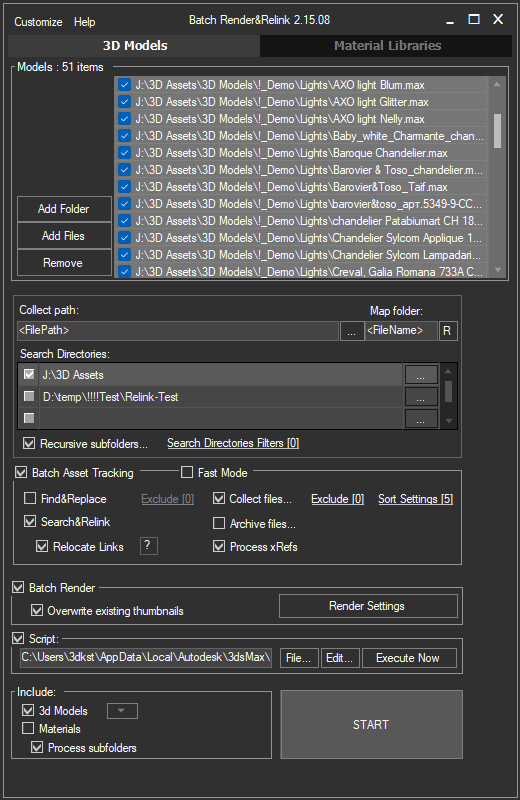
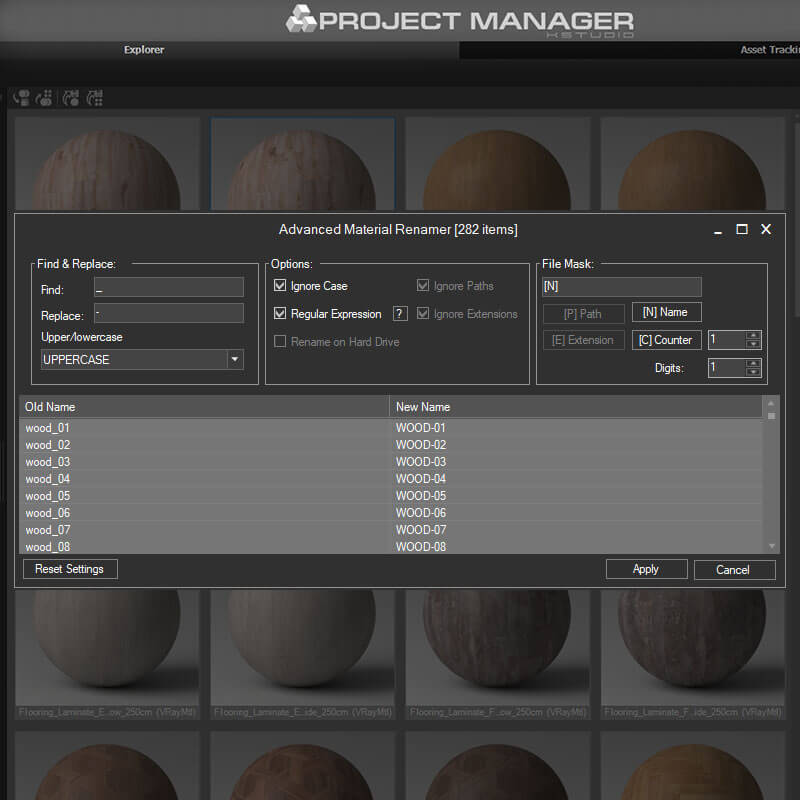
These are Convert & Resize Images, Advanced Asset Renamer, Auto Assign Preview and Batch Render & Relink.
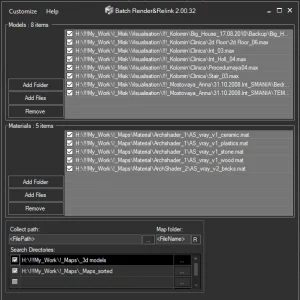
Batch Render & Relink is built to search for, relink and collect missing files across multiple 3D models and material libraries in batch mode.
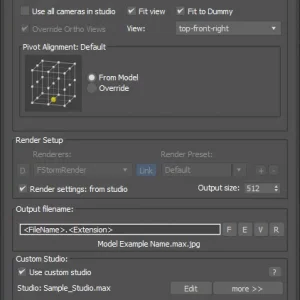
As the name suggests, it also renders previews for asset files — 3D models, material libraries and IES files are all supported, across most 3D formats including max, 3ds, fbx, vrmesh, abc, cgeo and many others.
Custom studios and render presets are available for better preview results.
Convert&Resize Images
Advanced Asset Renamer
Batch Render&Relink
Customisation
Project Manager speaks your language. The interface is localised into 12 languages — and not just the menus: filters, tooltips and even the category names generated by the AI are translated too.
You can adjust almost everything else as well: how assets are merged and stored in the library, the studio used for rendering previews, and much more.
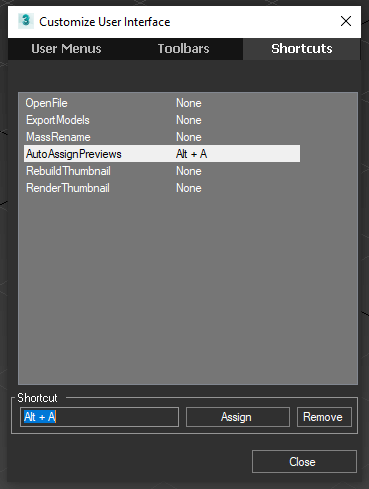
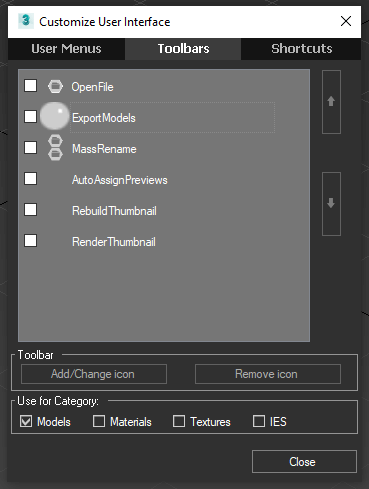
The interface itself is customisable — add icons to the toolbar or assign hotkeys to the menu items you use most.
On top of that, Project Manager has a MAXScript API that lets you extend its features and write your own tools for the tasks specific to your studio.
https://www.youtube.com/embed/6wKRcQLymdg
Why Choose Project Manager?
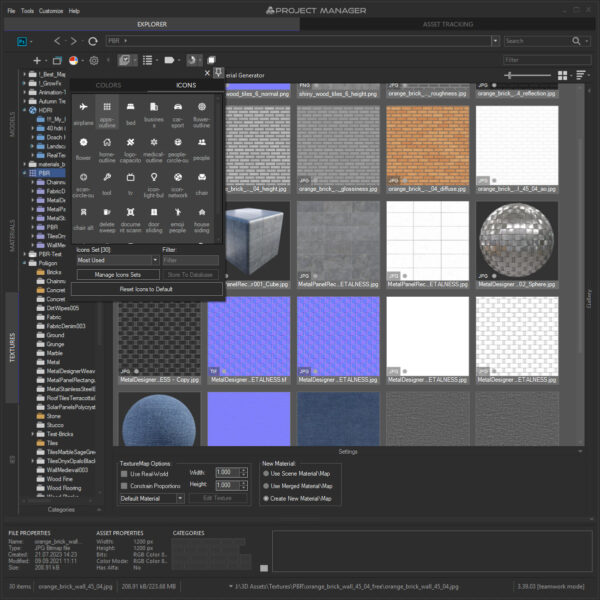
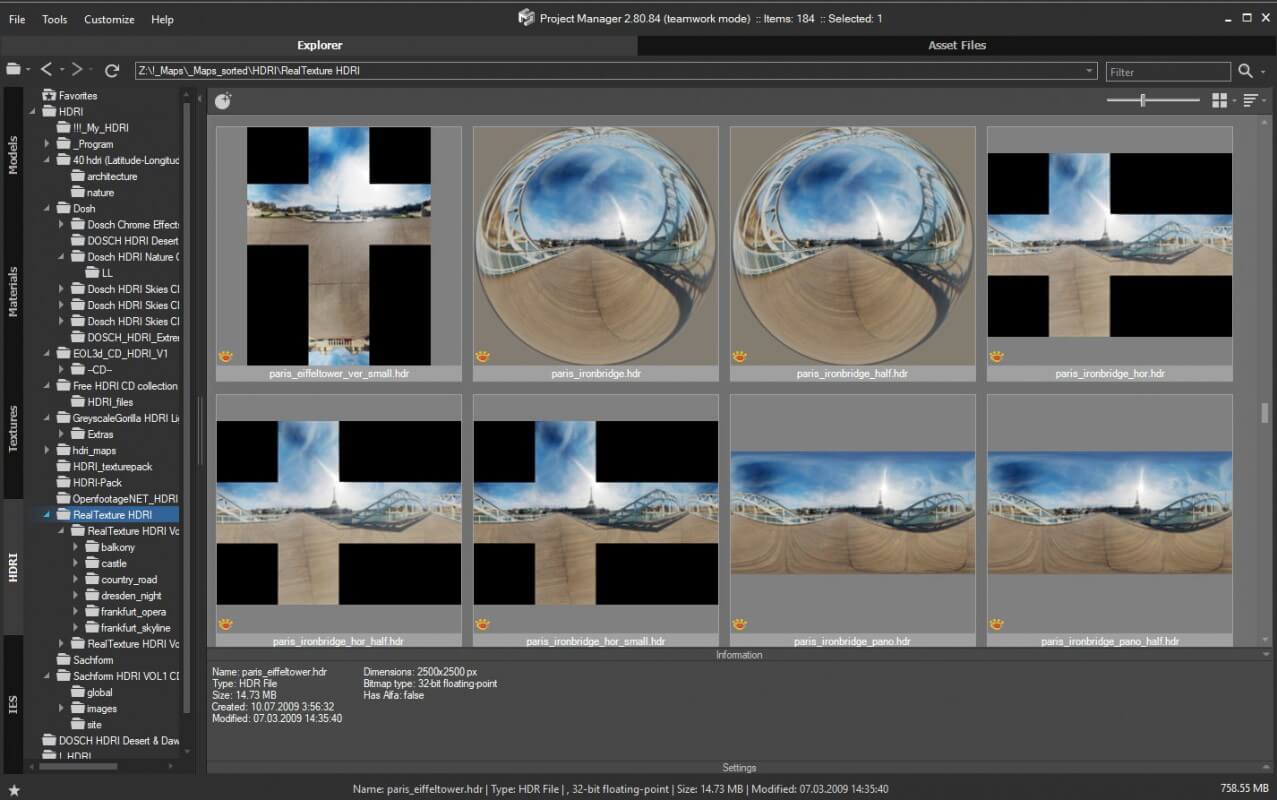
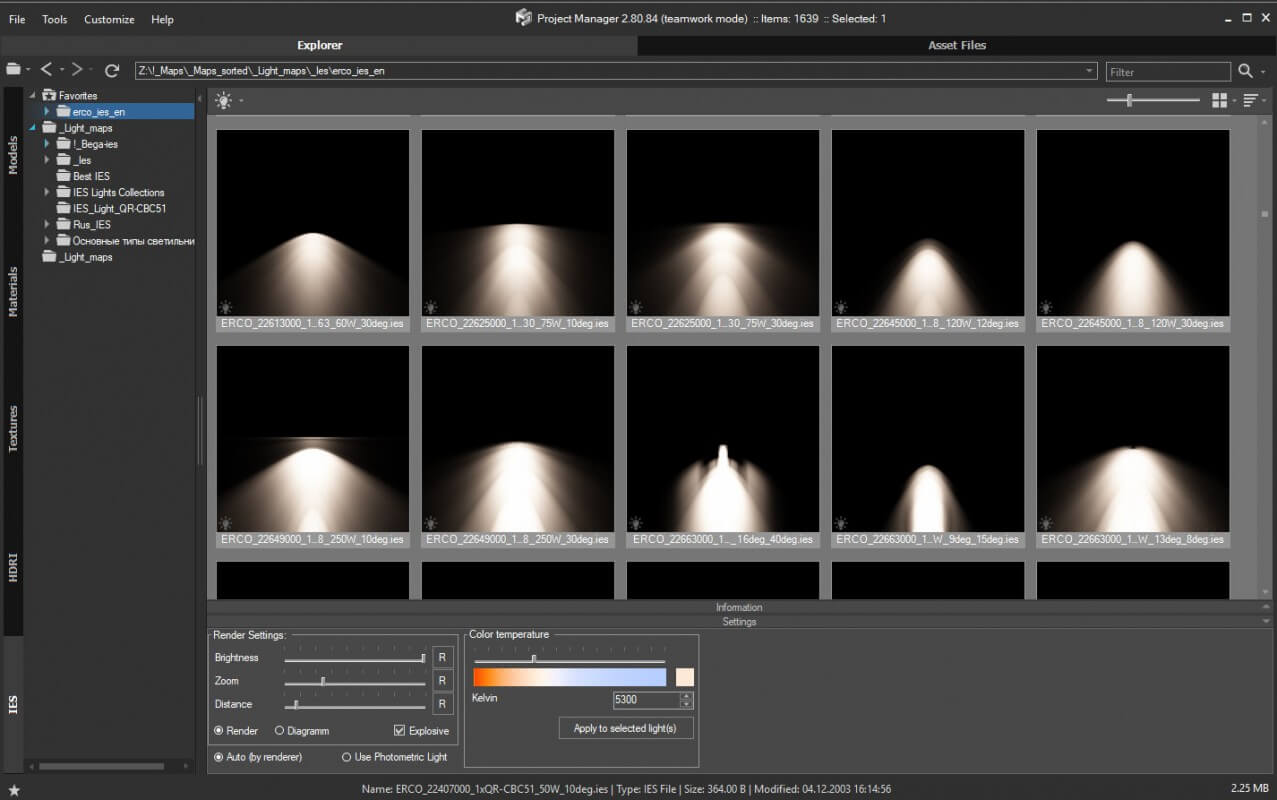
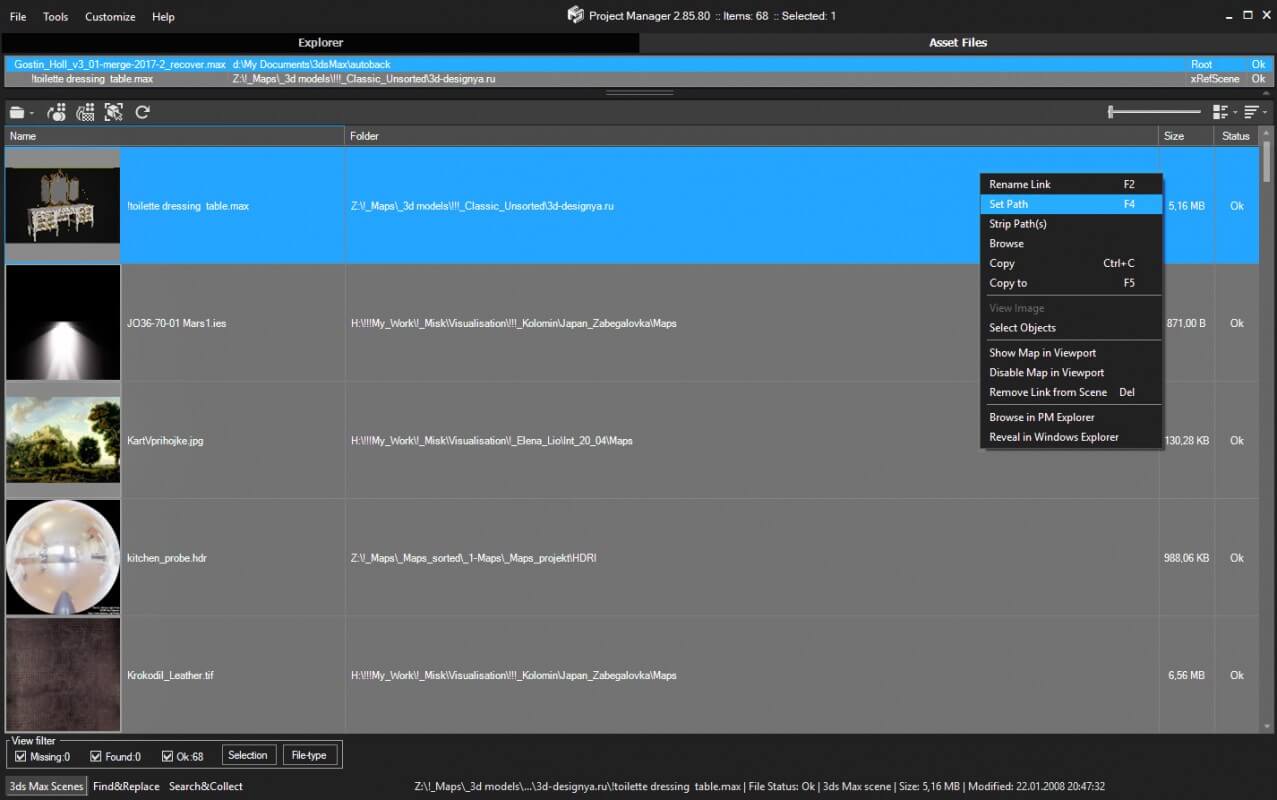
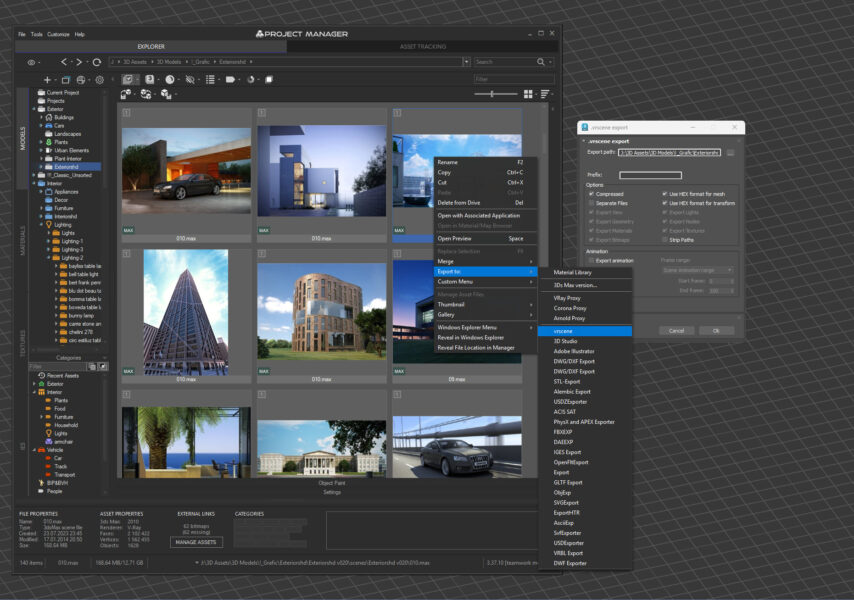
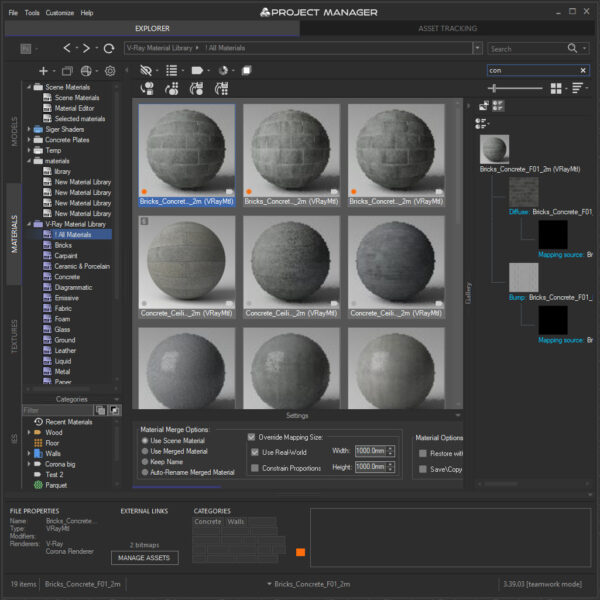
With version 4, a local AI engine organises your library for you: it classifies your models, and lets you find them by plain description, visual similarity or colour in seconds — all on your own machine, with no cloud and no subscription. Search in your own language, in an interface localised into 12 languages.
Drag-and-drop turns asset wrangling into scene-building: create complex materials and textures by dropping files straight onto your models or into the Material Editor, and merge objects as proxies or xRefs right in the viewport to keep heavy projects light.
The built-in asset tracking system fixes missing files across scenes and xRefs — collect and replace, search and relink, categorise and archive — helping keep projects intact when they move between workstations, folders or render farms.
In terms of compatibility, fully supported rendering engines include V-Ray, Corona, FStorm, Octane, Maxwell, Arnold, and many more, across 3ds Max 2016–2027.
Its interface is intuitive, so you can start right away. Studios and freelancers worldwide rely on Project Manager for everything from architecture and interiors to game levels and film scenes.
Whether you manage a personal asset collection or a shared studio library, Project Manager keeps the assets you need searchable, organised and ready to use — without taking you out of 3ds Max.
Main Features
- AI-Powered Search & Classification
- Classify 3D models automatically by type, style, material and brand.
- Describe what you need in plain words — no exact file names or categories required.
- Search in your own language — over 30 languages supported.
- Find assets by visual similarity from a model or reference image, or search by colour and name.
- Everything runs on your own machine — no cloud, no subscription.
- Interface Localisation
Work entirely in your own language: menus, filters and AI-generated categories are translated across 12 interface languages. - Easy Asset Import
Instantly add Models, Materials, Textures and IES files to your scene. - Archive Support
Browse ZIP/RAR/7Z archives like folders and drag assets straight into your scene. - Rich Thumbnails & Live Previews
Preview bitmaps (including HDR/EXR/PSD), 3D models, Proxies, Materials and IES files with real-time render. - Network Database Sync
Synchronise your asset structure (folder trees, categories and metadata) across users or workstations. - Silent Installation
Deploy Project Manager across studio workstations from a script — no need to visit each machine. - Unified Import Interface
Import via drag-&-drop, file dialogs, UI buttons, or API calls for maximum flexibility. - Versatile Model & Proxy Import
Merge geometry as standard meshes, V-Ray, Corona, Arnold, Redshift, FStorm proxies, xRef objects/scenes, SiniProxy, and more. - Slate Material Editor & PBR Creation
Drag materials into 3ds Max’s Material Editor and generate Physically Based Rendering materials in one click. - Object Painting
“Paint” accessories (e.g. table decor) or randomly scatter trees, bushes, etc., directly onto scene surfaces. - Batch Import/Export
Import or export multiple files at once to streamline large-scale workflows. - Asset Tracking Management
- Quickly locate and resolve any missing file references.
- Reassign broken links and gather all referenced assets into a single folder.
- Batch Utilities & API Extensibility
- Batch image conversion, batch render & relink, and batch-rename files using wildcards or masks—supports diacritics replacement and Cyril→Latin transliteration.
- Extend Project Manager via its API with included code samples.
What´s New
- Project Manager 4.01.88 — The Library That Remembers What You Searched For: Save searches as categories, assign icons in one click, and treat archives like folders
- Project Manager 4.01: The Asset Browser That Understands You: AI Text Search in Over 30 Languages, Search by Image, Localised Interface
- Project Manager 4 — AI asset classification is here: AI Sorting, Colour Search, Find Similar, Local & Fast
- Project Manager 3.41 — Features You Requested: Online Licenses, Merge from Archives, Personalize Colors
- Project Manager 3.40.00 — Instant Search: Instant Search & Blazing Fast Navigation
- Project Manager 3.38.10 with 3ds Max 2026 Support: Bug fixes and performance improvements
- Project Manager 3.37.41: Custom Icons and Quick Access Recent Assets: Bug fixes and performance improvements
- Project Manager 3.36.40 Release: Key Updates and Improvements: Customizable Interface & Hotkeys | Support to USD
- Version 3.35.75: Enhanced Asset Organization and Management
- Version 3.35.25: Enhances Asset Tracking Management for 3D Models and Materials
- Version 3.23.05: Bug fixes and performance improvements
- Version 3.20.02: Bug fixes and performance improvements
- Version 3.18.72: Speeds-up collect files on batch relink. Fixes some issues with HiDPI screens
- Version 3.18.34: Open the Material Libraries and 3Ds Max files in the Material Browser. Smarter Search for Preview Thumbnails
- Version 3.18.16: Templates for Physically-Based Rendering materials
- Version 3.17.46: Drag and drop Materials. Instancing 3D Models
- Version 3.17.26: Batch Archive. Speeds-up navigation
- Version 3.15.78: Batch Rename Materials
- Version 3.15.31: Dome Light. Search in Categories
Supported Renderers











Special offer
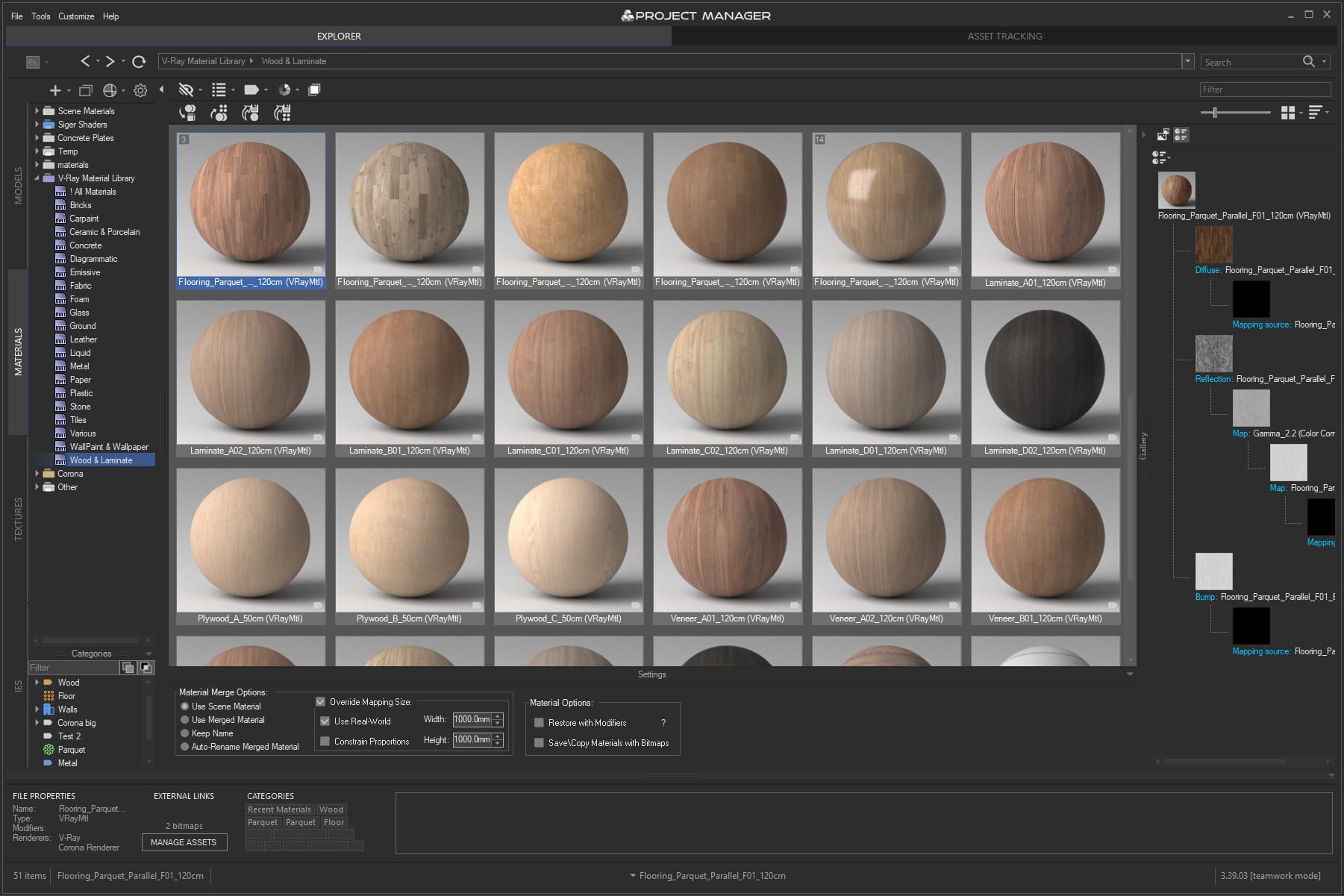
| 3ds max compatibility | 3ds Max 2016-2027 |
|---|---|
| Supported renderer | Any |
| Limitation for Demo | The demo works with a limited number of files. In Batch Render & Relink, relinking is disabled and some files are skipped during preview rendering. |
Features
AI-Powered Tools – New!
- AI Asset Classification
Automatically categorise your 3D models by type, style, material and brand — no more manual tagging. The AI proposes, you decide: review, reassign or remove any suggestion. Runs entirely on your machine: no cloud, no subscription, your assets never leave your computer. - AI Text Search
Describe what you need in plain words—”cube glass coffee table”—and get matching models straight away. No exact file names, no categories, no tagging. Search in your own language: over 30 languages supported. - Find Similar (Visual AI)
Pick any model and instantly find others matching its style, shape and look—or match by colour palette from any reference image. Search with external images too, crop to just the part that matters, and save your references as reusable Reference Sets. - Colour Search
Find both models and textures by colour—pick from a palette and instantly see matching assets, with perceptual colour-similarity matching. - Colour Labels
Tag assets with workflow states—Draft, Approved, In Review, Archived, Urgent—and filter by them. A shared status system that keeps the whole team in sync.
Main Features
- Easy Asset Import
Add any asset type (models, materials, textures, IES files) directly into your scene. - Library Cataloguing
Organise and browse libraries of models, materials, textures and IES files. - Interactive Search
Your personal asset search engine—find anything by name, description, category or colour. Every keyword, filter and colour pick updates the view instantly. - Smart Filtering
Narrow your library by category, material, colour or workflow label, and combine filters with AND/OR logic. Category filters are subcategory-aware—filtering “Furniture” also surfaces items under “Furniture → Chairs → Dining”—and your active filters stay visible even when you browse folders where they don’t apply. - Archive Support – New!
Treat ZIP/RAR/7Z files like folders: browse inside archives and drag assets straight into your scene. - Network Database Sync
Synchronise your asset structure (folder trees, categories and metadata) across users or workstations. Changes from teammates now sync live—files added or removed elsewhere appear automatically. - Full Drag & Drop Support
Drag assets to catalogue, merge or apply materials in one intuitive gesture. - Flexible Import Methods
Import assets via drag & drop, file dialogs, interface buttons, API calls for maximum flexibility. - Object Painting
Paint objects directly onto scene surfaces—perfect for placing accessories (e.g., table decor) or randomly scattering trees, bushes, etc. - Batch Import/Export
Import or export multiple files at once to streamline large-scale asset workflows. - Versatile Model Import
Bring in 3D models in any form—standard geometry, V-Ray/Corona/Arnold/FStorm (or other) proxy, xRef object or xRef scene, SiniProxy, and more. - Rich Thumbnails
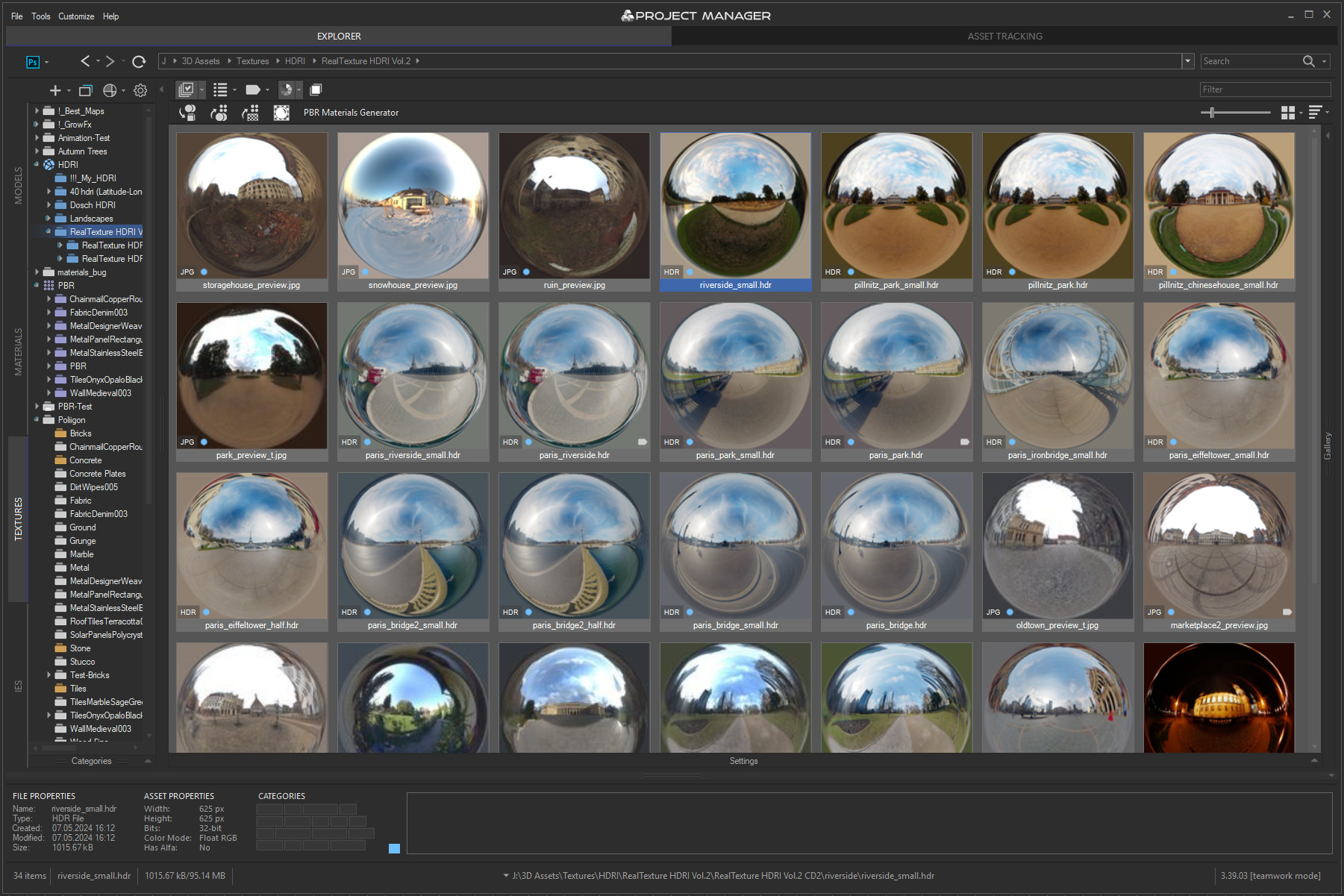
Preview bitmaps, 3D models, proxies, IES, material libraries and formats such as HDR, EXR, PSD, etc. - Interactive Render Previews
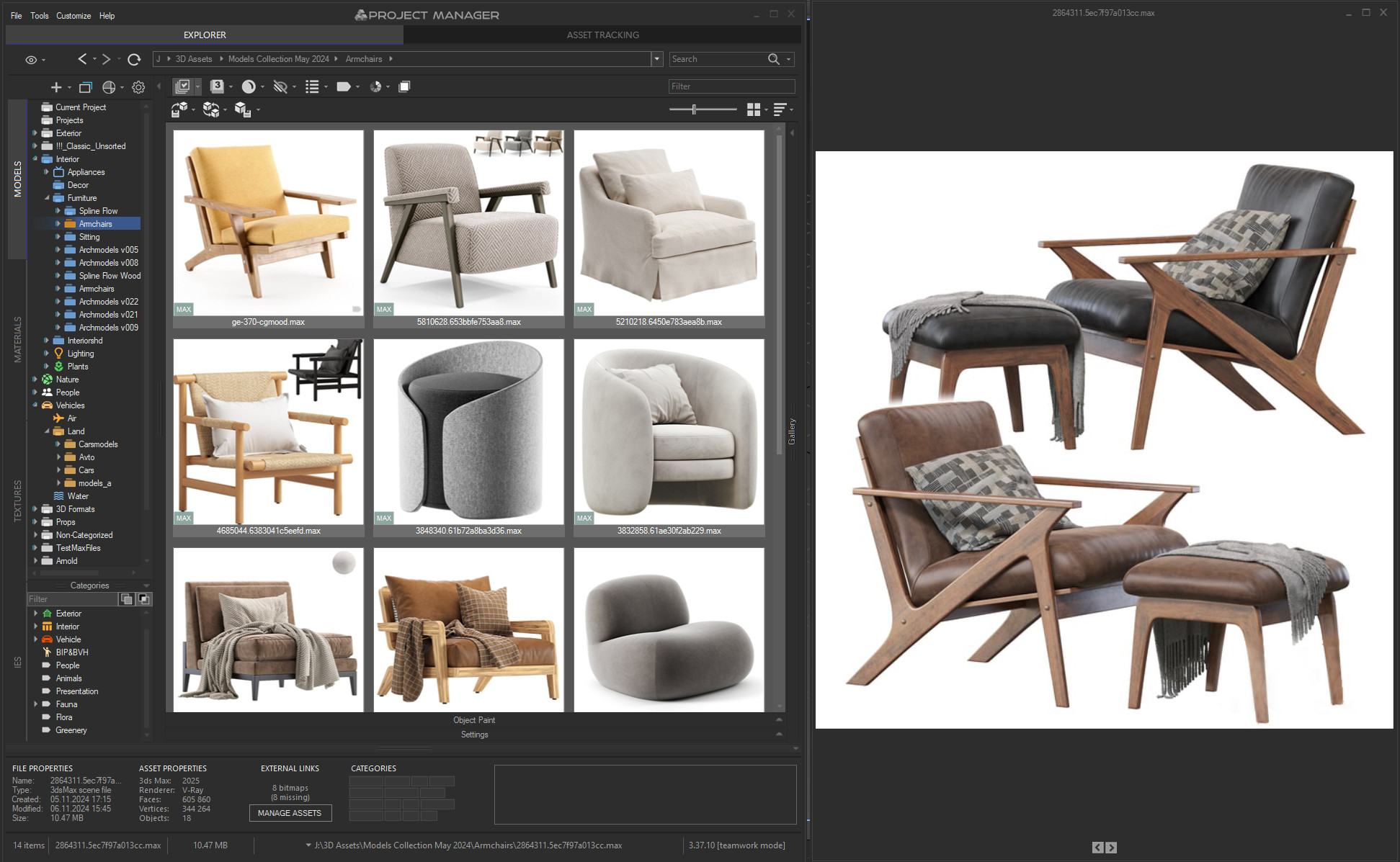
See live material, IES and BVH-animation previews right in the catalogue. - Gallery & 3D Preview
Pin extra files to any model—alternate angles, reference shots, related video—and browse them in the Gallery. New in v4: zoom previews to full resolution, spin imported 3D files (FBX, OBJ, 3DS and more) in an interactive viewport, and inspect a scene’s material tree and external file links right in the panel, without opening the source file. - Selective Merging
Exclude unwanted objects when merging 3d models. Supports custom expressions. - Auto-Fix Texture Paths
Automatically correct file paths for textures in merged models and materials. - Object Replacement
Swap scene objects with any other asset from your library. - Proxy Conversion
Auto-convert merged models to V-Ray, Corona, Arnold, Redshift, Final Render (and other) proxies. - Substance & VRMat Format Support
Import Substance (.sbsar) and V-Ray VRMat (.vrmat) files seamlessly. - Proxy Save & Restore
Save proxies with their applied materials—and restore them later. - Save Models & Materials with Maps
Archive complete assets, including all texture maps. - Save/Restore Material Modifiers
Preserve complex material setups and related modifiers. - Slate Material Editor Support
Drag and drop materials straight into 3ds Max’s Slate editor. - PBR Material Creation
Generate physically based rendering materials in one click.
Asset Tracking
- Missing Asset Finder
Quickly locate and resolve missing file references. - Relink External Files
Reassign broken links to new file locations. - Collect External Files
Gather all referenced assets into a single folder. - Scene Archiving
Package an entire 3ds Max scene for handoff or backup. - Exclude by File Type
Skip specific file types when collecting. - Mask-Based Link Renaming
Batch-rename file links using wildcards or masks. - Link Removal
Strip file references from your scene entirely. - Select by Link
Highlight objects in the scene based on their linked files. - Interactive Link List
See all files linked to selected objects in real time. - Material Editor Placement
Place materials and bitmap textures directly into the Material editor. - Viewport Bitmap Toggle
Show or hide bitmaps in the viewport without leaving the catalog. - xRef Support
Manage external references (.xref) seamlessly.
Utilities
- Mask-Based File Renaming
Batch-rename asset files using wildcards or masks, with support for replacing diacritics and transliterating Cyrillic to Latin—the same tool also renames the file links on the Asset Tracking tab. - Batch Image Conversion
Convert entire folders of bitmaps, HDRs, EXRs, PSDs and more in one go. - Batch Render & Relink Tool
Automate library organisation—render thumbnails, relink files and sort assets in batch mode. - API Support
Extend Project Manager via its API—create custom scripts and plugins with included code samples.
Miscellaneous Features
- Renderer & Plugin Compatibility
Supports virtually all known renderers and 3ds Max plugins, on every supported 3ds Max version. - Transparent Demo Mode
An unobtrusive, fully functional evaluation experience. - Settings Backup
Export your preferences before reinstalling 3ds Max or Windows. - Streamlined Windows Installer
Installs into Autodesk’s standard ApplicationPlugins folder—Project Manager is picked up cleanly by 3ds Max and stays easy to manage alongside your other plugins. - Silent Installation – New!
Deploy Project Manager across studio workstations from a script—no need to visit each machine individually. - Auto-Update Checker
Stay up to date with the latest plugin releases. - User-Friendly Interface
Intuitive controls designed for maximum productivity. - Interface Localisation – New!
Work in your own language: menus, filters and AI-generated category names are translated across 12 interface languages: English, German, Spanish, French, Japanese, Simplified Chinese, Turkish, Ukrainian, Portuguese (Brazil), Italian, Polish and Danish. - Smart Default Settings
Optimised presets for out-of-the-box usability.
Support
Tutorials
- Project Manager Team Setup: Database, Paths, Licences
- Shared Database Setup for Project Manager (MySQL/MariDB)
- How to Organise 3D Asset Libraries and Project Folders
- Organize and Access 3D Assets using Directories, Virtual Catalogs and Categories
- Sweep Profile Pro - a new tutorial from VizCourse
- Intelligent Preview Assignment for 3D Models and Materials
- Image-Based Lighting with HDR in Project Manager: Light Your Scene in One Drag
- Modelling Railing with Fusion parametric plugin for 3ds Max
- Advanced Asset Renamer - Using in workflow with VRay ACEScg space
- Merge and Manage 3D Models using Project Manager
- 3Ds Max with Project Manager v.3: Overview
- Asset Management Using Project Manager
Video tutorials
Quick start.
3Ds Max with Project Manager: Review
How to Merge 3D Models to 3Ds Max using Project Manager
This video shows different ways to add 3D models to the scene using Project Manager.
Details are considered all the settings on the “Models” panel.
Project Manager. Review the Batch Render Relink.
How to use Batch Render&Relink utility to organize libraries with 3D models, Materials, Textures and other CG content.
Creating user templates for Materials
Favorite 3D Assets in Project Manager
Create & Customize Templates for Phisically-Based Rendering Materials
Using Categories to organize the 3D Asset library
How to save Material to Material Library with Project Manager
Convert and Resize Images in 3Ds Max
Advanced Asset Renamer – mass rename 3d Files
Installation and Reception of License Key
Installation and Reception of License Key
Installation
- Download the archive with the plugin
- Unpack the archive
- Open 3ds Max application
- To install an MZP file in 3ds Max, you can use one of the following methods
- Drag and Drop Method:
- - Simply drag the MZP file from your file explorer and drop it into the 3ds Max viewport.
- Using Menu:
- - Go to the "Scripting" menu and select "Run Script."
- - Navigate to the location of your MZP file, select it, and press "Open."
- The installation will be automatically started
- Follow the instructions on the screen to complete the installation
- Generate the identification file, if you are the official client and you need a new license
- In the 3ds max menu "Customize">> "Customize User Interface">> Category "Kstudio" choose the plugin and drag it to the Panel of the Instruments
- Install the "Fusion", "Sweep PRO" or free version of the plugin "Sweep Profile"
- Unpack the archive with Mouldings.zip
- Drag the "Install Sweep-Profile Shapes.mzp" into the 3ds Max viewport
- Start the plugin (Fusion or Sweep Pro) and choose the directory with shapes on the top list of the plugin
- By default mouldings are installed by path "%localappdata%/Kstudio/Sweep-Profile Shapes/"
You must be logged in to download the full version.
* Applicable to official customers only
Receiving the License Key
Run the 3ds Max Choose the menu-item "Activation" from the main 3ds Max menu "Project Manager" or from the plugin menu "Help" 
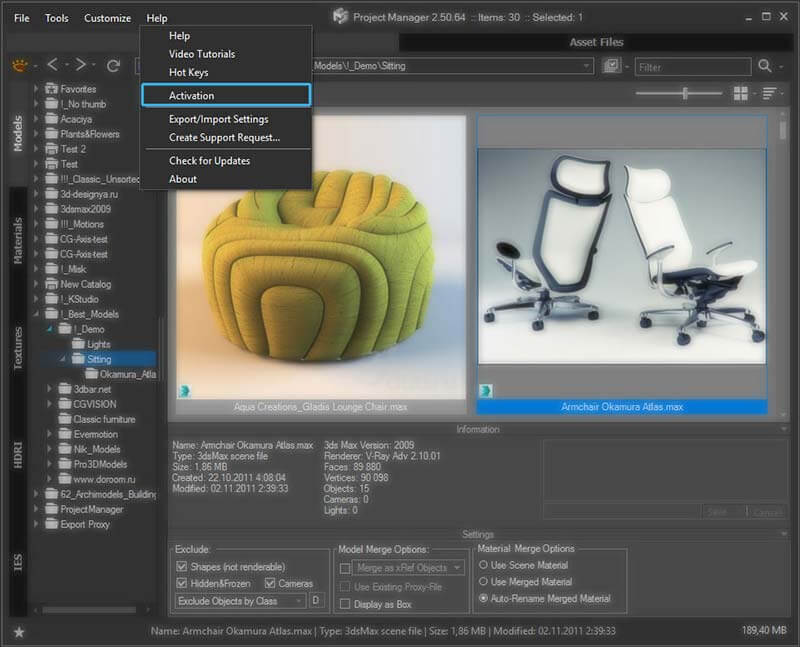
Select the most suitable activation type
- Run the 3ds Max
- Run Sweep PRO plugin
- An activation dialog will appear
Select the most suitable activation type
- Run the 3ds Max
- Create the Fusion/Spline Flow/.../Add the Modifier..
- To create an object, choose the Kstudio Category in the Create section on the Command Panel

- Create the object in the viewport and switch to the Modify tab
- Open the License rollout at the bottom and press the button License

- An activation dialog will appear
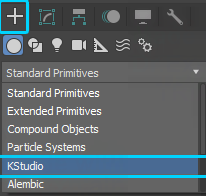
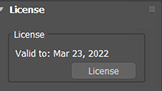
Select the most suitable activation type
Insert the activation key received in the confirmation email and click the “Apply” button.
You can always check and manage your activation keys in your dashboard.
If you move to a new computer or reinstall Windows, simply re-activate using the same key — no need to request a new one.
Each activation key can be used on one or several devices (depending on your license type).
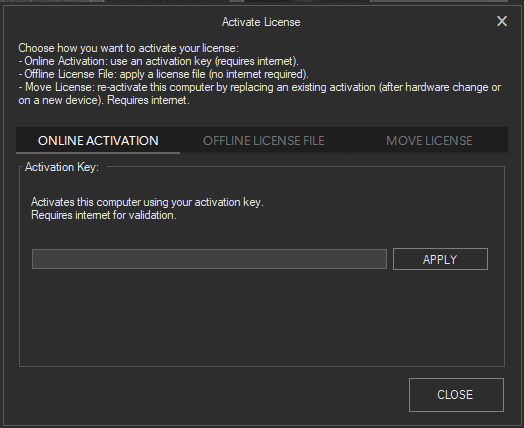
This feature is currently available for Project Manager, Models Manager, Materials Manager, Batch Render&Relink, FilePathFinder, and Sweep PRO.
Soon it will also be extended to other plugins.
Internet connection is required for activation and occasional validation.
Note: By default, the online license is activated for all new purchases.
If you are still using the old (offline) license type, you can easily switch to the online license in your dashboard.
This significantly simplifies license management, especially for teams.
Insert the activation key received in the letter and click the button “Apply License”
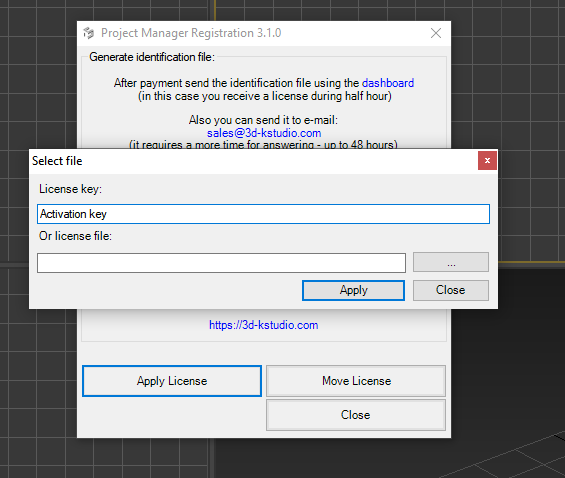
Note: Internet connection is required to use activation keys If you have a problem with this activation type, use the second method - using identification file
You can use a single identification file to obtain licenses for various plugins.
For instance, you can generate an identification file for Sweep PRO and use it also in the slot for generating a license for Spline Flow
1. Press the button "Generate identification file"
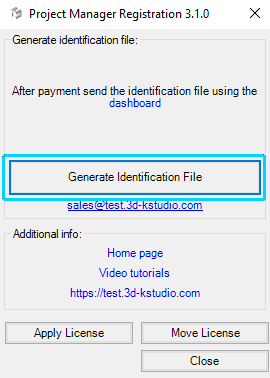
2. Login to dashboard using the same email you used for purchase
3. Upload the identification file, generated in the previous step, by pressing the "Choose File" button
4. Press the button "Send"

5. Download the license key from the dashboard.
Also, you will receive a copy of your license key to an email-box

6. Press the button "Apply License" and choose the downloaded license key
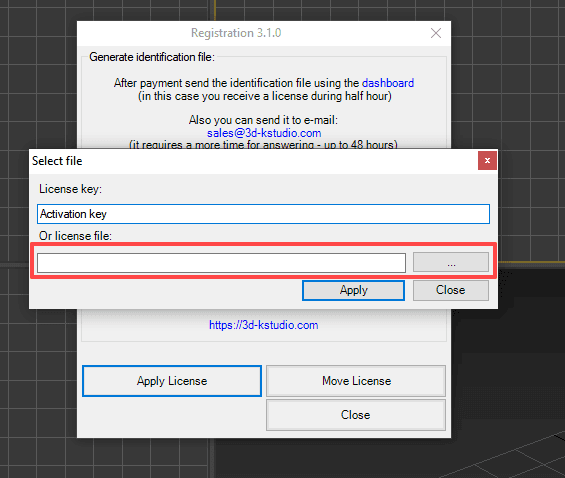
Kstudio plugins are used by freelancers as well as in studios of different sizes – from several employees to hundreds.
This feature simplifies the deployment of numerous installations into a large network.
This instruction applicable only for Project Manager
I recommend paying attention to utilities such as PsExec and PowerShell – with their help you can install the 3dsMax plug-ins and apply the license keys in a batch mode.
Using:
- Download and extract the archive SilentModeInstall.zip
- Copy the ZIP archive with the full version of the plugin into one folder with "AutoInstallStart.bat"
- Open "AutoInstallStart.bat" and uncomment/add a valid path to 3dsMax.exe
- Write activation keys to the file "ActivationActivationKeys.txt"
- Run "AutoInstallStart.bat" using PsExec/PowerShell or manually on each computer
How to Distinguish Between the Full and the Demo Version You Downloaded and Installed?
Before activation, do not forget to install the full version of the plugin
(the title shouldn’t contain the word Demo)
To determine if you have downloaded and installed the full version or the demo version, here are some key points to consider:
1. Activation: The demo version cannot be activated. If you have downloaded the demo version, activation will not be possible.
2. File Name: The archive containing the demo version will include the word "Demo" in its name.
3. Installation and Launch: During installation or when launching the plugin, the demo version will display the word "Demo" next to the logo.
4. Full Version: If there is no "Demo" label on the logo, but you see the "Demo" label over files, it means you have the full version which requires a license key for activation.

Full Version

Demo Version
Note: Please use the latest updates for your version of 3ds Max
3ds Max Updates & Service Packs
See Also:
Project Manager Wishlist
- Search images by color. (idea by Oleg Budeanu)
- Search for materials (idea by Ralf Jaskulki) [coming soon]
- Description for materials (idea by Ralf Jaskulki) [done! (version 3)]
- Mass rename the asset links and files on hard drive. (idea by Dmitriy Tereshchuk) [done! (version 3)]
- Option to set a directory for saving the proxy. (idea by Per Schelfhorst) [done! (version 3)]
- Ability to exclude certain folder or exclude folders by name – example “map*,texture*” (idea by Kinower ) [done! (version 3)]
- Set color folders to identify better (idea by tschuelke ) [done! (version 3)]
- Show materials in tree [done!]
- Using a single database on a network. [done!]
- Custom studio for materials and models [done!]
- Use regex and the simple patterns to refine the search files.(idea by Sorvin Sergey) [done!]
- Preservation of materials with modifiers [done!]
- Search and Description for 3d models (idea by Claus Mindermann) [done!]
- Ability to render preview as .png with alpha channel (idea by David Le Cardinal) [done!]
Changelog
Project Manager 4.01.88 — The Library That Remembers What You Searched For
October 6, 2026
Smart Categories
- Save any text or AI search as a Smart Category — it sits in the tree alongside your regular categories and shows the matching files every time you open it
- Group Smart Categories under a parent category, including a new one created on the spot, with an icon suggested automatically
- Edit a Smart Category whenever your needs change
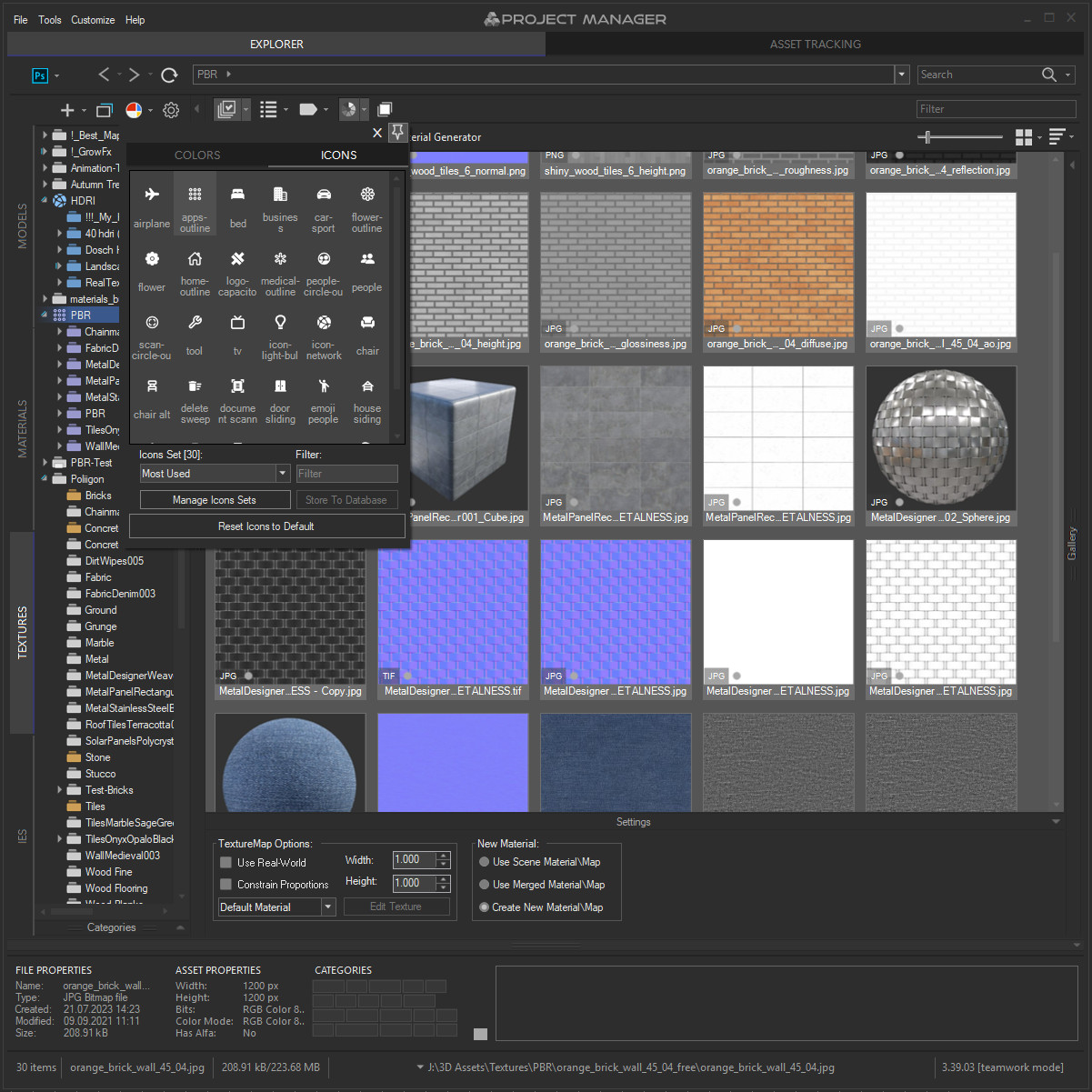
AI Icons
- Select folders and click Auto-Assign to selection — the AI picks an icon for each folder based on its name
- The AI looks at the icons themselves, not their names, so it doesn’t matter what an icon is called
- AI-powered icon search in the colour and icon panel — find the right icon from a short description
Archives
- Thumbnails for archives: custom file types added to the Models filter, such as .zip or .rar, now show a same-name preview image
- Auto-Assign Previews now processes these file types too
- AI classification supports archives that have a preview — find an archive by describing what its preview shows
- Predictable model choice when you drag an archive into the viewport: a model with the archive’s name comes first (AM251.zip → AM251.max), then .max files, then other formats; top-level files win over files in subfolders
- Fixed dragging a file from an opened archive picking a same-name file from another subfolder instead
- No needless prompts: already extracted, unchanged files are skipped silently; with Ask User on, you are only asked when a file on disk differs from the one in the archive
- Apply to all in the overwrite dialog now applies only to the current operation, including all archives dragged together, and no longer changes the setting in Preferences
Materials
- AI enhancement of interactive material previews — thumbnails and the large preview are now sharper and more detailed
- Applies only to previews created by 3ds Max interactive rendering; your own previews are left untouched. Can be switched off in Preferences → Interactive Rendering → Sharpen material previews (AI)
- Improved drag & drop of materials and textures into the Slate and Compact Material Editors, including OpenPBR map buttons
- Fixed errors when updating cached material libraries after renaming or categorising materials
- Fixed an issue with deleting materials
AI Search & Classification
- Fixed installation issues that could prevent AI from working on some systems — if AI didn’t start for you before, it’s worth trying again
- AI categories now update automatically
- Improved multilingual AI search accuracy for complex queries and words containing apostrophes
- Improved AI classification reliability when using several databases or 3ds Max versions
- Improved AI Classifier recovery after errors and handling of low GPU memory
- Improved AI search reliability and reduced delays when reclassifying assets with a MySQL database
- Fixed some minor issues with the AI Classifier
Performance
- Faster navigation and sorting in folders and catalogs with many files
- Faster IES preview generation with parallel rendering and disk caching
- Improved interface responsiveness while previews are loading
- Improved performance and stability with large shared MySQL databases
Interface & Localisation
- Improved translations and more consistent technical terminology
- Fixed display and scaling issues with the colour and icon panel in 3ds Max 2016–2025
- Fixed missing file type and category badges after sorting or scrolling
- Fixed hidden catalogs becoming visible again when switching categories
Fixes
- Fixed an issue that could prevent importing models
- Improved stability when generating previews and opening problematic 3D models
- Fixed AssetViewer compatibility with 3ds Max 2026 and later
- Fixed the saved Display as Box option not being applied when placing objects
- Fixed command behaviour when using Windows shell context menus
- Fixed an issue that could create invalid MySQL backups
- Fixed several issues with silent installation and deployment to another Windows user account
- Fixed several issues with generating and sending support requests
- Various other fixes and improvements
Project Manager 4.01: The Asset Browser That Understands You
August 11, 2026
AI-Powered Text Search
- Describe what you’re after in plain language — classic wooden chair — and Project Manager finds it. No file names, no categories, nothing to remember
- Search in your own language: 31 languages are supported out of the box — Arabic, Bulgarian, Chinese, Croatian, Czech, Danish, Dutch, English, Filipino, Finnish, French, German, Greek, Hebrew, Hindi, Hungarian, Indonesian, Italian, Japanese, Korean, Norwegian, Polish, Portuguese, Romanian, Slovak, Spanish, Swedish, Thai, Turkish, Ukrainian, Vietnamese — with around 30 more languages available as an optional download
- Ideal for multilingual studios: everyone searches the same shared library in their own language, and no one has to agree on a naming convention first
- Set the language for a single query with a prefix — uk:, ja:, deutsch:, 日本語: — while your default setting stays untouched
- The Filter field understands descriptions too, so you can search for lounge chair and then narrow it down with leather or red without rewriting the query
- Results appear as you type, even on large libraries — text and reference images work side by side as two routes to the same asset
- Searches the models the AI Classifier has already processed, so let it work through your library first — after that, everything is instant
- Local as ever: the language models are downloaded once, and from then on, everything runs on your machine. Nothing you type leaves your computer
Find Similar — Rebuilt on AI
- Find Similar Objects completely reworked — AI image similarity instead of tags, which makes results dramatically more accurate
- Pick any model and see what else in your library shares its shape, style and overall look
- Like text search, it works across the models the AI Classifier has already processed
Search by Reference Image
- Find Similar → By Image: search your library using external images — drag & drop, paste from the clipboard, or browse for files; up to five images at once
- A photograph, a render, or a pencil sketch — if you can show it, you can search for it
- Crop selection for reference images — search by a chosen area of an image rather than the whole frame
- Reference Sets: save your reference images as named, reusable sets. Each set keeps its own images and its own analysis, so you can switch between projects or moods instantly
Similarity Filters
- New view filters — “Filter Similar Objects” and “Filter By Similar Colour” — narrow the current view down to items resembling the ones you’ve selected
- Filter Similar Objects sorts by similarity score, so the closest matches sit at the top of the list
- When you search from several source files at once, results are grouped under each source
Interface Localisation
- Full interface localisation in 12 languages: English, German, Spanish, French, Japanese, Simplified Chinese, Turkish, Ukrainian, Portuguese (Brazil), Italian, Polish and Danish
- AI category and material names are displayed in your interface language, not only in English
- The category filter search matches both the localised name and the original English one — however your library was built, you’ll still find it
Silent Installation for Studios
- Unattended deployment: run the setup with /SILENT or /VERYSILENT to install across every workstation without a single prompt
- Full deployment guide: Silent mode installation
- Straight from the wishlist forum — thank you to everyone who asked for it
Material Import
- A new dialog when importing or assigning materials: keep duplicates as they are, replace them, or rename them
Performance & Fixes
- Faster folder browsing and scanning, particularly on large libraries and network locations
- Faster similarity search across large libraries, with specific optimisation for MySQL and MariaDB databases
- Classification now picks up your priority files first, so anything you request no longer waits behind a long folder scan
- Reclassify on request starts correctly even for files already marked as classified
- Fixed AI classification permanently skipping some folders, such as models without previews
- Fixed endless re-scanning of models with no AI vectors
- Fixed manually added category links disappearing after reclassification, and drag & drop between categories losing links to other categories
- Fixed MySQL connection failures — error 1042 and caching_sha2_password — and connections in 3ds Max 2026
- Fixed a startup error that could occur while a large SQLite database was being updated to version 4
- Fixed the AI engine failing to start when the Windows user name contained non-English characters, such as Turkish, German or Cyrillic
- Language model downloads are now paced and retried automatically, resolving “429 Too Many Requests” errors when installing several at once
- Improved preview file matching — previews are found more reliably and linked to the correct assets
- Fixed preview rendering for VRay Proxy, and a crash when rendering thumbnails for certain incompatible materials
- Colour search corrected across all asset types, with the slowdown that occurred under certain settings resolved
- Fixed interface freezes when applying filters on large folders
- Icons added to key Explorer context menu commands for easier visual navigation
- Fixed a bug with assigning textures, plus various sorting fixes and general speed improvements
Project Manager 4 — AI asset classification is here
June 8, 2026
AI-Powered Asset Classification
- Automatic categorisation of 3D models — no more manual tagging
- Dedicated AI Classifier engine runs in the background with GPU acceleration
- Classification by object type (chair, sofa, lamp…), material composition (glass, wood, metal…), style, and brand
- Brand and style recognition for furniture — classical, contemporary, and everything in between
- 3D Models get tagged by material type automatically
- AI-assigned categories are clearly distinguished from your manual ones, so you always know what came from where
- Full control over results: review, reassign, or remove any AI suggestion you disagree with — the AI proposes, you decide
- Reclassify specific folders or categories on demand — no need to reprocess your entire library when you want to update just one section
- Runs entirely on your machine — your assets never leave your computer
- Scale across your team: point multiple workstations at the same database and they’ll classify in parallel, each picking up its own share of the queue
- Designed to stay out of your way — runs in the background at low priority, so it won’t interfere with rendering or active work
- Pause classification anytime, from one hour up to five — perfect when you need every bit of GPU for a render
- Choose which GPU does the work, or fall back to CPU if you prefer
Colour Tools
- Colour analysis for both 3D model previews and textures
- Find assets by colour — pick any colours from a palette and instantly see matching models or textures
- Colour similarity search that understands perceptual colour
- “Find similar by colour” available in the asset menu — locate visually related models or textures across your library
- Visual colour swatches in the filter row show your active colour filters at a glance
Colour Labels — Team Workflow
- Built-in status system for your assets — tag models and textures with workflow states like Draft, Approved, In Review, Archived, or Urgent
- Perfect for team collaboration: artists can mark work in progress, leads can flag approved assets, and everyone sees the same status at a glance
- Filter and search by colour label — instantly pull up everything that’s “In Review” or hide archived assets from your daily view
- Use any colour and label text you like — set up a system that matches your studio’s existing workflow
Smarter Search
Find Similar — Two Ways to Match Assets
- Find similar by content — pick any 3D model and instantly find others that match its style, shape, and overall look, powered by AI visual analysis
- Find similar by colour palette — pick any image or texture, and Project Manager analyses its full set of dominant colours and their proportions to find other assets with a matching colour profile. Brilliant for finding textures that fit a specific reference photo or mood board
- Both available right from the asset’s right-click menu
Search
- Multi-keyword search returns more relevant results: searching “Chair, Glass” now finds a file named “Chair.max” described as “glass” — not only files containing both words literally
- Full-path category search: find every subcategory under a brand or style in a single query
- Instant feedback — every filter tick, keyword, and colour pick updates the view immediately, so you can explore your library by feel rather than by query
Redesigned Status Bar
- Completely rebuilt panels for Categories, Materials, Colour Labels, and Colours
- Each panel shows three contextual sections: what’s in your current selection, what filters are active, and what’s available across your library
- Active filters stay visible even when you navigate to folders where those categories aren’t present — no more “lost filter” confusion
- OR / AND filtering modes when combining multiple categories — match any of them or require all of them
Category & Material Filtering
- Filter by category directly from the category tree via right-click menu
- Category filter correctly includes subcategories — filtering “Furniture” also finds items in “Furniture → Chairs → Dining”
- Combine category and material filters to narrow down precisely: find glass-and-metal tables, or wooden ones, in one click
- Filter furniture by brand and style — classical, contemporary, industrial, and so on
- “Categorised” / “Uncategorised” quick filters — instantly see which assets still need attention
- Per-category control over subfolder visibility — show files from subfolders only for the categories where it makes sense
Gallery & 3D File Browsing
- Three gallery tabs for .max files — Models (linked previews), Materials (the scene’s material tree), and External Links (every texture and asset the scene references)
- Drag materials straight from the gallery into your open 3ds Max scene — no need to open the source file first
- Edit external links right in the gallery — fix or replace missing textures and asset references without opening the .max file
- 3D viewport preview for FBX, 3DS, OBJ, and other 3D formats right in the gallery — inspect geometry before importing
- Materials gallery for material libraries — browse linked previews, the material tree, and every texture used by each material; edit external links inline
- Zoom & Pan for images — inspect textures and reference images at full resolution without leaving Project Manager
- Use any image format as a preview — WebP, EXR, HDR, and more all work as custom thumbnails
Seamless Migration & Gradual Rollout
- Perfect for studios: run v4 on one artist’s workstation while the rest of the team stays on v3, then migrate when you’re ready
- Upgrade at your own pace — v3 and v4 share the same database format, so your library works with both versions simultaneously
- No library rebuild required: point v4 at your existing v3 database and you’re ready to go
- License compatibility across versions — use v3 with 3ds Max 2026 and v4 with 3ds Max 2027 on the same license on one computer
- Broad 3ds Max coverage: supported from 2016 all the way through 2027
- Everything you relied on in v3 is still here — v4 adds on top, it doesn’t take away
3ds Max 2027
- Full support for 3ds Max 2027
Other Improvements & Fixes
- Significantly improved UI responsiveness — reduced flickering, faster scrolling, and snappier list updates across the board
- Dramatically faster file and folder deletion — operations that used to take minutes on large libraries now finish in seconds
- Live sync in shared database mode — files added or deleted by a colleague now appear automatically, without reloading the folder
- Smart memory management for AI Classifier — the CLIP model unloads from RAM when idle and reloads instantly when needed
- Windows installer that integrates ...
Project Manager 3.41 — Features You Requested
September 29, 2025
New Features & Improvements
- Online Licenses – new activation and license management system.
- Import from Archives – added support for importing assets directly from archive files.
- Custom Color Labels – personalize your workflow by adding, editing, or removing label colors.
- Folder Colors Palette – choose your own set of colors for highlighting folders and nodes in the tree.
- Category Filtering – filter assets by one or multiple categories directly in the current view (hold CTRL to select multiple).
- PBR Materials – added support for translucence maps.
- Batch Import – import multiple selected models at once using the Merge to Scene button.
- Directory Icons – 12 new icon sets for directories (Food, Gadgets, Landmark, Nature, Science and Technology, Shopping, Signs, Sports, Transportation, Wildlife, People, Miscellaneous).
- Extract Command – new “Extract” option in TreeView and ListView context menus.
- API – new method MergeSelectedFiles (see free example add-on Forest Pack Bridge).
- Drag & Drop – support for dragging textures and materials into the Command Panel, Render Dialog, and Slate Material Editor in the latest versions of 3ds Max.
- Compatibility – Redshift Renderer: support for the latest version; updated compatibility with the latest 3ds Max versions.
- (Behaviour) Search Reset – clearing the search box in interactive mode restores folder contents.
Fixes
- Fixed a bug with previewing assets in Details View.
- Fixed issues with displaying archives in the treeview.
- Fixed an issue with displaying archive content.
- Fixed an issue with filtering during navigation.
- Fixed an issue with regex-based search.
- Fixed an issue with relinking resources containing invalid characters in path.
- Fixed Auto Assign Previews for directories with material libraries.
- Fixed assigning shortcuts to some default commands.
- Fixed an issue with sorting files in directories when “Display Sub-directories” is enabled.
- Fixed an issue with removing links from a scene on Asset Tracking tab.
- Fixed a bug with relinking scenes containing IES files using Batch Render&Relink utility.
Project Manager 3.40.00 — Instant Search
July 8, 2025
Search & Filtering Improvements
- Interactive search across the entire database — enter a query and see the desired results immediately!
- Interactive complex filters with include/exclude conditions for Filename, Descriptions, and Categories
- Separate Filter and Search text boxes for clearer workflows
- Locate assets by their complete folder path for more precise filtering
- Added a filter textbox in the Categories dialog
- Option to disable scanning for missing external links across the entire database—only user-specified folders will be scanned (Preferences → Database)
- Added “Isolate Selection” filter
- Added ability to assign and filter by Color Labels
- Significantly speed up asset filtering
UI Performance & Stability
- Significantly improved asset display speed for large file sets
- Enhanced navigation responsiveness across all views
- Smoother preview thumbnail caching for quicker loading
- Improved UI responsiveness for a more fluid browsing experience
- Eliminated interface freezes when handling uncached thumbnails
Interface Improvements
- Redesigned bottom-panel layout, with an option to hide it
- Ability to disable some default shortcuts
- New shortcuts – Ctrl+F to focus Search textbox, and Ctrl+Shift+F to focus Filter textbox
- Support for hiding folders by relative path (per parent node), enabling more precise control over which folders are hidden
- Unified gallery and material tree into a single pane with tabbed views (Materials tab)
- Added “Batch Rename“, “Convert Images“, and “Open With…” buttons to the main toolbar
- Expanded texture data display to include color mode and bit depth
Mass Rename Tool Enhancements
- New options to replace diacritic characters and transliterate Cyrillic text to Latin
- Ability to specify the increment step for sequential numbering of files
Batch File Conversion & Tools
- Resolved an issue affecting batch conversion of files between formats
- Fixed minor issues with the Batch Render & Relink tool
3ds Max Integration
- Ability to specify custom expression to exclude objects from merging
- Resolved a bug in 3ds Max 2023 and earlier related to placing materials into the Slate Material Editor (SME)
- Improved detection of appropriate material slots when creating PBR materials from maps with specific naming patterns
Miscellaneous
- Resolved UI rendering problems on high-DPI displays at specific scale settings
- Fixed gallery update for selected items upon addition or removal
- Resolved an issue when searching within categories only
- Option to clear cached data from the database
- Fixed several bugs in 3ds Max 2026
- Other minor fixes, optimizations, and interface improvements
Project Manager 3.38.10 with 3ds Max 2026 Support
April 29, 2025
- Support to 3Ds Max 2026
- Improved performance when displaying files from directories containing numerous subfolders
- Significant performance improvement when show search results or navigate to directories with huge numbers of files
- Ability to override texture’s Mapping Size for materials on merging from material library
- Play video, audio, IFL, and animated GIFs directly in the list view
- Play video, audio, IFL, animated GIFs, ArchVision RPC, and BIP files in the external Asset Viewer
- Ability to set a custom pivot point for models prior to merging into the scene
- Ability to add custom menu items to the tree-view context menu
- Ability to change selected assets directly from the Asset Viewer using keyboard shortcuts
- Uses the default value for the “Hide Unused Nodeslots” option when dragging a material or texture(s) to the Slate Material Editor (SME)
- More accurate material/texture placement in SME
- Ability to exclude specific files from automatic PBR material creation using filename masks
- Combined dialogs for setting up PBR and Single texture materials into a single window with separate tabs
- Fixes some issues with rendering preview using Arnold renderer
- Fixes some issues with HDPI screens with some specific scale factors
- Fixes a bug with category filtering
- Fixes minor issues with material/texture placement in SME
- Fixes an issue with dragging HDRI files to the viewport
- Fixes an issue with searching, relinking, collecting, and archiving the content of IFL files
- Fixes some issues with selecting multiple directories
- Fixes other minor issues and includes performance improvements
Project Manager 3.37.41: Custom Icons and Quick Access Recent Assets
January 27, 2025
- Adds the ability to assign icons to directories
- Adds the ability to add custom fonts and SVG files to the library
- Introduces a new category: Recent Assets, which stores recently merged 3D models, textures, and materials
- New menu item “Include to Catalog” makes it easier to add selected directories to catalogs from the context menu
- Adds a new search option, “Everywhere”, enabling searches across all cached assets (requires the Assets Cache option to be enabled)
- Displays recent search terms in the Search menu
- Discontinues support for the light theme
- Adds compatibility with the latest versions of MySQL (9.1.0) and MariaDB (11.6.2)
- Includes optimizations and improvements for MySQL/MariaDB databases
- Fixes an issue with asset caching in teamwork mode
- Resolves minor issues with MariaDB servers
- Some interface changes and bug fixes
- Some additional optimizations and improvements
- Important: Please upgrade to MariaDB 11.6.2 if you are using a version earlier than 11.6
Read More
Related to "Project Manager"
-20%
Original price was: $9.00.$7.20Current price is: $7.20.
-20%
Original price was: $15.50.$12.40Current price is: $12.40.
-20%
Original price was: $9.00.$7.20Current price is: $7.20.
-20%
Original price was: $9.00.$7.20Current price is: $7.20.
-20%
Original price was: $9.00.$7.20Current price is: $7.20.
-20%
Original price was: $9.00.$7.20Current price is: $7.20.




Romas Noreika (verified owner) –
Great great tool for 3ds max. Does take time to set up you libs but once you do it its a blast to work with.
Oleksandr Kramer (verified owner) –
Thanks a lot, great to hear it’s working well for you. Setting up the libraries is a one-time investment that keeps paying off on every project.
Volkan Dinç (verified owner) –
Project Manager has become an essential part of my daily 3ds Max workflow. Managing models, materials, textures, IES lights, and proxies without it honestly feels unthinkable now.
What really stands out is how actively the plugin is maintained. It’s consistently updated, and whenever there’s an issue or a question, the support response is impressively fast and genuinely helpful. You never feel left hanging.
Browsing archives like normal folders, real-time previews, batch tools, and the overall performance make a huge difference in real production environments—not just demo scenes. It clearly feels like a tool built by people who actually use 3ds Max professionally.
Highly recommended for anyone serious about asset-heavy projects. Saves time, reduces friction, and just works.
Oleksandr Kramer (verified owner) –
Thank you so much for this wonderful feedback — it means a lot! It’s great to hear Project Manager has become a core part of your workflow.
Stay tuned — a new version is coming soon, featuring exciting AI-powered upgrade that will take things to the next level! 🚀
Fa Huynh (verified owner) –
This plugin save me a lot of time and easy to use. Many Thanks
Oleksandr Kramer (verified owner) –
Thank you!
We’re thrilled Project Manager is helping your workflow.
Happy creating!
Dart Design (verified owner) –
Best plugin for 3D assets and the best support ever!
Highly recommended!
Oleksandr Kramer (verified owner) –
Thank you so much for your kind words and recommendation!
Lukasz Redjam (verified owner) –
Total “must have” in 3ds max! An add-on that completely changes the workflow and incredibly speeds up work. Managing assets or materials is pure pleasure if you use Project Manager. If I could give more stars, I would without hesitation :)
Grzegorz Mularczyk (verified owner) –
Project manager is great plugin. My job very boost now… Thank you for this plugin. Just i needed like this solution.
Oleksandr Kramer (verified owner) –
Thank you!
Your comments are appreciated, and we’ll continue working to make the plugin even better for users like you.
emmanuilkav (verified owner) –
Project manager is an essential tool that I have been using for over two years. It has significantly sped up my workflow and keeps all my assets well-organized. It is totally worth the investment, and I highly recommend it!
Oleksandr Kramer (verified owner) –
Thanks for your feedback! Happy creating!
Juan Pablo Estupinan (verified owner) –
This is just a small thank you to Oleksandr for the last update 3.37.17, it running great for us, librarys load so much faster, icons are a great addition !! ability to share icons and colors with the database and team..
Been using PM for at least 10 years and its better than ever :)
Oleksandr Kramer (verified owner) –
Thank you for your support and kind words!
🙌 We’re glad you’re enjoying the latest update and its new features. 😊
Sameer Nagar (verified owner) –
Great plugin
Krzysztof Levin (verified owner) –
It is one of the most advanced libraries I´ve ever seen and it is packed with goodies that help to save shaders and models and more….I really like it alot. Very useful and a must for any artist who takes himself seriously.
Oleksandr Kramer (verified owner) –
Thank you so much for your kind words!
Your support and feedback mean a lot to us.
Keep creating amazing art!
esam da (verified owner) –
Most great plugins. help to fasten the project. Very glad to use it
Thank you
Jorge Martinez (verified owner) –
Project Manager is definitely one of the plugins you want to have in your set of tools. It is not only a time saver, but also a perfect library organizer. Thank you!!!
Oleksandr Kramer (verified owner) –
Glad to hear you’re enjoying Project Manager!
Thanks for the feedback!
Kostas Geranios (verified owner) –
One of the most useful plugins for 3ds max. Stable enough, it could be a little bit more customizable. Worth buying 100% though.
Oleksandr Kramer (verified owner) –
Thank you for your feedback! We’re glad you find it useful!
niknok47 (verified owner) –
Great Plugin! A must for 3dsmax user.
Oleksandr Kramer (verified owner) –
Thank you so much for your kind words! Happy creating!
Chad McDonald (verified owner) –
Essential plugin for any serious Max user. Updates are quick and support reliable. FIlls a neglected gap in Autodesk development. Use it everytime I open the program.
Oleksandr Kramer (verified owner) –
Thank you for the high praise!
We’re delighted to be a key part of your Max toolkit.
kadir gurer (verified owner) –
It is definitely very useful, it speeds up the workflow incredibly. The interface is very easy to use. I definitely recommend it. I would also like to thank those who developed the product.
Oleksandr Kramer (verified owner) –
We are pleased to hear that the plugin has significantly sped up your workflow and that you highly appreciate the interface. Your feedback means a lot to us.
pstros (verified owner) –
One of the best plugins for 3ds max. I use it every day.
Oleksandr Kramer (verified owner) –
We’re thrilled to hear that our plugin has become a daily part of your workflow with 3ds Max.
Thank you!
Samer Serhal (verified owner) –
That is so efficient, i hope you keep developing it
Jesus Velazco (verified owner) –
Absolutely a most to organize libraries, from 3d models to textures. The tool to create renders for the thumbnails is amazing, I used it to generate previews for a project with a bunch of assets and share them to my client. Time saver
Oleksandr Kramer (verified owner) –
Thank you for your glowing review!
We’re delighted our tool has been a time-saver for your projects.
Keep creating and sharing!
j.a.b (verified owner) –
Indespensable tool for any serious viz-artist. I cannot imaging how much time this tool has saved me. Support and bug-fixing is extremely fast.
nateclowar (verified owner) –
Quick and easy to use, already does exactly what I need and I haven’t even started using all the features yet.
Adele Qasim (verified owner) –
great tool !
Paul H (verified owner) –
Excellent product. I use this plugin everyday and it saves me soo much. I wouldn’t be without it.
Oleksandr Kramer (verified owner) –
Thank you for using. Glad to be helpful!
Machteld (verified owner) –
I heard of this plugin via ArchVizArtist.com and I love it, huge timesaver!
Zora Groothuis Arroyo (verified owner) –
Nos ha cambiado por completo el ritmo de trabajo, tanto a la hora de crear nuevas escenas como gestionar escenas externas, es maravilloso para tener tu biblioteca a un click de distancia y de un simple vistazo, y gestionar los assets de una escena. Lo hemos comprado ya 2 veces, y cuando necesitemos un upgrade lo volveremos a comprar
Bastian Robertino Galleani Cabrera (verified owner) –
excelente producto, cuando ya lo tienes configurado acelera tu producción de muy buena manera.
Kotaro Mori (verified owner) –
非常に有意義なプラグインです。大変時間の節約になります。
Thomas C (verified owner) –
Definitely a huge time saver, I highly recommend this useful plugin.
ABDNAF (verified owner) –
One of the most useful plugin, Must have!
Thanks KSTUDIO
兵 黄 (verified owner) –
very good production .i love it
Hans-Peter Moehlig (verified owner) –
The full version works very well and is very helpful to organize materials and scenes. It saves a lot of time. Very useful.
Richard Throgmorton (verified owner) –
I initially bought this ‘hoping’ it would help me consolidate a projects’ files into its main project folders. It wasn’t immediately clear if it was possible, but it seemed that the literature was stating something to that effect. If it did I was still looking forward to a few hours of work, but at least an hour or so would have been saved. (Stuff was scattered on different network drives.)
I install, restart Max, test the Project Manager to make sure it will work, load my scene, and attempt to consolidate.
Overall it took about 20 minutes to get started, test, and run the tools to do the work. Maybe 30 minutes passed, maybe, and all files were copied into the correct folder, the sweet little PM relinked the textures to the materials (holy mother of beer, it worked), the project was packed, and it was uploaded to the file drive for the client.
I literally saved HOURS of work on that one single operation. The stress I usually feel of having to do that manually just washed away. It’s not possible to regret purchasing this plugin.
Alexander Kramer (verified owner) –
Glad to be helpful to you and thanks for your story!
Komodo (verified owner) –
One of the most useful plugin.
Must have!
LeXuanFX (verified owner) –
非常好用的一款插件,使用它可以轻松管理各种3dsmax资源、能够节省很多时间!期待发布中文版
Abderat Qias (verified owner) –
he best timesaver for working in 3dsmax
I have come across! I have to kick myself for not buying it earlier. After only two days use I can’t manage without :-)
Semiha Karatas (verified owner) –
A great time saver! We use it, especially for material collections and management and it is very useful
Alejandro Gonzalez Romo De Vivar (verified owner) –
A must have tool for 3dsmax everyday users. The new advanced asset renamer is a time saver!
Roberto Albinati (verified owner) –
Es un producto que me facilita y agiliza el trabajo, es muy útil, organiza y optimiza mi tiempo, excelente, lo recomiendo ampliamente!!!
Uno de los mejores complementos para 3d Max.!!
Erdenebayar Minjuur (verified owner) –
Very very useful plugin! Amazing! Thanks KSTUDIO
D0br0 (verified owner) –
At first I was skeptical about this product. But after trying it, I really liked it. Now I actively use it.
Jonas Noell (verified owner) –
Can really recommend this very helpful plugin. Helps a lot with keeping your whole asset library organized and has many helpful additional functions!
Gordon (verified owner) –
I use a while with the demo version, it was a great help for my assets organization. Good job!
Mauricio Cavalla (verified owner) –
Project Manager is an incredible plugin that not only helps you organize your libraries, but it also has many more powerful tools to work smoothly and optimizing time for your projects. Now that I use it, I wouldn’t know how to go back without this tool.
Terje Hamnes (verified owner) –
The best timesaver for working in 3dsmax
I have come across! I have to kick myself for not buying it earlier. After only two days use I can’t manage without :-)
Alexander Kramer (verified owner) –
Thanks for your review.
Nice to be helpful!
mochinaga (verified owner) –
Project Manager is a very good 3ds Max script. It will definitely be one of 3ds max’s best plug-ins. By introducing it, work will be much faster.
It’s a complete plugin, but I personally want it.
・ I hope the font looks big for 4k monitors.
・ I want a function to close the project manager with the cross button.
(Because the file display may not be reflected.)
・I want you to support double-clicking to open a file.
When organizing files, I made several mistakes in saving when merging.
Alexander Kramer (verified owner) –
Thanks for your review!
– Use the menu item “Exit” for closing the plugin.
The cross button hides Project Manager.
Jose Miguel Perez Colon (verified owner) –
Project manager is a stunning plugin for organize your CG library. It’s like a ‘Lightroom’ for 3ds max users because you can keep organize your 3d models, HDRI, Materials and texture of easy way. The plugin runs in a separate window that you can see all yours assets and it’s very useful to choose the correct models, also have a extra tools that help to insert very handy in your 3ds max scene.
Project manager it’s robust, intuitive, useful and necessary for your 3ds max workflow. The customer support it’s 5 stars, Alexander Kramer will attend your ask in short time. And for what not to talk about the price is super fordable. For what reason I putted a excellent review? It’s because I be totally satisfied with this product.
I recommend Project Manager to all 3ds Max users!
Fateh Alsam (verified owner) –
Amazing
Oscar TUNG (verified owner) –
high recommended
Alexander Kramer (verified owner) –
Thank you for your contribution.
Some of the fixes and features of the latest version appeared thanks to your feedback.
Osvaldo C Nevot - Co-Founder of Cuban Spartan Studio (verified owner) –
The life of an indie studio is not possible without this product. It has simply changed the speed and structure of our studio. There is nothing like it.
We strongly believe that every artist or studio on the planet should have this piece of software.
Alexander Kramer (verified owner) –
Thank you! Glad to be helpful for you!
jeanphi (verified owner) –
It is a necessary tool for organizing projects! I’ve tried other similar tools but Project Manager works best!
Marcio Santos (verified owner) –
Best project Manager tool on market that we know. We have researched a bit, including some famous tools, and this one is by far the most simple and complete.
Thank you!
Edson Sanchez (verified owner) –
Definitely an indispensable tool. I have discovered elements of my library that I never used because they were not well cataloged and thanks to project manager I have started to have everything under control. The best thing is that it still has room for improvement and is constantly updated. Very happy with the acquisition.
David Sáenz De Ynestrillas Vera (verified owner) –
I will not exaggerate, it is a great plugin. I bought it recently but I already use it in every project I do.
It really speeds up my workflow and makes the tedious process of maintaining the library of objects, maps, materials even fun.
The only thing I regret is not buying them before.
Man Mars (verified owner) –
Managing asset is one of the most important thing with a 3D artist. Well managed asset helps you work much more effective. And this tool can help you to do that with its powerful functions and easy to use. Plus supporting from the developer is very good. Recommand!
Alexander Kramer (verified owner) –
Hi, Man! Thanks for the great comment!
We are very pleased and important to know what you find Kstudio Asset Browser useful.
Tryharder (verified owner) –
Takes a while to understand all the features. But after a while it rocks.
That´s a real time saver. A must have plugin!
Jixal (verified owner) –
Fantastic plugin! Works effectively and efficiently. Easy to install and setup. Makes managing & using asset & shaders libraries intuitive and easy.
This is something that should be natively included in 3DS.
Alexander Kramer (verified owner) –
Thanks for your words, Jixal!
Hope you will also like 3rd version.
PS. Development of 3rd version now at the final stage.
And will be available in month or maximum two.
Mohammad Nabil (verified owner) –
for me, I’m very happy to get powerful script help me to work very fast more than ever
shawnolson (verified owner) –
Total must-have tool. I love it.
路明 陈 (verified owner) –
The first time I used this software, it improved my efficiency in CG work. I am a CG worker from China. Can you develop multilingual versions?
Alexander Kramer (verified owner) –
Thanks for your feedback.
Multilingual version in my wishlist.
Tristan Hung –
It’s one of the best plugin for 3Ds Max you can get !
but not sure is there any other way you can create like shortcut links in Windows, show model thumbnail in couple different folders but only save the whole model asset once in a folder?
Thank you
Ramon Aranguren (verified owner) –
I have been working on Archviz for longer that I can even remember, through times I have used many asset management tools, both free and paid, even tried to implement workflows that would allow for easy management, and none of those practices come even close to what KSTUDIO’s Project Manager has to offer, plus the state of the art customer service that Alexander offers.
Marco Andrade (verified owner) –
I havent used it a lot since I bought it a few weeks ago, but it is fast and better than browsing in the normal windows explorer, I still have to understand how to add all my libraries. I will keep looking in the manual. Great plugin so far!
Alexander Kramer (verified owner) –
Thanks for for your feedback, Marco!
Hope what next links will be useful for you:
Here you can find a videos about working with Project Manager
Videos about using the Project Manager
Tutorials
And
Frequently Asked Questions
Chris Wade –
I have used Project Manager for a few Years now, and although it can be buggy at times, the Positives out weigh the Negatives massively, I would like to see it be able to Run Faster loading thumbnails generally etc, I would like to see a MOVE Textures option for assets, instead of always COPYING, but that’s a minor thing, unless it does that already and I have missed it.
I would like better control on Thumbnail rendering, doesn’t quite work as you would think always.
But generally It’s Great, well done to the Team
Daniel Diaz Del Castillo (verified owner) –
A must have for any office size, PM is in the heart of our daily workflow, and the customer support is out of this world! Must buy!
Gustavo Ratner (verified owner) –
llevamos pocos dias usando el Project Manager, pero en principio nos parece un Excelente producto. 100% recomendable!!
Torri Walter (verified owner) –
Uso questo prodotto da più di 5 anni e questo è il secondo Project Manager che acquisto.
Un prodotto indispensabile nel lavoro 3D.
Grazie anche al continuo aggiornamento svolto
Dal nostro Alexander Kramer.
Rodrigo Aldeabaran Diaz Maldonado (verified owner) –
hasta el momento que lo he ocupado es fantástico es muy bueno y recomendado 100%
Sérgio Merêces (verified owner) –
It helps us a lot in several tasks and get our stock models organized and ready to populate our scenes. Keep improving it and for sure we will get a really great tool
Joe (verified owner) –
Used for several years, is one of the best plug-ins I’ve ever used. Very practical and convenient at work.
If can add a library management script is even better.
Clark Bickford (verified owner) –
Inserting models is very difficult compare to Asset Browser, and not from a learning curve, from a software point of view. It’s slow, glitchy and not great at picking or placing objects compared to other tools we have used.
The program has quite a lot more features, but can be unstable and requires lots of updates to fix bugs. It’s getting better but still needs quite a bit of work to make it worth the asking price. It lacks the feature to add a thumbnail from clipboard or file easily, it’s quite a manual process to add a model and thumbnail compared to HCGAB. This additional time adds up in a production envrionment.
All in all, not a bad program that will only get better with improvements/time.
Alexander Kramer (verified owner) –
Thank for your review.
Please describe more about issues with inserting models and other issues what you receive using Project Manager.
About the purpose of assigning custom thumbnail to files – the next version will be able to use a custom preview and be able to specify several related files.
P.S. I would be grateful if you could post a description of your wishes and bug reports on the forum. As a rule, most of the errors are resolved within a week if there is sufficient information from users.
Warren DeBruyn (verified owner) –
Probably one of the best thought out plugins, fast and reliable, easy to use and very convenient. It makes populating a scene very easy!
Brian Chapman (verified owner) –
My favorite plugin by far. There’s no comparison to the instant access and import options for everything needed (mats, textures, models, etc).
Nazarii Vovk (verified owner) –
It is just amazing! It has everything i need.
George Chianese (verified owner) –
Excellent for managing proxies. Easy to create thumbnails of your models. Was using connector app, but this is simpler to use.
Nicolas Balagny (verified owner) –
Our whole team has been using “Project Manger” for a year now. We can not imagine the daily work without this brilliant plugin. The developer is extremely close to the user and is very quick to answer questions
Michael Bilodeau Balatti (verified owner) –
I don’t know what i would do without this and each time i wonder why it doesn’t cost more$. Thanks!
Gary Tyler (verified owner) –
I have been blown away by the new Project Manager demo so I purchased it.
I had tested the past versions and while impressed, I did not purchase.
I expect this new version will become a popular must-have for every 3ds Max user.
Very excited to adopt this into my workflow!
Bob Emerson (verified owner) –
been using this for 5 years and every time I switch 3d max on (which is daily)
no problems at all, it keeps getting better and the support is great when I update my hardware and need to re-install and get a new license key.
alex is a top man.
John Santangelo (verified owner) –
I have been using Project Manager for about 3 years now. Can’t live without it. Powerful, easy to use and the customer service is unmatched.
Scheffold Christian (verified owner) –
Perfect.
Don’t sell it to Autodesk!
Rossen Mitov (verified owner) –
Very pleased with this product. It definitely saves me time. The support is great too. Highly recommended!
John Santangelo (verified owner) –
Project Manager streamlines the creation and maintenance of large 3D library assets.
I love using it and the customer support is great!
This is a tool that I will never do without!
Tarek SAADE (verified owner) –
I used this tools a lot everyday, usually finding, relinking or copy images are time consuming,
but PM helped me to do it as fast as possible with one click.
I think many people do not know what treasure it is, so I recommended everybody to try at least one time.
Thank you so much for this great tools.
Albert Chan (verified owner) –
Excellent software. Customer support is awesome.
Mustafa Mamdouh –
One of best products for 3ds max I have ever seen!
Nicolas Bischoff (verified owner) –
The best asset browser available.
Our entire studio uses this and it was worth every penny.
Peter Letten (verified owner) –
Great product by the way!
Its totally integral to the way I use max.
IFan Juang (verified owner) –
“Project Manager” has been made a considered impact in our organization of files;
especially at the final phase of a project, when we are pressed for time and where all the small enrichment (models, materials, lights) in the 3d scene make all the difference in the final render.