 Translate
Tagged: 2027
- April 7, 2026 at 11:49 #46747
 jamjamParticipantPosts: 2Threads: 3Joined: Sep 2024
Hey,
is 3ds max 2027 officially supported in the latest version or when can we expect a official release for 2027?
Thanks and best,
Gerald
- April 7, 2026 at 11:49 #46749Oleksandr KramerModeratorPosts: 269Threads: 1411Joined: Aug 2009
Hi Gerald,
3ds Max 2027 was released by Autodesk on 25th March 2026.
We’re pleased to let you know that Kstudio Scripts, Sweep Profile Pro, and Curlipse already support 3ds Max 2027.
As for Project Manager, we are currently working on verifying full compatibility, and official support will be included in our next update, which we expect to release soon.
We’ll announce it on our website and forum as soon as it’s available.Kind regards
- May 6, 2026 at 13:53 #46856Scumi ScumParticipantPosts: 0Threads: 1Joined: May 2026
Hi Oleksandr,
Following up on this, as I am in the middle of migrating a massive legacy library (~9TB, 1.67 million files) and need to establish the Project Manager SQLite indexing pipeline on Max 2027 immediately rather than waiting for the official patch.
I understand the automated MZP wrapper (installStart.mse) has a hard-coded version block for 2027. My question is regarding the core encrypted binaries: If I manually unpack the MZP, bypass the installer, deploy the core folders directly to \ENU\scripts, and write a custom MacroScript to trigger Main.mse via fileIn, will the current engine run cleanly on Max 2027?
Or are there fundamental SDK/.NET changes in the Max 2027 architecture that will cause the current compiled .mse files to throw runtime/load errors regardless of the installer? If it is purely the wrapper holding it back, I will proceed with the manual hard-wire.
Thanks for your time.
- May 6, 2026 at 23:20 #46858Oleksandr KramerModeratorPosts: 269Threads: 1411Joined: Aug 2009
Thanks for the detailed breakdown of what you’re attempting — it’s a clever approach, but unfortunately it won’t work in this case.
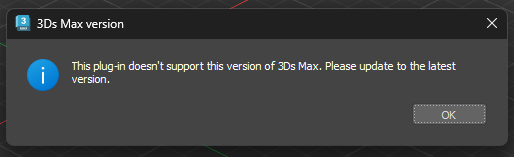
The version block in the installer isn’t the only obstacle. 3ds Max 2027 requires .NET Core 9 support, and the current v3 binaries simply don’t provide that.
Manually deploying the core folders and bypassing the MZP wrapper will still result in load errors at the binary level, regardless of how the bootstrapping is handled. There’s no workaround on the deployment side that can bridge that gap.The good news is that Project Manager v4 will be released soon.
We’re targeting release within the coming weeks, so you won’t be waiting long.Kind regards
- May 7, 2026 at 17:18 #46865turbo squidParticipantPosts: 0Threads: 3Joined: May 2026

- May 9, 2026 at 23:59 #46869Bruno DiasParticipantPosts: 0Threads: 4Joined: Apr 2025
I’m glad I just found this thread, I was coming here to talk about Max 2027, as I am not upgrading my whole suite of software, albeit a bit risky, and I am depending heavily on Project Manager for my workflow. Hoping that V4 will come soon enough.
Thank you!
- May 10, 2026 at 09:38 #46871Oleksandr KramerModeratorPosts: 269Threads: 1411Joined: Aug 2009
The new version of Project Manager is currently in its final testing stage, so it will be soon.
Kind regards
- May 21, 2026 at 17:47 #46961turbo squidParticipantPosts: 0Threads: 3Joined: May 2026
You said “soon” 11 days ago. Doesn’t this “soon” have a specific date? We bought the product but we can’t use it.
- May 22, 2026 at 00:03 #46962Oleksandr KramerModeratorPosts: 269Threads: 1411Joined: Aug 2009
We appreciate your patience, and we do have good news — the release of Project Manager v4 with full 3ds Max 2027 support is now scheduled for the first week of June.
We’re in the final stages of testing and are on track to meet that date.
- June 5, 2026 at 13:15 #47116Bruno DiasParticipantPosts: 0Threads: 4Joined: Apr 2025
Oleksander, would you be so kind and whenever you have some news or a link for the new Project Manager, to tell us here?
Thank you so much, wishing everyone a great day.- June 5, 2026 at 14:51 #47118Oleksandr KramerModeratorPosts: 269Threads: 1411Joined: Aug 2009
Hi!
Project Manager v4 is now available.An official announcement with full details is coming shortly.
Kind regards
- June 5, 2026 at 14:53 #47119Bruno DiasParticipantPosts: 0Threads: 4Joined: Apr 2025
Sounds great! Do we need to buy it again, or how does one have access?
Thank you,
Bruno- June 5, 2026 at 17:09 #47125Oleksandr KramerModeratorPosts: 269Threads: 1411Joined: Aug 2009
If your license was purchased less than a year ago, the upgrade to v4 is free — just download it from your account dashboard at https://3d-kstudio.com/my-account/downloads/
If your license is older than a year, an upgrade fee applies (less than the full purchase price).
You are welcome to purchase an upgrade at a reduced price – find link on your dashboard https://3d-kstudio.com/my-account/
Kind regards- June 5, 2026 at 18:04 #47127Bruno DiasParticipantPosts: 0Threads: 4Joined: Apr 2025
I did buy it just over a year ago by a month or so, I had to buy the upgrade. Thanks for the quick reply, will install today.
- June 5, 2026 at 13:50 #47117turbo squidParticipantPosts: 0Threads: 3Joined: May 2026

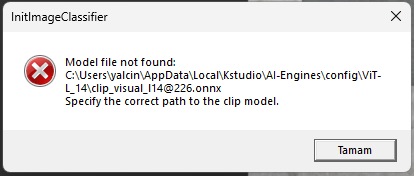
What is causing this error? It keeps giving this error message. Error occurring while program installation?
- June 5, 2026 at 15:08 #47121Oleksandr KramerModeratorPosts: 269Threads: 1411Joined: Aug 2009
The AI classification model file is missing from your system.
This happens when the model package was not downloaded or extracted correctly during installation.Please download the model archive from the link below and extract it to the following folder:
C:\Users\yalcin\AppData\Local\Kstudio\AI-Engines\
https://3d-kstudio.com/kstudio-content/product-info.php?onnx
After extracting, restart classifier ( click on the tray menu → exit, after this run from the Project Manager menu or from Windows start menu)
Kind regards
- June 18, 2026 at 01:24 #47347JOAQUIN PRADOS CORDONParticipantPosts: 26Threads: 42Joined: Mar 2018
I bought the new version of Project Manager and it’s exactly the same as v3. I feel like I paid to have Project Manager in 2027.
- June 18, 2026 at 12:16 #47362Oleksandr KramerModeratorPosts: 269Threads: 1411Joined: Aug 2009
https://3d-kstudio.com/kstudio-blog/the-asset-library-that-organises-itself/
The latest version is much faster at searching for similar images.
(note that the search is already performed among cached files. This takes some time)
- June 18, 2026 at 12:25 #47363JOAQUIN PRADOS CORDONParticipantPosts: 26Threads: 42Joined: Mar 2018
The search for similar objects looks great, is there a way to search for assets based on an image we have on the desktop?
My clients send me briefs, and it would be great to search for assets directly.
- June 18, 2026 at 14:02 #47365Oleksandr KramerModeratorPosts: 269Threads: 1411Joined: Aug 2009
Yes, you can. See at 0:30
- June 18, 2026 at 15:29 #47367JOAQUIN PRADOS CORDONParticipantPosts: 26Threads: 42Joined: Mar 2018
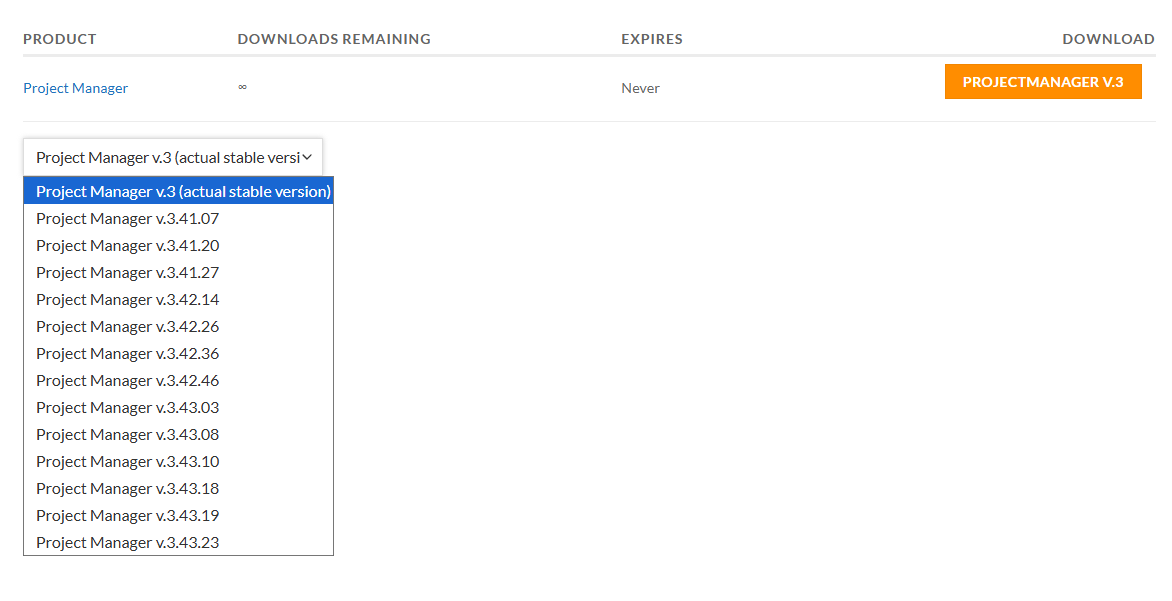
That was it, I downloaded version 3 and selected “uninstall v3,” now it works. Thanks.




You must be logged in to reply to this topic.

