 Translate
- June 17, 2026 at 18:18 #47330
 Gethin HooperParticipantPosts: 19Threads: 28Joined: Jun 2019
What is going on with this software? Caching thumbnails no longer works with V4. We had this resolved in v3!
- June 17, 2026 at 18:22 #47332Oleksandr KramerModeratorPosts: 269Threads: 1411Joined: Aug 2009
I understand the frustration, especially after we sorted the previous two issues — let’s get this one resolved as well.
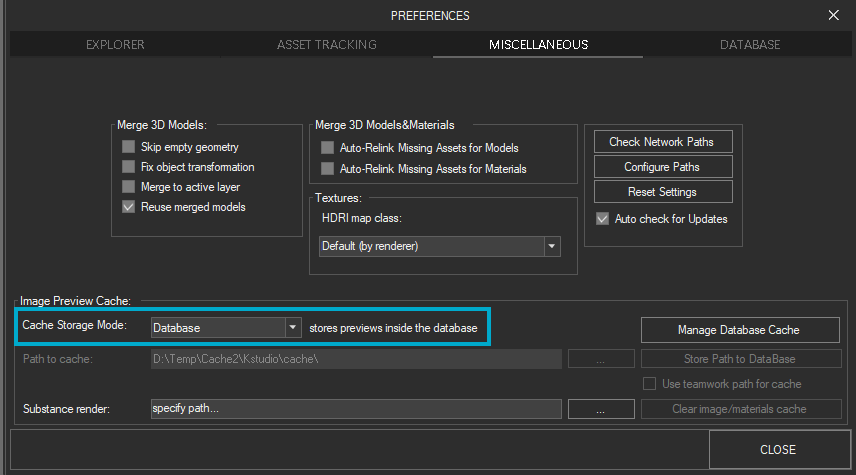
Before we dig in, could you please let me know which Cache Storage Mode you’re using?
As a quick test, try switching the Cache Storage Mode to “Database” or “Disk”.
It would also help to take a closer look at your full configuration.
Could you generate a Support Request?
This lets me review your exact settings.
You’ll find it in the main 3ds Max menu: Project Manager → Create Support Request.Once I have that, we’ll get to the bottom of it.
Kind regards
- June 17, 2026 at 18:28 #47334Oleksandr KramerModeratorPosts: 269Threads: 1411Joined: Aug 2009
Before we dig in, could you tell me how you’re seeing this?
What exactly happens that makes you think the caching isn’t working — are thumbnails not appearing, regenerating every time you open a folder, or something else?
A quick description (or screenshot) of the behaviour will help a lot. - June 17, 2026 at 21:23 #47337Gethin HooperParticipantPosts: 19Threads: 28Joined: Jun 2019
ok. I’m using database for the cache and I’ve cleared the database cache and started again and it seems to be working now..I’m monitoring it. Looks like clearing the cache did the trick..


You must be logged in to reply to this topic.

