 Translate
- June 17, 2026 at 11:56 #47322
 Gethin HooperParticipantPosts: 19Threads: 28Joined: Jun 2019
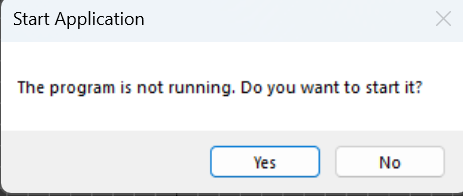
Can’t start classifier. keep getting this message.

Plugin version: 4.00.47
3ds Max version: 2026 - June 17, 2026 at 12:03 #47324Oleksandr KramerModeratorPosts: 269Threads: 1412Joined: Aug 2009
Hi,
Following up — yesterday you mentioned the uninstall didn’t complete successfully.
That’s very likely connected to the AI-Engines problem you’re seeing now.Before I change anything, I’d like to confirm exactly what’s on disk so I fix the right thing.
Could you tell:
After the install, does the AI-Engines folder exist?
%localappdata%\Kstudio\AI-EnginesIf it exists — what’s inside? Is the bin\ folder (DLLs/EXEs) present, or is the folder empty/partial?
Which user profile are the files in?
e.g. C:\Users\<admin>\AppData\Local\… vs. your own user account C:\Users\<you>\AppData\Local\…?Is ApplicationPlugins or the Kstudio folder a junction / symlink to another drive (e.g. redirected to D:)?
This is the most common trigger for the install’s final move step failing silently.Was the “AI Classifier” checkbox enabled on the install page?
Your Windows version, and are you installing from a standard user account or an administrator account?
Things to try (in this order)
Quit the AI Classifier first.
If you see the AI Classifier icon in the system tray (bottom-right, near the clock), right-click it and choose Exit / Quit. A running classifier locks its files, so the installer may skip or fail to replace them.
To be sure it’s fully closed, open Task Manager (Ctrl+Shift+Esc → Details tab) and end these if still listed:Kstudio.AssetAI.Tray.exe
Kstudio.AssetAI.exe
Remove the leftover AI-Engines folder, then reinstall.
Delete this folder and run the installer again:
%localappdata%\Kstudio\AI-EnginesCheck the Windows Event Viewer.
Windows Logs → Application. Look for errors around the install time from Kstudio.Manager.Install or any .NET runtime exceptions.Check the installer log (most useful).
Open the most recent file here and search for AI-Engines, MoveDir, and robocopy:
%temp%\Setup Log*.txt
A line like robocopy FAILED code=N (or failed to launch robocopy) tells exactly where it stopped.
If you can, attach that log file — it usually pinpoints the cause immediately.Thanks — once I know which profile the files land in (and whether a junction is involved), the fix is straightforward.
- June 17, 2026 at 12:35 #47326Oleksandr KramerModeratorPosts: 269Threads: 1412Joined: Aug 2009
This bug is fixed in version 4.00.49
You can download the latest version from the dashboard.
Auto-updater will be triggered in a few days if there’s no critical issue found.
Thanks for your feedback. - June 17, 2026 at 13:29 #47328Gethin HooperParticipantPosts: 19Threads: 28Joined: Jun 2019
ok seems to be working now with latest version. I’ll report back.


You must be logged in to reply to this topic.

