 Translate
- February 1, 2026 at 19:16 #46487
 jamjamParticipantPosts: 2Threads: 3Joined: Sep 2024::
- Assign to object
- Replace material in slot 5 (slot number would be the ID where it was dropped)
Hey,
a feature I would love to see in project manager: When dragging and droping a material it replaces only the submaterial. This would be very handy to quickly assign new materials to assets without the need to open material editor. A little bit trickier, but also doable: It should also work with proxies like VrayProxy.
This feature would make our workflow so much faster. I thought about creating my own tool for this and hacked together a Prove-Of-Concept (mainly for the VrayProxy part), but thought it would be great to have directly in project manager :)
To make it consistend and user-friendly it could also be a pop-up:
I would love to hear your opinion about it and if you would consider it.
Prove-of-Concept (for getting MaterialIDs) : https://pastebin.com/qfJiYTP9
- February 1, 2026 at 19:16 #46489Oleksandr KramerModeratorPosts: 269Threads: 1411Joined: Aug 2009
Hey,
Thanks for the detailed feature suggestion!
I really appreciate you taking the time to code a proof-of-concept – that shows genuine interest in improving the workflow.Great news: this functionality already exists in Project Manager and has been available for over 10 years! 😊
You can assign materials to specific Material IDs using several methods:
Method 1: Direct viewport drag-and-drop Simply drag a material from PM directly onto an object in the viewport. PM will automatically detect and assign it to the appropriate slot. This works with regular objects and proxies (VRay/Corona).
Method 2: Face selection assignment Select the faces that need the material, then assign directly from PM – either by dragging or using the Assign button. Here’s a video demonstration:
Method 3: Multi-material slot replacement You can drag a material directly onto a specific slot in a Multi/Sub-Object material within the Material Editor to replace just that sub-material.
All these methods support both standard geometry and proxy objects, so you should be able to achieve exactly the workflow you described without needing a custom tool.
Give it a try and let me know if you encounter any issues or if there’s something specific that doesn’t work as expected!
Cheers
- February 2, 2026 at 10:58 #46496jamjamParticipantPosts: 2Threads: 3Joined: Sep 2024
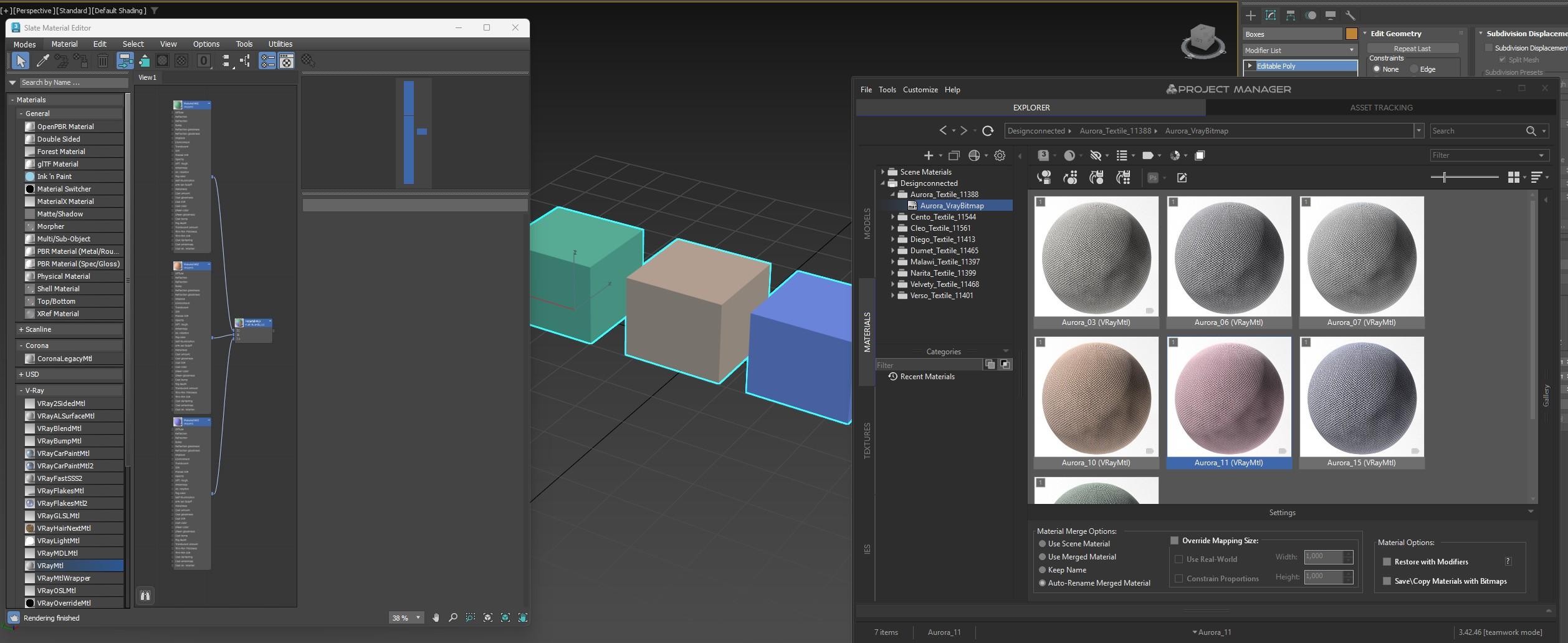
- One object with three elements.
- Each element has a different MaterialID.
- The object has a Multi-SubMaterial with 3 Materials.
Hey Oleksandr,
Thanks for your reply!
Happy to hear this was implemented in project manager already, but unfortunatly it doesn´t work for me.
Not sure if it´s something on my side or we are just talking about different things.
Method 1 would be the workflow I proposed.
To clearify here is an example:

When I drag and drop a material from project manager onto the blue cube (MatID=3), it assigns this material to the whole object.
Instead it should only replace the Material in the Multi-SubMaterial Slot 3 with the new one.
From your discription it sounds like this should work.
Cheers
- February 2, 2026 at 14:32 #46498Oleksandr KramerModeratorPosts: 269Threads: 1411Joined: Aug 2009
Hey,
Thanks for the clarification – now I understand exactly what you mean!
You’re right, the current behaviour works differently: when you drag a material onto an object, PM assigns it to the entire object (replacing the whole Multi/Sub-Object material).
What you’re proposing is more advanced: PM would detect which Material ID you’re hovering over and automatically replace only that specific slot in the Multi/Sub-Object material, leaving other slots untouched.
While I can see how this could speed up certain workflows, I have some concerns about implementing it as default behaviour:
1. Ambiguous behaviour
The same drag-and-drop gesture would produce different results depending on precisely where you drop the material on the object. This could make the interface less predictable – sometimes it replaces the whole material, sometimes just one slot.2. Existing workflow disruption
Currently, drag-and-drop onto an object has clear, predictable behaviour. Changing this could confuse existing users who rely on the current functionality.3. Alternative solution already exists
Method 3 (dragging directly onto a slot in the Material Editor) does exactly what you need with complete clarity – you can see exactly which slot you’re replacing, and there’s no ambiguity.However, here’s the good news:
You can implement this exact workflow yourself using Project Manager’s MaxScript API!
The API allows you to get the currently selected material from PM.
Check out the API documentation and examples here: https://3d-kstudio.com/faq-cat/maxscript-api/The page includes an example of how to get the selected material from PM, which is exactly what you’d need for this workflow.
Once you’ve written your script, you can add it directly to PM’s toolbar for quick access:
This way, you get precisely the behaviour you want without affecting other users’ workflows, and you have complete control over how it works.
If you run into any issues while implementing it, feel free to reach out!
Cheers
- February 2, 2026 at 18:49 #46502jamjamParticipantPosts: 2Threads: 3Joined: Sep 2024
Hey Oleksandr,
Totally understandable. It was meant as an alternative approach, but I also acknowledge that even as an alternative it could end up being quite complex and confusing.
Thanks for the API suggestion. I didn’t know Project Manager had this. Amazing tool, really!
Best of both worlds! I don’t have to manage duplicated libraries and can implement it exactly to fit my needs.
Appreciate the help and the quick replies 🙂
Cheers
- April 20, 2026 at 11:54 #46782jamjamParticipantPosts: 2Threads: 3Joined: Sep 2024
Hey Oleksandr,
I finally had time to implement this, and it is working well so far.
There is one final thing I haven’t managed to get working: using drag-and-drop directly from Project Manager.
I’m not entirely sure if this is something on my side or if the API simply doesn’t provide this functionality. I can get the postFileMerge hook to work for .max files, but not for materials.
Is there a way to intercept a material drop from Project Manager, so I can implement my own assignment function?
Any help or pointers in the right direction would be much appreciated.
Thanks again and all the best,
Gerald - April 22, 2026 at 08:09 #46793Oleksandr KramerModeratorPosts: 269Threads: 1411Joined: Aug 2009
Hey Gerald,
Great to hear you’ve made progress with the implementation!
Unfortunately, there’s currently no hook available for intercepting material drag-and-drop events from Project Manager.
However, this is a really valuable suggestion – having a material assignment hook would open up a lot of workflow customization possibilities. I’ve added this to our roadmap for future consideration.
In the meantime, you might be able to work around this limitation by adding a custom button to PM’s toolbar that applies the selected material using your logic
Not as seamless as drag-and-drop interception, but it should still give you the workflow benefits you’re after.
Thanks for the feedback and for sharing your experience implementing this – it’s exactly this kind of input that helps us improve the API!
Kind regards


You must be logged in to reply to this topic.

