 Translate
- August 23, 2025 at 01:28 #45477
 Rossen MitovParticipantPosts: 10Threads: 11Joined: Jan 2015
Hello,
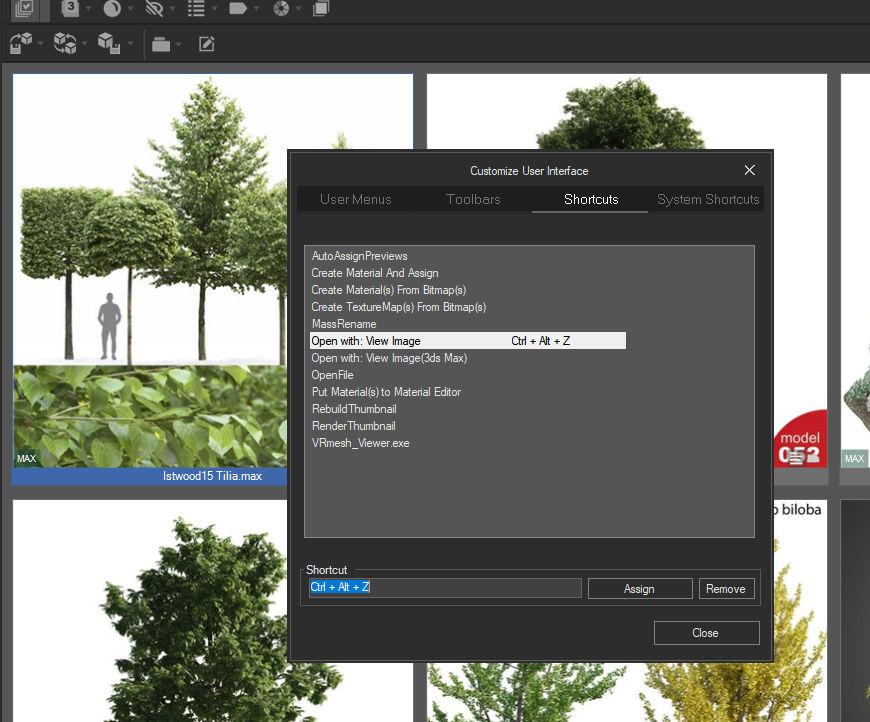
My “View Image” shortcut no longer workS in the new version of Project Manager. It did work a few versions back. I can no longer open the preview image with the custom shortcut from the screenshot below. Thanks in advance!

Plugin version: 3.40.34
3ds Max version: 3ds Max 2023.3.3
Renderer: V-Ray 7 Update 3 - September 6, 2025 at 15:07 #45556Oleksandr KramerModeratorPosts: 269Threads: 1411Joined: Aug 2009
This issue is fixed in version 3.41.00
You can download the latest version from the dashboard.
Auto-updater will be triggered in a few days if there’s no critical issue found.
Thanks for your feedback. - September 14, 2025 at 00:12 #45599Rossen MitovParticipantPosts: 10Threads: 11Joined: Jan 2015
Hello. Thanks for looking into this issue. I’ve just installed version 3.41.07, but the shortcut for “Open with: View Image” still doesn’t work for me.
- September 14, 2025 at 02:06 #45600Oleksandr KramerModeratorPosts: 269Threads: 1411Joined: Aug 2009
Delete file “UserInterface.xml”
Close Project Manager using menu File ⇒ Close
Open Project Manager’s directory using main 3ds Max menu “Project Manager”⇒ Open plugin’s folder
Delete file “/Settings/UserInterface.xml”
Open Project Manager and reassign shortcut (you will see this item as “View Image”) - September 22, 2025 at 23:08 #45705Rossen MitovParticipantPosts: 10Threads: 11Joined: Jan 2015
This worked! Thanks!!


You must be logged in to reply to this topic.

