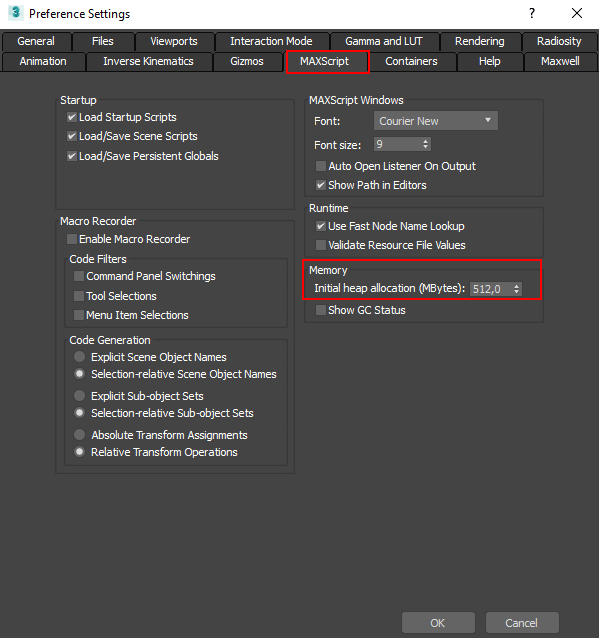
Issue: When running a script you repeatedly receive a MAXScript Garbage Collection error. Solution: Open the “Preferences” dialog and change a value for “Initial heap allocation” to 256 or 512. Restart the 3Ds Max. See another solution here: 3ds max Maxscript Heap Memory Allocation
FAQ: Frequently Asked Questions - Page 6
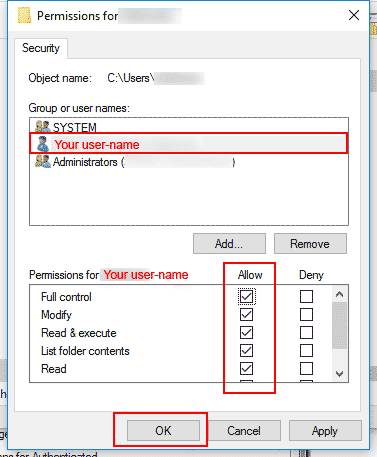
Issue: When you start a plugin/script or run an installer, an error message references a Temp/User account folder on your machine. Applicable to any script/plugin. Additional information: By default user must have permissions to read/write to directory %USERPROFILE% (“C:\Users\USERNAME”) but sometime this permission can be changed. As a result, the user receives an errors when […]
The “Project Manager” unlike “Materials Manager” supports to 3d models, bitmaps and IES files. The “Project Manager” contain the tool “Batch Render&Relink”. The “Project Manager” contain all abilities of the “FilePathFinder PRO” See Comparison for Kstudio asset management tools on this page.
The “Project Manager” unlike “Models Manager” supports to materials, bitmaps and ies-files. The “Project Manager” contain the tool “Batch Render&Relink”. The “Project Manager” contain all abilities of the “FilePathFinder PRO” See Comparison for Kstudio asset management tools on this page.
Use the tool “Export/Import Settings” for exporting the settings before reinstalling the 3ds Max or Windows. Or for transferring them to another computer. https://youtu.be/ZfxNnBef__QVideo can’t be loaded because JavaScript is disabled: Backup and Restore the Settings for Kstudio's Asset Manager (https://youtu.be/ZfxNnBef__Q) Before restoring settings you should close the plugin using the menu “File” => “Exit” […]
Translate