 Translate
- October 9, 2024 at 16:49 #42815
 Keith LeeParticipantPosts: 5Threads: 9Joined: Nov 2022
Hi,
I do not do this very often, but I swear every time I need to do it, I cannot figure out the process… to me it’s not very intuitive. I need to search and replace a folder of scene files that point to a xref material library. I want to change the name of the library using the search and replace function. The problem is, I cannot figure out how to tell Project Manager to process the folder of files. When I turn on Search&Relink and Find&Replace, and fill out the needed fields, it does not work. And if I have an empty untitled scene, it wants me to save it first. What is wrong here?
Plugin version: 3.35.85
3ds Max version: 2024.2
Renderer: vray - October 9, 2024 at 16:50 #42817Oleksandr KramerModeratorPosts: 269Threads: 1411Joined: Aug 2009
Hi
As I understand, you want to rename a material library file? - October 9, 2024 at 17:39 #42819Keith LeeParticipantPosts: 5Threads: 9Joined: Nov 2022
Hi,
Not really. It’s really an xref object file that has xref materials within it. For example, the xref object file is named “materials.max”, and I want to rename all references to it in a folder containing 3ds max files to “materials-2024.max”.
- October 9, 2024 at 18:39 #42821Oleksandr KramerModeratorPosts: 269Threads: 1411Joined: Aug 2009
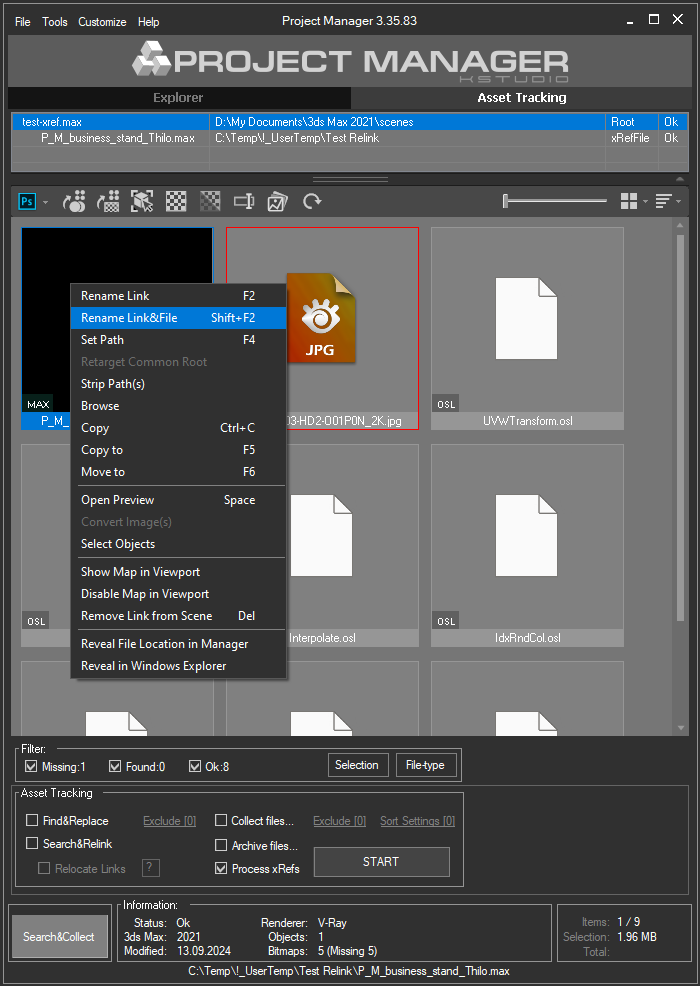
- Open a scene with xRef-files
- Select xRef file and Rename it using the menu-item “Rename Link&File”
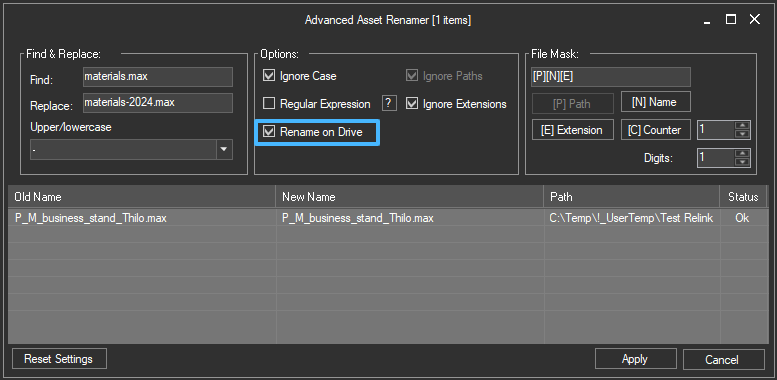
- If the scene contains a few xRef files, you can also use Advanced Asset Rename tool
- Select xRef files
- Open Advanced Asset Rename tool using F2 or from menu Tools => Mass-Rename Tool
- Check Rename on Drive
- Print “materials.max” to Find field and “materials-2024.max” to Replace field
- Press Apply button
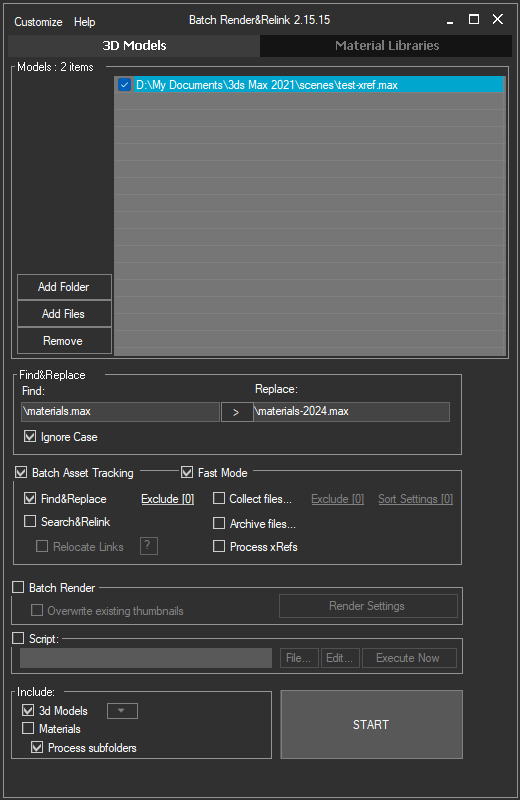
- Add files that contain xRef scenes
- Turn on the option “Find&Replace”
- Print “\materials.max” to Find field and “\materials-2024.max” to Replace field (I recommend to use slash before filename)
- Press START button
- Please note that this function doesn`t rename xRef files on drive, and you should do this manually
You can do this on from the next methods
1) Just rename xRef files
2) Rename xRef files using Mass-Rename Tool
3) Rename using Batch Relink tool (shipped with Project Manager)
[Resolved]
- October 9, 2024 at 22:10 #42822Keith LeeParticipantPosts: 5Threads: 9Joined: Nov 2022
Thank you! Bookmarking this one.


You must be logged in to reply to this topic.

