Translate
-
×
 Project Manager 1 × $60.00
 Project Manager
Question
Can I merge 3D models stored in ZIP, RAR or 7z archives into 3ds Max without unpacking the archives first?
Answer
Yes. In Project Manager an archive behaves like an ordinary folder: open it, look through what’s inside and merge any file straight into your scene.
Or skip that step and drag the archive itself into the viewport.
There is nothing to unpack by hand — Project Manager extracts the files for you.
Dragging the archive itself.
Project Manager extracts the whole archive and merges the first 3D model it finds, looking at the top level of the archive first and then inside its subfolders.
That is exactly what you want when an archive contains one model. If it contains several, open the archive like a folder and drag the file you need.
On the Textures and IES tabs, all textures or IES files from the archive are added. Up to 20 files are added at a time.
Where the files are extracted
Set it in Preferences → Explorer → Merge from Archive → Path to Extract:
<FilePath>\<FileName>(default) — a folder named after the archive, next to the archive.<FilePath>\Archives\<FileName>— the same, but inside an Archives subfolder next to the archive.<Temp>— a temporary folder. Only the files you merge are extracted, and they are always overwritten. In this mode you can merge 3D models only.- Your own path — type any folder with a drive letter, for example
D:\Extracted\<FileName>. 3ds Max project paths such as<ProjectFolder>\Archives\<FileName>work too. Keep<FileName>in the path so that every archive gets its own folder.
With any path other than <Temp>, Project Manager extracts everything next to the model in the archive, so its textures come along.
When the file already exists
Choose what happens in On Exists: Skip if exists, Overwrite if newer, Always overwrite or Ask user.
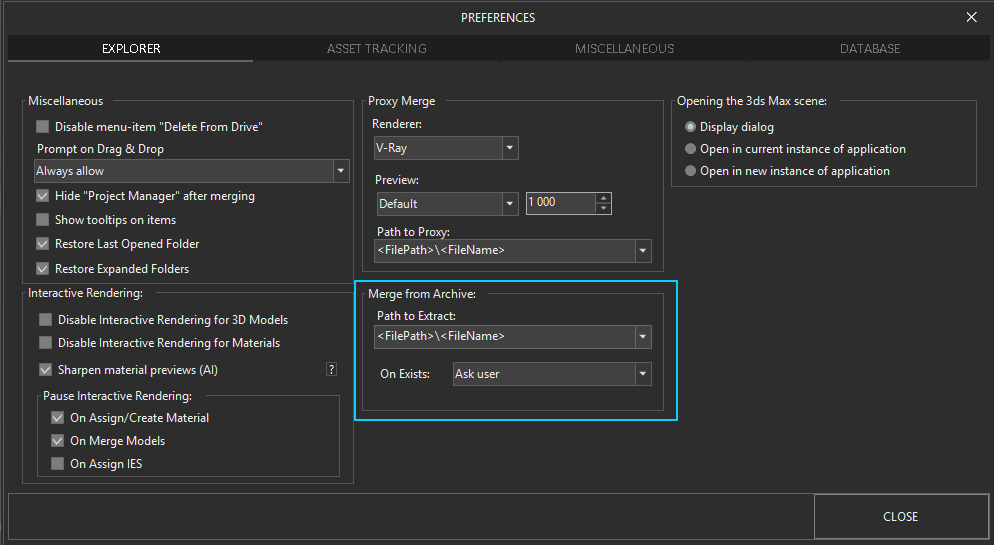
Choose where files from archives are extracted and what happens when a file already exists — Preferences → Explorer → Merge from Archive.
$60.00Add to Cart