Translate
-
×
 Project Manager 1 × $60.00
 Project Manager
Question
My 3D models are stored in RAR archives with JPG or PNG preview images next to them. Can Project Manager’s AI classify and search these models using those images?
Answer
Previews next to RAR files. Yes, this works. Project Manager can classify and search archived models so they’re classified from those previews. Add .rar (and .zip and .7z, if you use them) to the list of model file types: open the “Filter by file-type” dropdown and choose Edit.
The archives are then shown in the Models tab and treated like any other model, so they’re classified from the preview images next to them and become searchable with AI Text Search and Find Similar.
Note: this works at the archive level, not for the individual files inside. An archive is treated as a single item, with one preview and one set of categories. That is exactly what you want when each archive contains one model.
If an archive holds a whole collection, all the models in it share one preview and one classification.
You can still open any archive like a folder and merge the files inside it (see P.S. below).
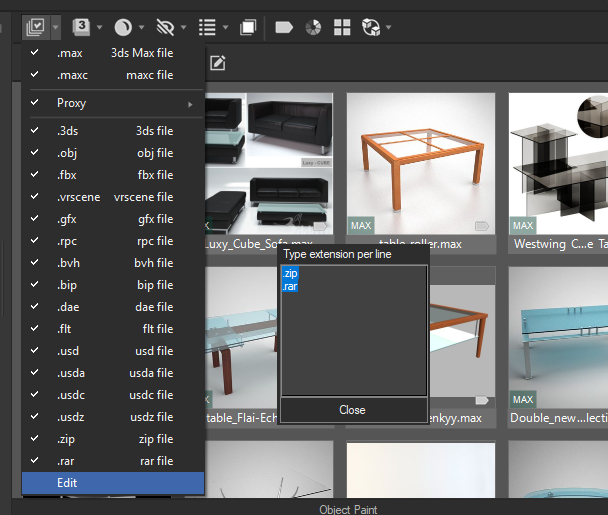
Include RAR and ZIP archives in the Models tab using the file-type filter. With assigned preview images, archived models can be classified and found using AI Text Search and Find Similar
P.S. You can also browse inside archives just like regular folders, and merge files from them straight into 3ds Max, without unpacking them yourself first.
You can even drag an archive file itself into the 3ds Max viewport.
$60.00Add to Cart