
Stop censorship Рейтинг@Mail.ru
Join the forum discussion on this post

Project Manager v.1.52.21

  • New features:
    • Adds ability to use custom studio for rendering the 3d models and materials.
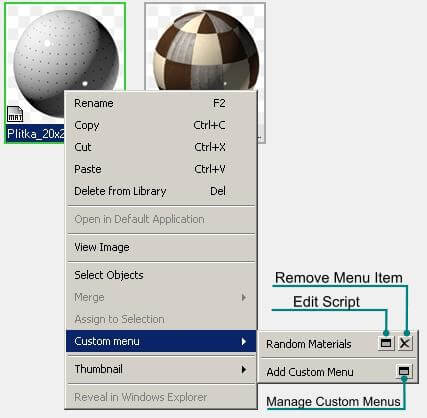
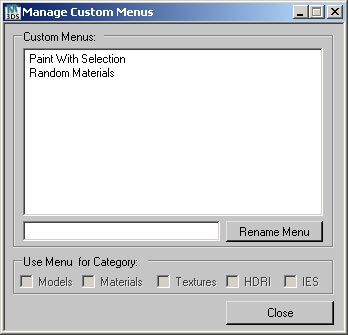
    • Adds ability to add custom commands to menu.
  • Modified features:
    • Some changes for Batch Render&Relink tool.
    • Now the size of TextureMaps in RealSize mode shows the correct values.
  • Bug fixes:
    • Fixes a issue with correct placing objects on the floor in the 3dsmax 2012.
    • Fixes a issue with flipping the thumbnails for max and video files.
    • Fixes a bug with spinners on some computers.

    Note: This version include HELP – file for “Batch Render&Relink” utility.


    In this version you can add custom commands to menu.
    (Writing a custom menu requires knowledge of the maxScript language.)
    Before adding a new menu item, create a script that will execute with menu item.
    See description below.
    Also see the script “Paint With Selection.ms” and “Random Materials.ms” in the folder “TrackScripts\ProjectManager\presets”

    Customize Project Manager Menu

    Customize Project Manager Menu


    SelectedStruct = PMStructureInfo()
    SelectedStruct.RemoveSelection() – Remove Selected Items from List
    SelectedStruct.SelectedItems()  –Get List of Selected Items
    –Return Array of Selected Items
    Example:
    #(#Multi/Sub-Object:Floor(VRayMtl:POL-parket, VRayMtl:POL-parket_Dark,
        VRayMtl:POL-plitka, VRayMtl:POTOLOK, VRayMtl:POL-plitka-3, VRayMtl:DEREVO-dveri,
        VRayMtl:POL-plitka-2, VRayMtl:plitka3, VRayMtl:Kover), Floor_Smania_Light:VRayMtl)

    SelectedStruct.SelectedItems includeMaps:true  includeThumbs:true
    includeMaps:true Get Array of used maps (Available for Materials and 3ds Max files(max file must be saved in 3ds max version 2010 or above))
    includeThumbs:true Get Array of thumbnails for selected items

    SelectedStruct.SelectedThumbs –Array of thumbnails for selected items
    Example:
    #(“\\SUNNY\3dsmax2009\materiallibraries\Kstudio_Materials\Floor\Floor.jpg”,
        “\\SUNNY\3dsmax2009\materiallibraries\Kstudio_Materials\Floor\Floor_Smania_Light.jpg”)

    SelectedStruct.SelectedMaps –Array of used maps
    #(
        –Array of used Maps for 1st Material
        #(“D:\3dsmax2009\materiallibraries\Kstudio_Materials\Maps\wood_floor.jpg”,
        “D:\3dsmax2009\materiallibraries\Kstudio_Materials\Maps\107.JPG”,
        “D:\3dsmax2009\materiallibraries\Kstudio_Materials\Maps\oak1.tga”,
        “D:\3dsmax2009\materiallibraries\Kstudio_Materials\Maps\SA147.tif”,
        “D:\3dsmax2009\materiallibraries\Kstudio_Materials\Maps\Tile1.JPG”,
        “D:\3dsmax2009\materiallibraries\Kstudio_Materials\Maps\SNA83.jpg”),

        –Array of used Maps for 2nd Material
        #(“D:\3dsmax2009\materiallibraries\Kstudio_Materials\Maps\wood-39_d.jpg”,
            “D:\3dsmax2009\materiallibraries\Kstudio_Materials\Maps\wood-39_r.jpg”,
            “D:\3dsmax2009\materiallibraries\Kstudio_Materials\Maps\wood-39_b.jpg”)
        )

    Get the Array of used Maps for 1st Material (#Multi/Sub-Object:Floor)
    SelectedStruct.SelectedMaps[1]

    Related articles:


    Speak Your Mind

    Tell us what you're thinking.


    created by dimoning.ru