Translate
Tagged: folder preview
- February 2, 2011 at 02:58 #9597
- Is there a way to add multiple folders at once?!
- How to switch between high/low resolution version of the 3ds max scene
- How to relink and collect maps for 3D Models to their corresponding local maps folder?
- How to Archive 3Ds Max files and Material Libraries with Assets in the Batch mode
- Is it possible to display all content of the directory?
- Is it possible to customize file types for displaying/hide them by default?
- How I can Add a New Material to the Material Library?
- Is it possible to Replace Materials with Project Manager?
- Does it possible to export the list of the missing maps to file?
- How to find what material/object contains a missing texture map?
- Where find the option to preview images in the 3rd version?
- How I can merge an animated model with keeping a hierarchy?
- How to setup studio with reference model
- How to create a Bitmap instead of Material when dragging to Material Editor
- How I can Transfer/Backup/Restore the Settings?
- Upgrade Database to 3rd version of Project Manager
- What is the difference between the “Models Manager” & “Project Manager”
- What is the difference between the “Materials Manager” & “Project Manager”
- Which 3d programs and renderers are supported?
Q. Is there a way to add multiple folders at once?!
A.
It is simple!
Select multiple folders in Windows Explorer and drag them on “Project Manager” treeview panel.Q. How to switch between high/low resolution version of the 3ds max scene
A.
Using Project Manager you can change your models and textures to lower resolution versions.
For example, you can use the next scheme:
Place low-poly models and textures to a directory called “low-poly” and hi-poly to another directory – “hi-poly”.
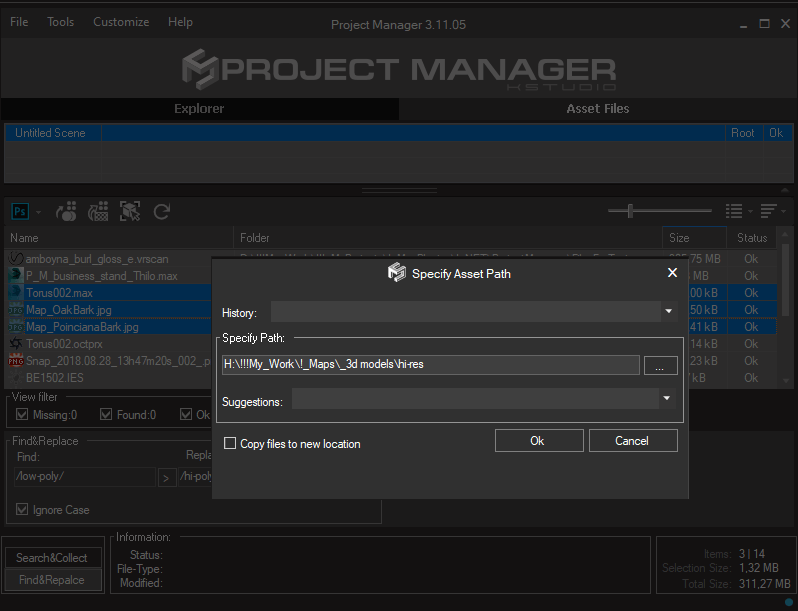
Find&Replace Links
For switching between high-res/low assets use the function “Find-Replace” what present in the Project Manage functionality.
Just open Project Manager and type “/low-poly/” to the field “Find” and “/hi-poly/” to the field “Replace”. Press the Apply button.
This will replace all links to scene assets to high-res.

Also, you can relink only selected assets – just select desired links in the list and choose in the context-menu the menu-item “Set path”
Specify the path to high-res/low assets.
Of course, models should be placed as xRef or Proxy.

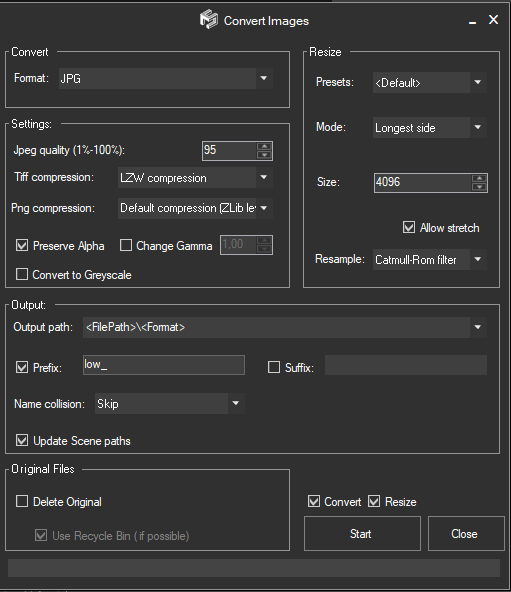
Convert & Resize Images
Also Project Manager from version 3.11.45 supports to resize image files. You can use this functionality to resize your images to lower resolution.

Replace 3D Models
For replacing non-xRef to another (high/low) use the Replace 3D Model functionality.
Please see this video.
Q. How to relink and collect maps for 3D Models to their corresponding local maps folder?
A.

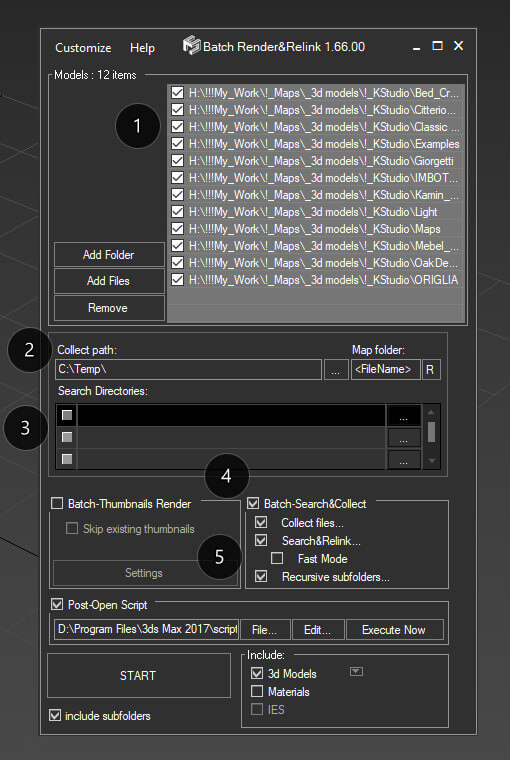
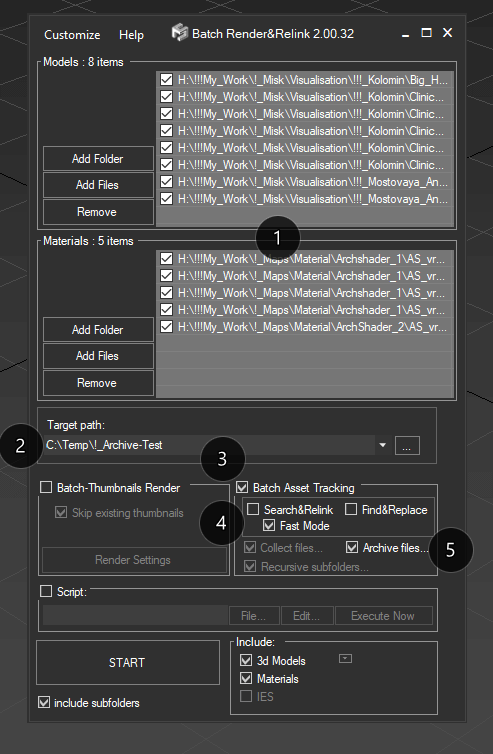
Just use “Batch Render&Relink” tool for this. Batch Render&Relink shipped with Project Manager.
Turn on the option “Batch-Search&Collect“, and “Collect files…” if you want to collect assets. (4)
Use “Fast mode” for relinking maps in 3ds max files without opening each file. Use this option if your scenes saved in 3ds max 2010 or above and used plugins support this capability. For example, Maxwell renderer doesn’t allow relink assets without opening a 3ds max scene. (5)
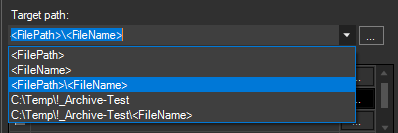
For collecting maps to one directory with model set the “Collect path” to <FilePath> and “Map Folder” to <FileName>. Also, you can specify an absolute path to the directory and map folder like “C:\Models” and “Maps”. (2)
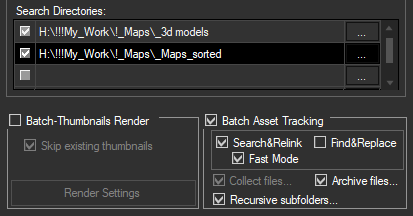
Specify directories with models in the list at top (1) and set directories for searching assets in the list “Search Directories: ” (3)
See also related articles on 3d-kstudio:
https://3d-kstudio.com/tutorials/manage-asset-files-project-manager/
And videos:
Q. How to Archive 3Ds Max files and Material Libraries with Assets in the Batch mode
A.
Batch Archiving
Project Manager since version 3.17.26 allows you to batch archive 3ds Max files and Material Libraries with all assets.
This is an extremely useful feature for backing up your projects and models, transferring data to another location, or rendering on a render-farm, such as RebusFarm.
Just run the “Batch Render&Relink*”, add a folder (folders) or some 3ds Max files or a material library, specify the folder where you want the data stored, and shortly you will have all the archives ready.
*Applicable to the 3ds Max utility “Batch Render&Relink” and Windows application “Batch Relink”
The utility “Batch Render&Relink” which shipped with Project Manager and FilePathFinder PRO.
Also, you can acquire “Batch Render&Relink” as a separate tool- Add files/directories for archiving 3d files with assets
- Specify the path to store archives (supports full and relative paths)
- Turn on the Batch Asset Tracking option
- Turn on the Search&Relink option (optionally)
- Turn on the Fast Mode (recommended, optionally)
- Run the process by pressing the START button

The archives will, of course, contain the source files for the scenes and materials. When opening a scene from the archive on another computer, all links will remain valid, because the links during archiving are made using relative paths.
Before archiving, you can use Search&Relink option to search for missing links, if necessary.

For the target folder, you can specify both full and relative paths. For the latter, use <FilePath> and <FileName> masks.

PS. Previously, this feature was only available with the Project Manager API
With Project Manager, you can write scripts expanding the features of the plugin in a way that you specifically need for your tasks.
This makes Project Manager incredibly flexible and you can always, if necessary, tailor it to your everyday needs or even to the needs of a particular project.Q. Is it possible to display all content of the directory?
A.
Of course!
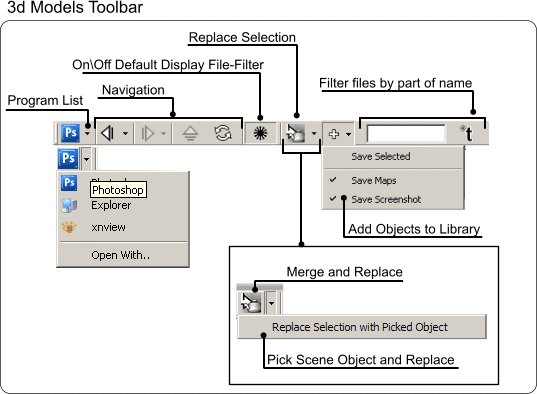
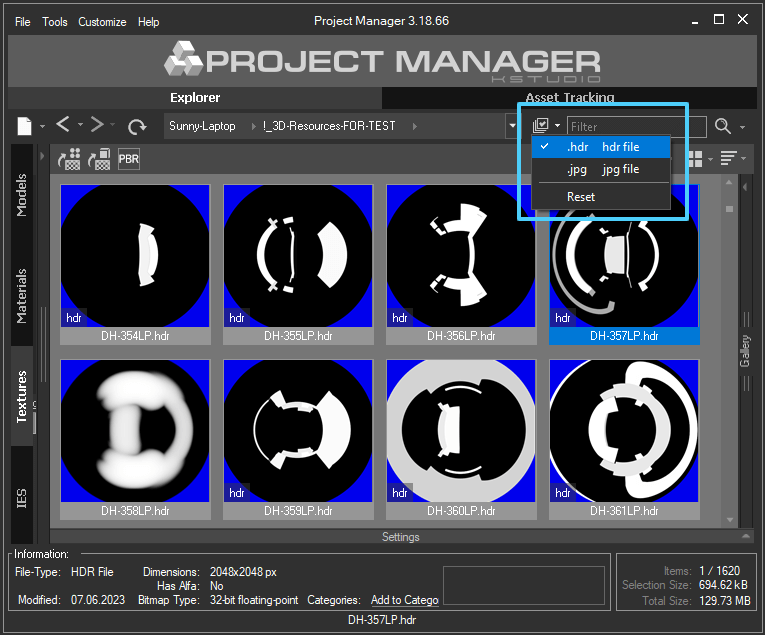
Use the filter button on the panel.

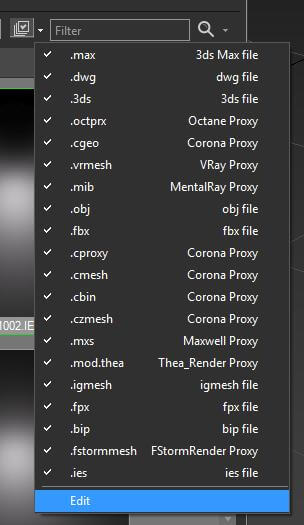
Q. Is it possible to customize file types for displaying/hide them by default?
A.
You can hide file types from the list on the “Models” and “Textures” tabs.
The way this option works varies slightly on these tabs.On the Models tab, this option applies to all folders. Also on the Models tab, you can add new file types that will be displayed in the default list. To disable any filters for models, click on the button.
On the Textures tab, you can only turn on/off file types from the list, which only affects the active folder. This filter is saved and will be applied the next time as well.
Q. How I can Add a New Material to the Material Library?
A.
You can save material to the Material Library just by dragging the material from Standart or Slate Material Editor
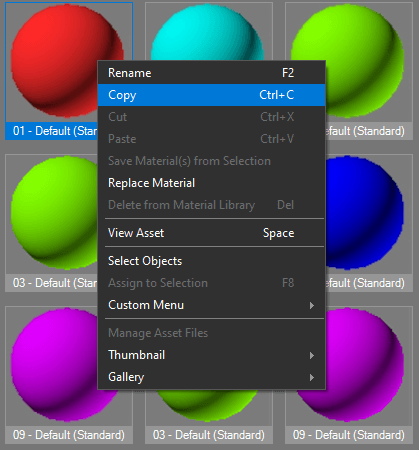
directly to the Material Library that opened in the Project Manager:Or save material to the Material Library using Copy/Paste method:

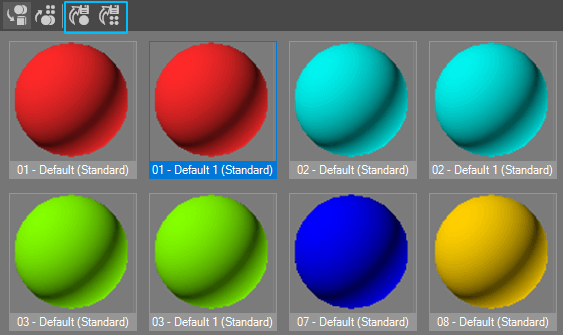
Also you can use the buttons on the panel

Q. Is it possible to Replace Materials with Project Manager?
A.
Choose a material with which you wish to replace a scene material.
Copy it (CTRL + C) or from the context menu item “Copy”.
Go to the catalog “Scene Materials” and select the material you want to replace.
(To quickly find the material in the scene, you can use a >>filter)
Choose in the context menu the item “Replace Material”.Q. Does it possible to export the list of the missing maps to file?
A.
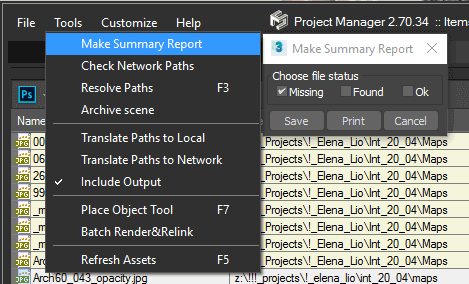
You can export the list of the missing maps to file using the menu-item “Make Summary Report” from menu “Tools”.

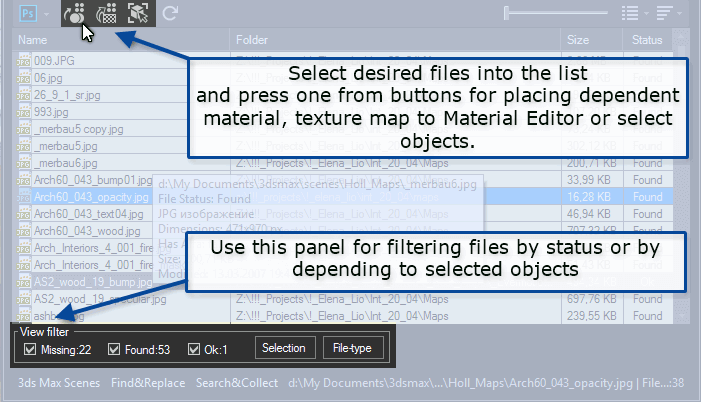
Q. How to find what material/object contains a missing texture map?
A.
It’s simple using Project Manager or FilePathFinder.
Select desired files into the list and press one from buttons on top panel for placing dependent material, texture map to Material Editor or select objects.
Using panel on bottom you can filter files by status or by depending to selected objects.
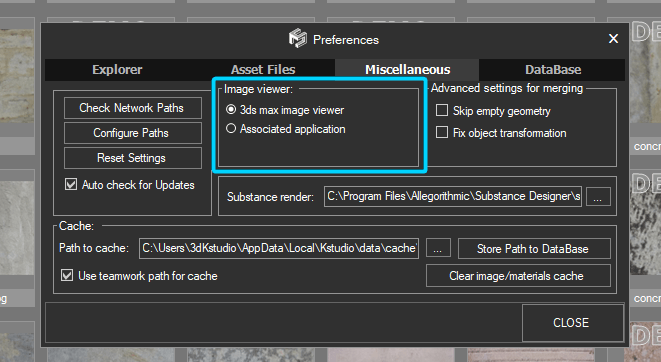
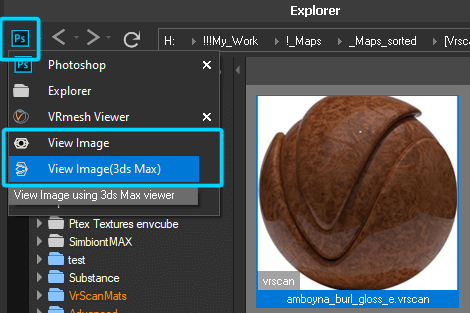
Q. Where find the option to preview images in the 3rd version?
A.
The option for choosing the default viewer for images in the associated application is moved to Project Manager menu above the address bar.

>>>

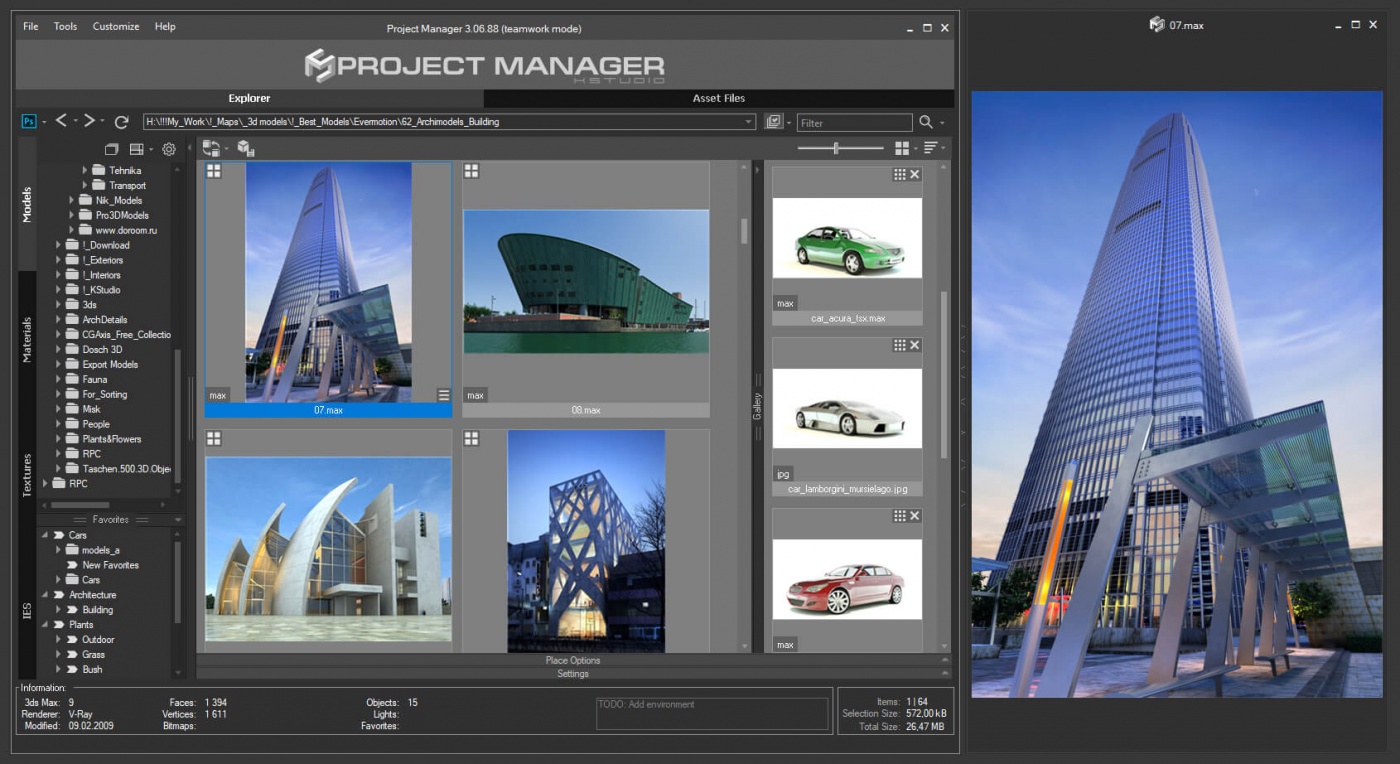
Project Manager viewport
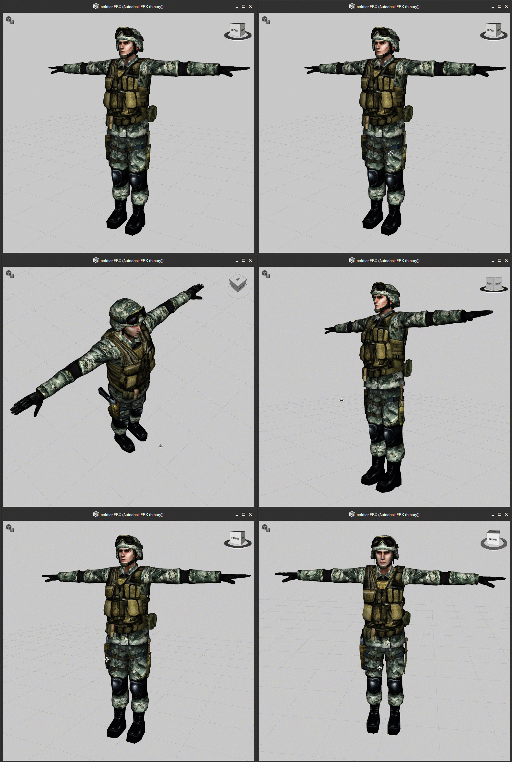
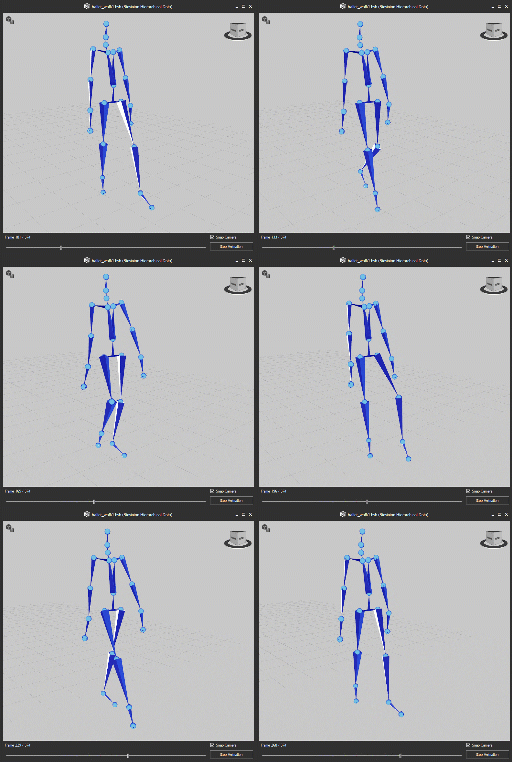
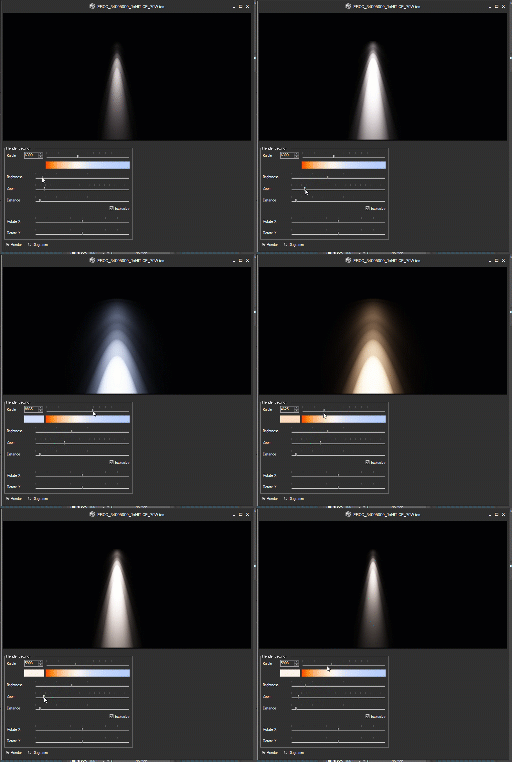
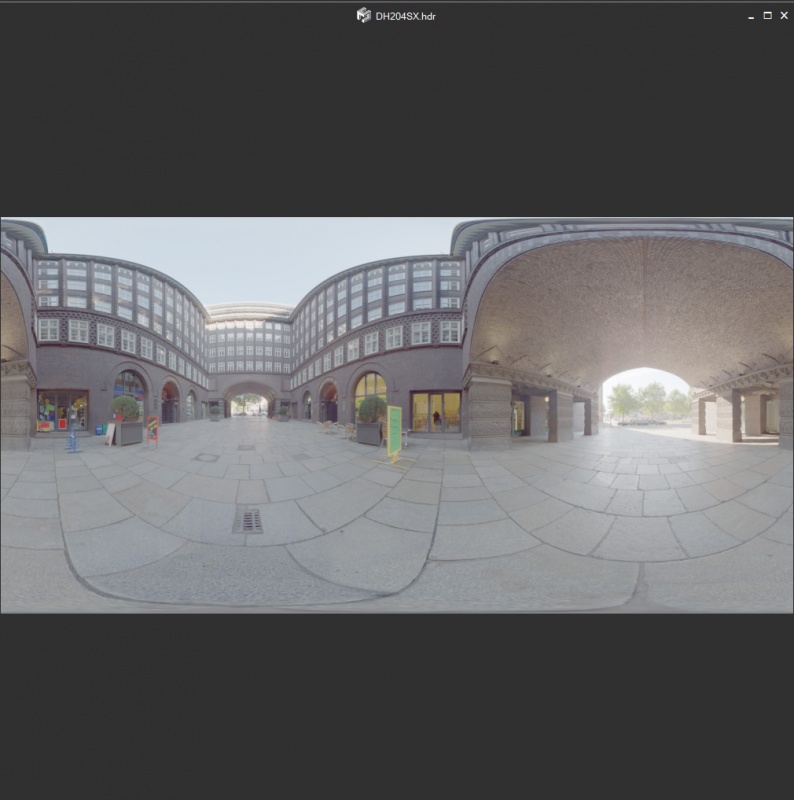
Also 3rd version allows viewing any type of asset in a separate window. Whether is it an image, an HDRI file, a 3D FBX file, 3DS, BVH or IES file – any of these files you can view in high resolution in a separate window. The file in the window is updated when you change the file selection in the list. You can also save the selected view for a 3D file into the file’s gallery.
To opening a file in a separate window, find a related option on the menu or use the SPACEBAR key.


Applicable to:
Q. How I can merge an animated model with keeping a hierarchy?
A.
There are a few options to keep a hierarchy for an animated model:
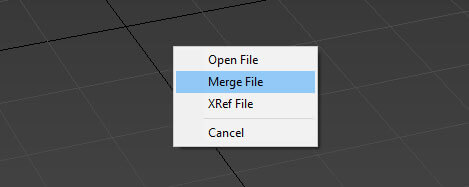
- Merge using double-click on 3D file
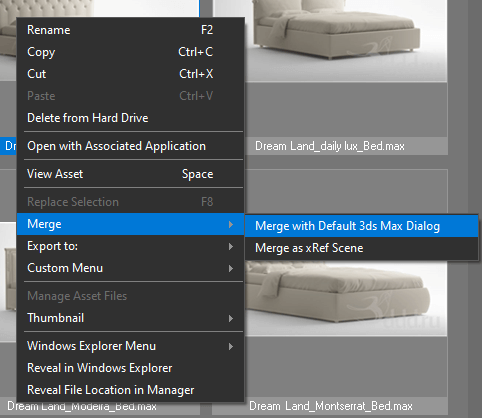
- Merge using the menu-item “Merge with default 3Ds Max Dialog” from the right-click menu “Merge”

Hold the SHIFT key when dragging a model.

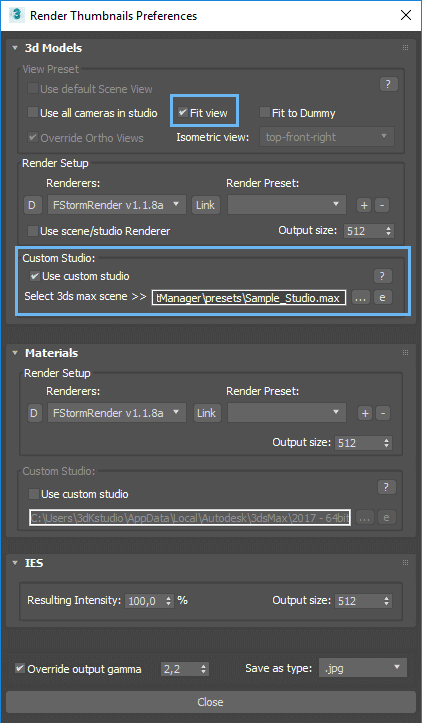
Q. How to setup studio with reference model
A.
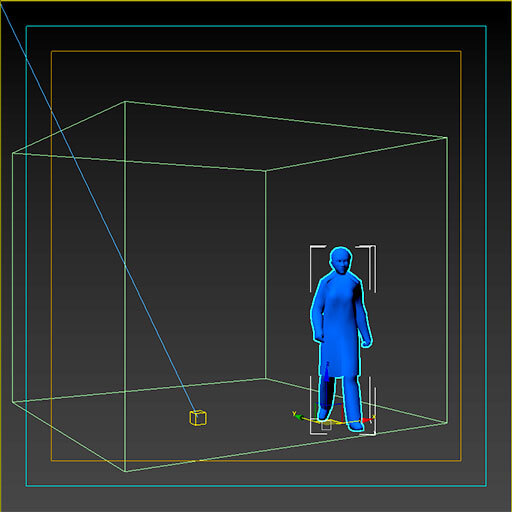
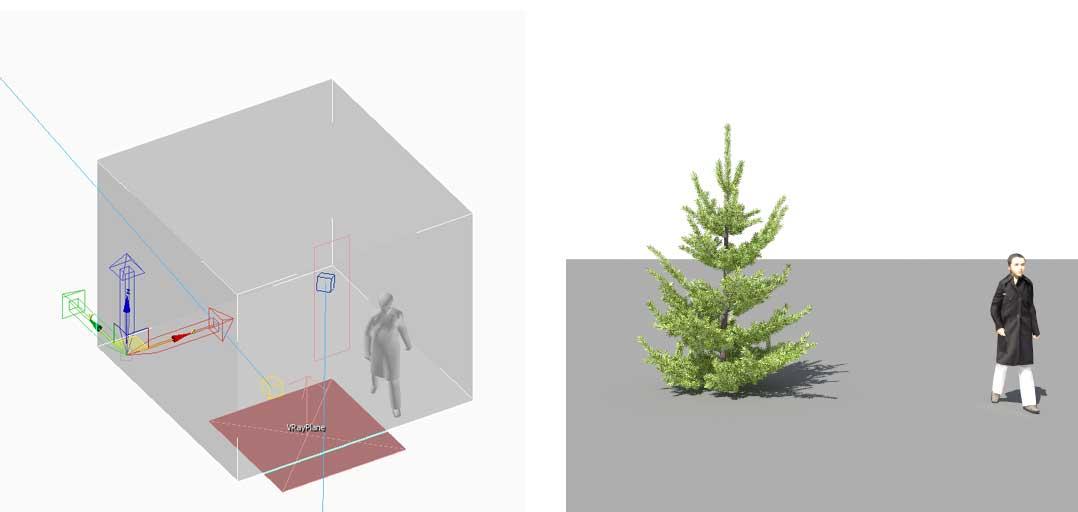
Let’s talk about how to set up a studio for rendering previews for 3d models with a reference model in the Project Manager.
Open your studio and insert the desired model used as a reference.
The reference model should be located inside the “SceneDummy” object.
Move SceneDummy’s pivot point to specify the position of the model on rendering preview.
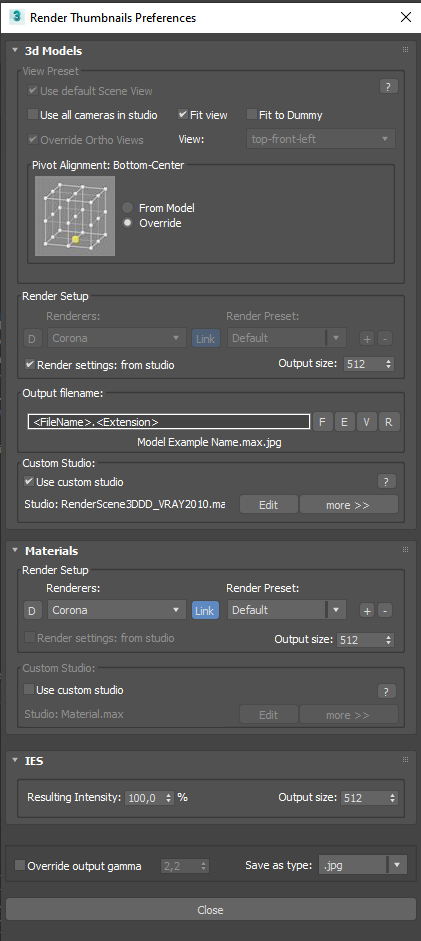
Open the “Render Thumbnails Preferences” and turn on the checkbox “Use custom studio” and “Fit view”
Turn of the “Fit to Dummy” checkbox.
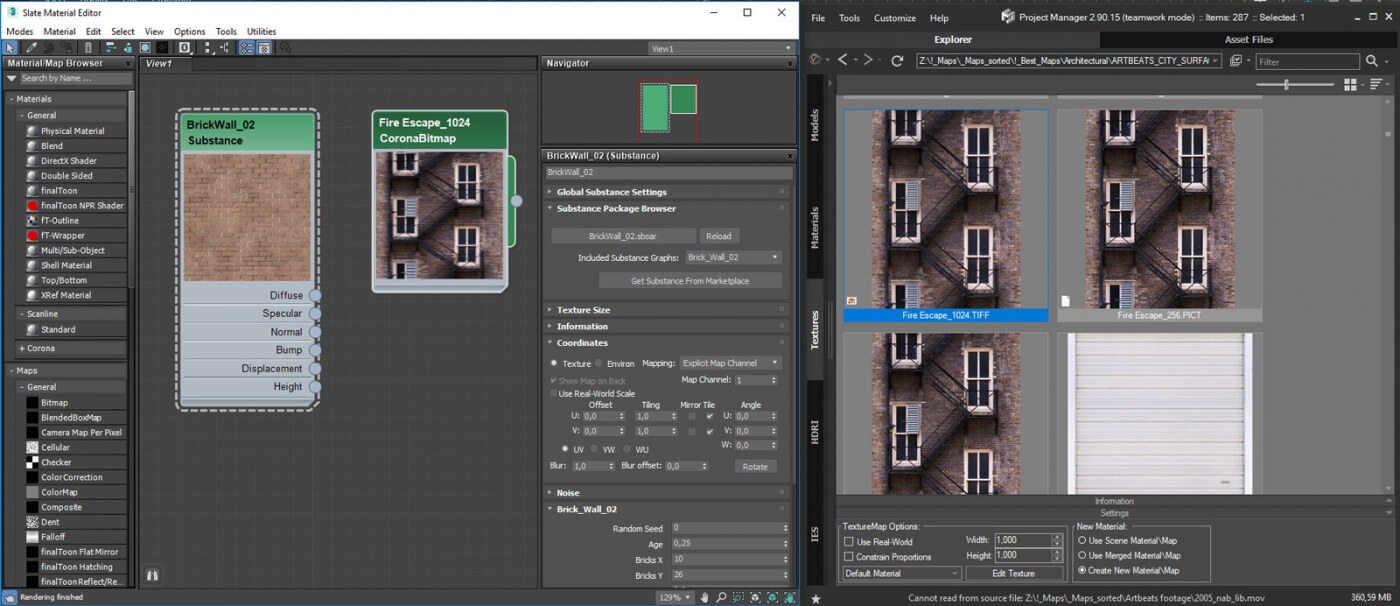
Q. How to create a Bitmap instead of Material when dragging to Material Editor
A.
Just hold the SHIFT key while dragging the bitmap/map into Material Editor.
A textureMap supported by your active renderer (Bitmap, CoronaBitmap, etc.) will be created.
Q. How I can Transfer/Backup/Restore the Settings?
A.
Use the tool “Export/Import Settings” for exporting the settings before reinstalling the 3ds Max or Windows.
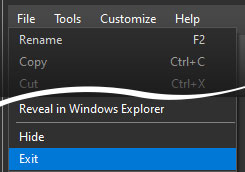
Or for transferring them to another computer.- Before restoring settings you should close the plugin using the menu “File” => “Exit”
- Don’t miss to turn on all desired settings to import. Some settings, such as database, by default, are ignored

By default the settings are placed in this directory:
%USERPROFILE%\AppData\Local\Autodesk\3dsMax\20XX – 64bit\ENU\scripts\Kstudio\ProjectManager_3\Settings\About upgrading a database from 2nd to 3rd version please read the next article:
https://3d-kstudio.com/support/faq/#21770Q. Upgrade Database to 3rd version of Project Manager
A.
When installing the 3rd version, a new database is created and the data is copied from the existing one.
In this way, you can upgrade to a new database, but at the same time, if you use a common database with your team, your team will be able to use the previous version of the database. Thus, you can deploy a new version gradually, transferring your team to use the new version step by step.
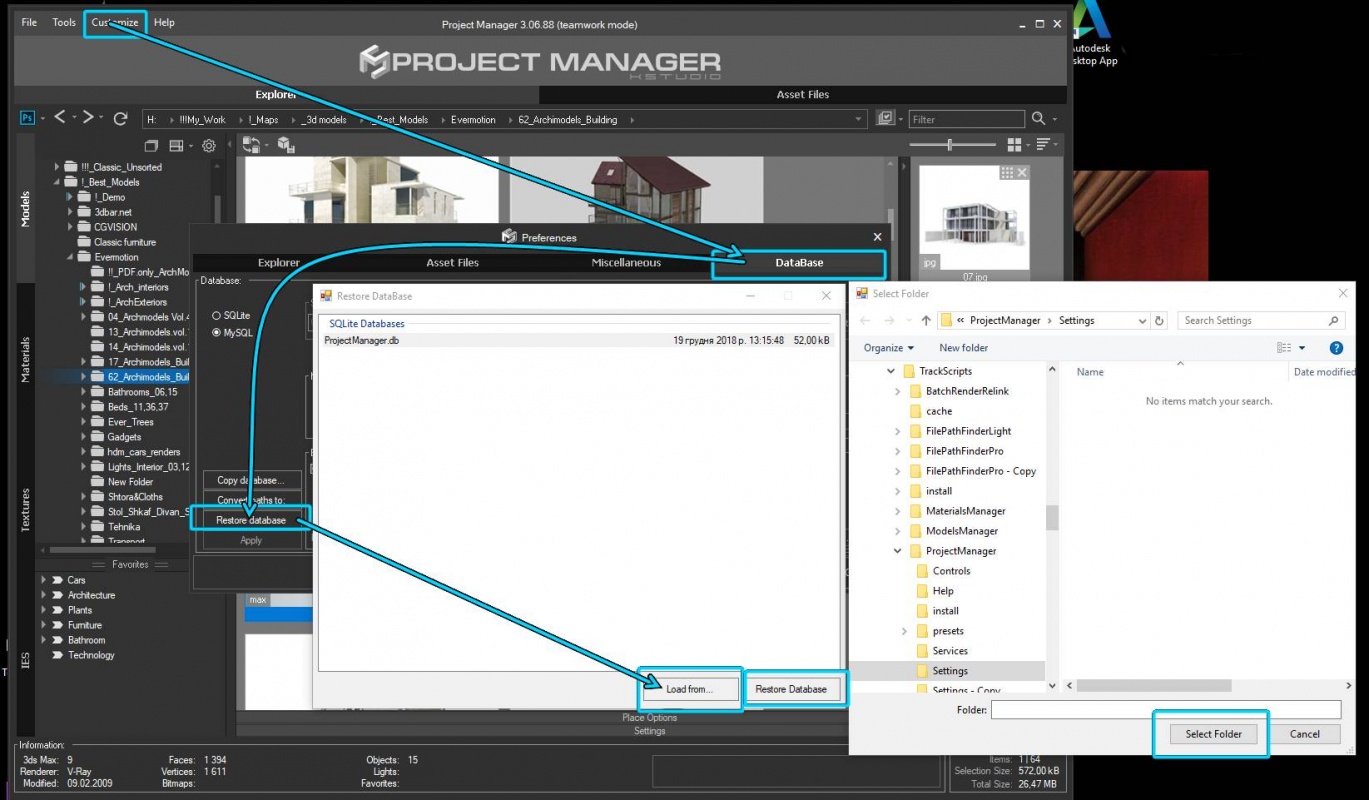
Also, if necessary, you can always update your database manually using the “Restore database” utility.
To do this, open the preferences dialog => tab “DataBase” =>
press the “Restore database” button => “Load from” and specify the location of backups database for 2nd version. ( By default the database for 2nd version located in the directory %USERPROFILE%\AppData\Local\Autodesk\3dsMax\20XX – 64bit\ENU\scripts\\ProjectManager\temp\databaseBackup)
Select the database in the list and press the “Restore database” button.
Q. What is the difference between the “Models Manager” & “Project Manager”
A.
- The “Project Manager” unlike “Models Manager” supports to materials, bitmaps and ies-files.
- The “Project Manager” contain the tool “Batch Render&Relink”.
- The “Project Manager” contain all abilities of the “FilePathFinder PRO”
- See Comparison for Kstudio asset management tools on this page.
Q. What is the difference between the “Materials Manager” & “Project Manager”
A.
- The “Project Manager” unlike “Materials Manager” supports to 3d models, bitmaps and IES files.
- The “Project Manager” contain the tool “Batch Render&Relink”.
- The “Project Manager” contain all abilities of the “FilePathFinder PRO”
- See Comparison for Kstudio asset management tools on this page.
Q. Which 3d programs and renderers are supported?
A.
- 3ds Max 2016 and above (see the additional information tab on the related page of the product )
- Arnold
- Corona
- Final Render
- FStorm Render
- Indigo
- Maxwell
- Mental Ray
- Octane
- RedShift
- Scanline
- Vray
- Another renderers and plugins
Note: Please use latest updates for your version of 3ds max
3ds Max Updates & Service Packs
For plug-in work it is required to Net Framework version 4.0.
https://www.microsoft.com/net/download/framework
- June 5, 2018 at 17:54 #16017
 NGUYEN TRUONG HAIParticipantPosts: 0Threads: 2Joined: Apr 2018
When I drag the texture to Slate Material, result is auto-create a new CoronaMtl, but I don’t want to do it.
I just want to create a CoronaBitmap or Bitmap. Is there setting to change it? (version I using is 2.90.16)- June 7, 2018 at 13:10 #16025Oleksandr KramerModeratorPosts: 253Threads: 1060Joined: Aug 2009
Good question!
Yes – you can. This capability always present in Project Manager.
Drag bitmap to Material Editor and hold the SHIFT key.
Will be create a textureMap which supported with your active renderer(Bitmap, CoronaBitmap and etc.).
[Resolved]
- June 8, 2018 at 04:19 #16032NGUYEN TRUONG HAIParticipantPosts: 0Threads: 2Joined: Apr 2018
Hi Alexander,
It is awesome for the method, SHIFT key is very good key. Project manager is wonderful :)
Thank you very much.
- October 16, 2018 at 12:09 #16675pixelflakesParticipantPosts: 0Threads: 5Joined: Oct 2017
Hi all,
This may seem like a silly question, but I really can’t seem to find the answer.
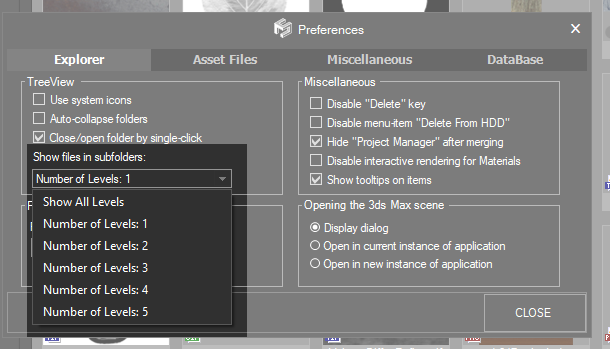
We have a looot of folders / sub folders etc in our library. I can right mouse click each folder and tick ‘display items in subfolder’ but this then needs to be done for all our users accross all our folders.
If I enable this at a top level it works, but then the second you go down one folder the arrow icon is grey and the contents of this folder are not displayed unless the option is manually enabled.
Is there a way to quickly enable this option for all folders no matter what level?
Thanks!
Marvin
- October 16, 2018 at 13:05 #16677Oleksandr KramerModeratorPosts: 253Threads: 1060Joined: Aug 2009
Hi
Thanks for your question.
You can change level of subdirectories, but this option applicable only to one level and also this option isn’t shareable and each customer must do this himself.

- October 16, 2018 at 13:55 #16679pixelflakesParticipantPosts: 0Threads: 5Joined: Oct 2017
Hi,
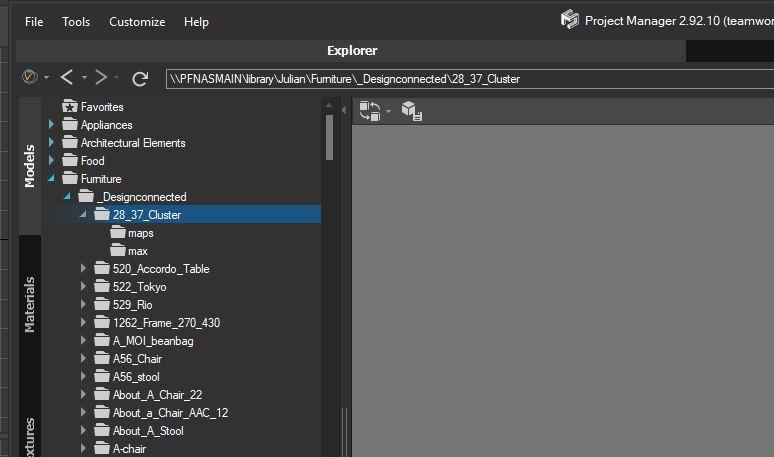
I have set this option but how would this work in the following structure:
As you can see if I were to click the folder ‘design connected’ I would see all the models throughout all sublevels. As soon as I enter one of these folders (with sublevels of its own) I have to reselect ‘show files in subfolders’ otherwise I won’t see the model.
With 100s of folders this is a tiring process each time… Is there a workaround?

- October 16, 2018 at 17:23 #16682Oleksandr KramerModeratorPosts: 253Threads: 1060Joined: Aug 2009
There is example script for recursively add directories to list of directories with ability to display sub-directories.
Applicable for Project Manager version 2.xx
Using:
– Drag script into viewport
– Select top directory for add subdirectoriesBy default only one level of directories will be add.
For chaging level find in script the line “level = 1” and change number to desired. For processing all subdirectories set value to “-1”.
Be note than very big number of directories can make the plugin slow.After processing copy the file “ShowSubDirectories.ini” to all another computers.
- October 16, 2018 at 18:09 #16683pixelflakesParticipantPosts: 0Threads: 5Joined: Oct 2017
Hi, this doesn’t seem to work for us.
The folder in question in a network drive on a NAS – could that be why?
Thanks
- October 16, 2018 at 19:34 #16684Oleksandr KramerModeratorPosts: 253Threads: 1060Joined: Aug 2009
No matter where the folder is.
Just specify the path to the root folder.
- October 22, 2018 at 14:28 #16702Oleksandr KramerModeratorPosts: 253Threads: 1060Joined: Aug 2009
This will be more easily in Project Manager version 3.
Project Manager version 3 will have ability to select multiply folders for setting folder’s color and change other parameters like “Show subdirectories”.
Thanks for your idea, Marvin!
- October 16, 2018 at 12:17 #16676pixelflakesParticipantPosts: 0Threads: 5Joined: Oct 2017
Hi,
Also we have another question! A lot of files come from sources such as design connected who include their previews as ‘preview.jpg’.
Apart from manually renaming these files to the name of the actual file in question, is there a quick way to relink all of these previews?
Thanks,
Marvin
- October 16, 2018 at 13:09 #16678Oleksandr KramerModeratorPosts: 253Threads: 1060Joined: Aug 2009
Next version(version 3) will have ability to set custom preview for each file, but in automatic mode this applicable only for thumbnails with same name as 3d model file.
- October 16, 2018 at 13:56 #16680pixelflakesParticipantPosts: 0Threads: 5Joined: Oct 2017
OK, thanks.
- September 21, 2019 at 12:22 #208473dwannabParticipantPosts: 4Threads: 15Joined: Sep 2019
Sorry if this has been asked already, but I’m about to purchase either project manager or material manager. Is material manager bundled with project manager or is it slightly different in terms of features.
- September 21, 2019 at 12:27 #20848Oleksandr KramerModeratorPosts: 253Threads: 1060Joined: Aug 2009
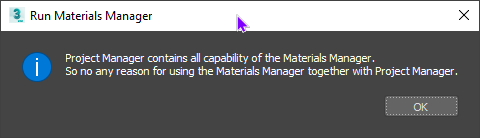
Project Manager supports to all types of assets including materials. So Project Manager has all capabilities of Materials Manager.
- September 21, 2019 at 12:35 #208503dwannabParticipantPosts: 4Threads: 15Joined: Sep 2019

Thanks, I’ve got my answer. I’ve installed the demo.
- December 5, 2020 at 00:06 #30425Pureblink ServerParticipantPosts: 2Threads: 5Joined: Nov 2020
How can I share catalogs between my studio?
- December 5, 2020 at 00:50 #30426Oleksandr KramerModeratorPosts: 253Threads: 1060Joined: Aug 2009
For sharing directory structure use the MySQL
Guide for installing and configuring MySQL for Project Manager
- January 4, 2021 at 19:03 #30734dmyersParticipantPosts: 2Threads: 1Joined: Oct 2020
is it possible to sort the root directory in 3d models by name? i imported my library and it did not import alphabetically.
- January 5, 2021 at 14:55 #30740Oleksandr KramerModeratorPosts: 253Threads: 1060Joined: Aug 2009
Use the commands “Move above/below” from the context menu for sorting directories on the tree top-level.
Thanks for your questions!
- August 21, 2021 at 22:09 #33171Holy 3DParticipantPosts: 0Threads: 4Joined: Jan 2021
I am using custom studio with no cameras, just with ortho view. But View Presets is inactive. Why? How do I activate the View options list.

[Resolved]
- August 21, 2021 at 23:05 #33172Oleksandr KramerModeratorPosts: 253Threads: 1060Joined: Aug 2009
@holy3dcg
I’ll check for a possibility to adding support to use View Presets with custom studio
- August 21, 2021 at 23:26 #33173Holy 3DParticipantPosts: 0Threads: 4Joined: Jan 2021
If you turn off UseCustomStudio, then the View selection menu will become available and you can change it. And then turn UseCustomStudio back on. And then the model is rendered in a custom studio with the selected preset from the View menu. This is very strange )
[Resolved]
- August 21, 2021 at 23:50 #33174Oleksandr KramerModeratorPosts: 253Threads: 1060Joined: Aug 2009
Thanks for your notice.
- September 6, 2021 at 00:26 #33339Oleksandr KramerModeratorPosts: 253Threads: 1060Joined: Aug 2009
Since version 3.15.55 Project Manager allows using view preset if no cameras presented in the studio
- September 5, 2021 at 21:23 #33335ALI RafaatParticipantPosts: 0Threads: 1Joined: Sep 2021
Hello , i see in some videos of project manager 5 categories , 1-models 2-texture 3-material 4- hdri 5- ies….my project manager is missing the HDRI category how can i add one
- September 6, 2021 at 00:23 #33338Oleksandr KramerModeratorPosts: 253Threads: 1060Joined: Aug 2009
- September 6, 2021 at 10:06 #33340Holy 3DParticipantPosts: 0Threads: 4Joined: Jan 2021
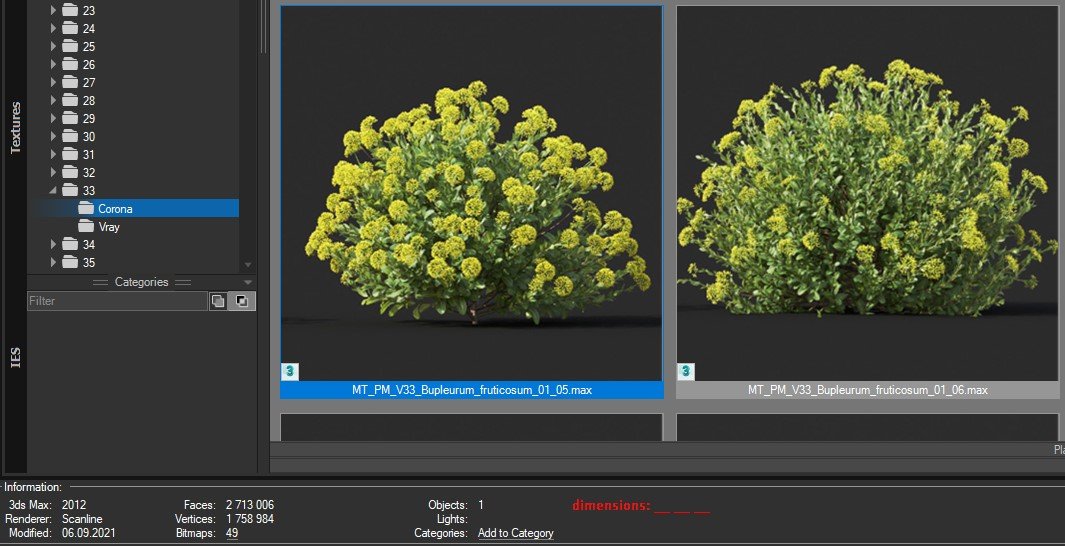
Thank you for the previous feedback. Is it possible to add dimensions to the information in the next releases? This will help you understand the size of objects such as bushes.

- October 11, 2021 at 13:48 #33624Holy 3DParticipantPosts: 0Threads: 4Joined: Jan 2021
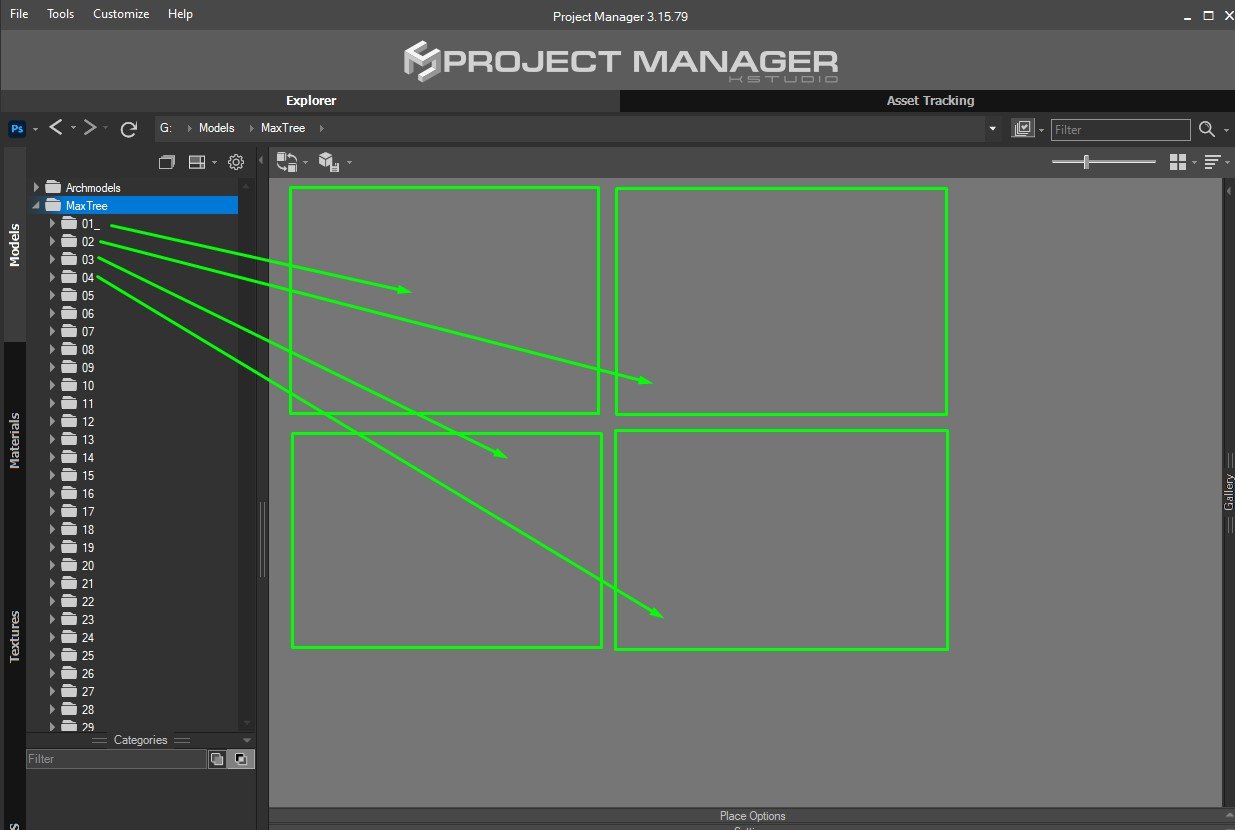
Is there a way to add a preview to the folder directory?

- November 30, 2022 at 03:56 #37679Nei PangilinanParticipantPosts: 0Threads: 2Joined: Aug 2016
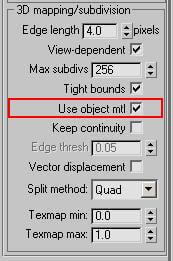
I just have a question about the project manager. Is it also possible to save material with vray displacement modifier of 2D landscape type? I guess this is very much more efficient for ground object types such as grass than to displace it as 3D type.
- November 30, 2022 at 12:38 #37680Oleksandr KramerModeratorPosts: 253Threads: 1060Joined: Aug 2009
Displace modifier is stored with material, but only if the modifier used with material











You must be logged in to reply to this topic.